Best GPU cloud for AI: where to rent a GPU for Stable Diffusion and LLM fine-tuning
Renting a GPU by the hour is the cheapest way to run Stable Diffusion, fine-tune an open LLM or serve a model without buying hardware. For the lowest hourly price, Vast.ai's marketplace usually wins; for fixed prices, serverless endpoints and no egress fees, RunPod is the simpler choice. This guide is for developers, researchers and hobbyists paying for GPU time themselves: prices as listed on October 29, 2026, spot vs on-demand, storage and egress.
Comparison at a glance
| Service | Best for | Starting price | Free plan / trial | Key limit | Review & sign-up |
|---|---|---|---|---|---|
| RunPod | Fixed per-second GPU prices, serverless endpoints, no egress fees | From $0.16/hr (RTX A5000, Community Cloud) | No free tier; start with $10, sign-up credit after first $10 | Credits non-refundable; pods without a network volume deleted at $0 | RunPod review →Get RunPod → |
| Vast.ai | Lowest hourly prices and interruptible bids on a marketplace | RTX 3090 median ~$0.19/hr (Oct 29, 2026) | No free tier or promo code | Host-set prices; storage and bandwidth billed separately | Vast.ai review →Get Vast.ai → |
| Timeweb Cloud | Full data-center GPUs (up to H100) billed in rubles | Quote on request; 5,000 RUB minimum advance | No free trial | No public GPU price list; monthly plans charged hourly | Timeweb Cloud review →Get Timeweb Cloud → |
| VDSina | Small L4/L40S GPU slices in rubles for Windows apps and light inference | 4,770 RUB/mo (159 RUB/day) | No trial; billed per day | 2–8 GB of GPU memory per server | VDSina review →Get VDSina → |
Disclosure: the sign-up buttons in this table are affiliate links. If you sign up through one, we may earn a commission at no extra cost to you. Commissions don't decide which services we include or what we say about them.
The short answer
For most people renting a GPU by the hour, the choice is between two models:
- Pick Vast.ai if price is what matters most. It is a marketplace: independent hosts and datacenters list machines and set their own rates, so you usually find the lowest hourly price there, and interruptible bids go lower still. You trade predictability: prices, reliability and network quality vary from host to host.
- Pick RunPod if you want fixed prices and less hunting. It publishes one hourly rate per GPU, in a cheaper Community Cloud and a pricier Secure Cloud, adds Serverless endpoints that scale to zero, and charges no data transfer fees.
Paying in rubles? Timeweb Cloud and VDSina rent GPU servers on monthly plans. Prices below are as listed on October 29, 2026; GPU rates move weekly, so check the live page before you top up.
How to choose a GPU cloud
The hourly rate is only one line of the bill. What decides the real cost:
- VRAM first, then speed. The model has to fit in GPU memory. Image generation with Stable Diffusion or ComfyUI and LoRA fine-tuning of smaller models are usually done on 24 GB consumer cards (RTX 3090, 4090) or the 32 GB RTX 5090. Full fine-tuning or serving larger LLMs pushes you to 48 GB (L40S) or 80 GB and up (A100, H100, H200, B200).
- Price model. A fixed price list (RunPod) versus host-set marketplace prices (Vast.ai).
- On-demand vs interruptible. On-demand capacity runs until you stop it. Interruptible (spot) capacity is cheaper but can be taken away, so it suits jobs that save checkpoints.
- Storage and egress. Disks often keep billing while the GPU is stopped, and some providers charge for every byte in or out.
- Billing granularity and minimum deposit. Per-second billing makes short experiments cheap; a high minimum deposit or non-refundable credit makes trying a provider expensive.
- Serverless. If you are serving a model behind an API, paying only while requests run can beat keeping a GPU on all day.
- Trust and data. Who owns the machine, and can they see your data?
Marketplace vs Secure and Community Cloud
On Vast.ai's pricing page there is no single price per GPU. Hosts install Vast's software, list their machines and set the rate, which depends on GPU model, reliability, network and location. Vast lists 68+ GPU types. Vast's own FAQ notes that hosts can access data on their machines, so it recommends its Secure Cloud filter (vetted datacenters with ISO 27001 and/or Tier 3/4 certification) for sensitive or production work.
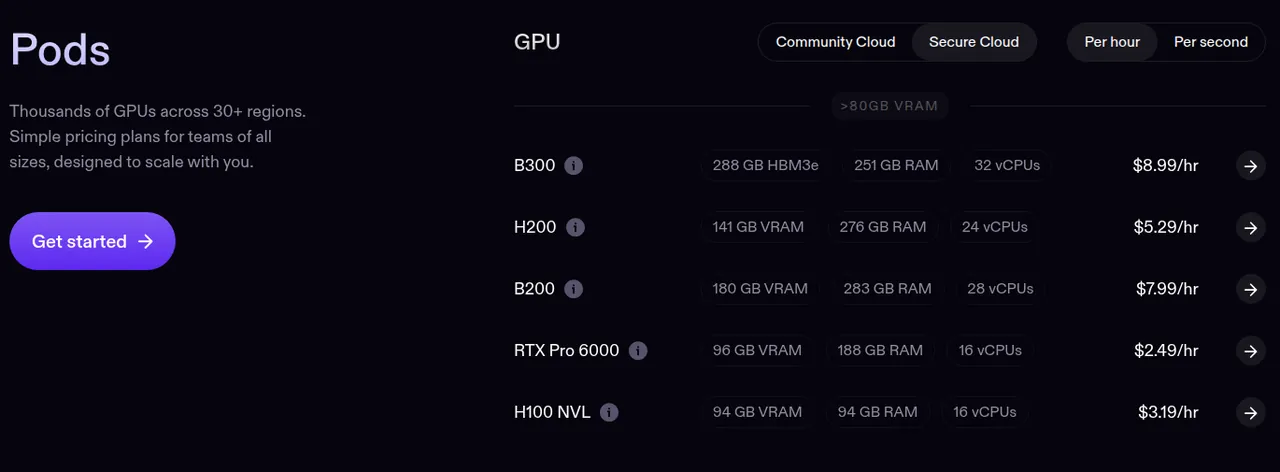
RunPod splits its capacity in two. Community Cloud is cheaper capacity from vetted hosts; Secure Cloud runs in RunPod's data-center partners. The same GPU costs more in Secure Cloud: an RTX 4090 is $0.34/hr in Community Cloud and $0.89/hr in Secure Cloud on the RunPod pricing page.
For a hobby session or a public-dataset fine-tune, the cheaper tier is fine; for client data or private weights, pay for the vetted tier.
GPU prices side by side
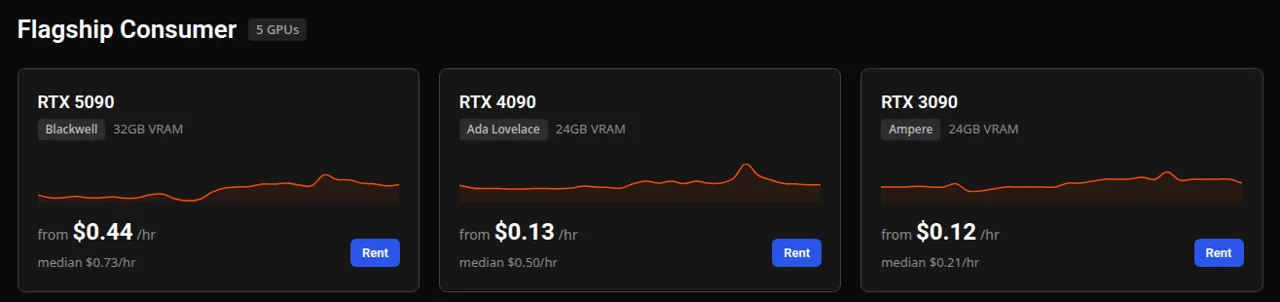
RunPod rates are its published on-demand pod prices. Vast.ai rates are the current median of live offers in Vast's public price feed; individual hosts list above and below the median. All per GPU-hour, as listed on October 29, 2026.
| GPU | VRAM | RunPod Community | RunPod Secure | Vast.ai median |
|---|---|---|---|---|
| RTX 3090 | 24 GB | $0.22 | $0.50 | $0.19 |
| RTX 4090 | 24 GB | $0.34 | $0.89 | $0.50 |
| RTX 5090 | 32 GB | $0.69 | $1.19 | $0.71 |
| L40S | 48 GB | $0.79 | $1.09 | $0.69 |
| A100 SXM | 80 GB | $1.39 | $1.79 | $0.80 |
| H100 SXM | 80 GB | $2.69 | $3.99 | $2.40 |
| H200 | 141 GB | $3.59 | $5.29 | $5.05 |
| B200 | 180–192 GB | $5.98 | $7.99 | $8.75 |
On the marketplace, the RTX 3090 and A100 came in below RunPod's fixed rates (and an RTX 3060 median was about $0.08/hr), while on the H200 and B200 RunPod's Community rates were lower that day. Neither is always cheaper: compare the exact GPU on the day you rent.
RunPod: best for predictable pods and serverless
RunPod rents NVIDIA GPUs from the RTX A5000 ($0.16/hr in Community Cloud) up to the H200, B200 and B300. Its products:
- Pods: GPU instances over SSH or Jupyter.
- Serverless: endpoints that scale to zero when idle, billed per second of worker time, e.g. $0.69/hr for 24 GB GPUs, $4.79/hr for an H100.
- Clusters: multi-GPU capacity for distributed training.
According to RunPod's billing docs, compute and storage are billed per second with no data transfer fees, and you can start with $10. Storage is where idle costs come from: a volume disk costs $0.10/GB per month while the pod runs and $0.20/GB per month while it is stopped; network volumes are $0.07/GB per month under 1 TB.
Pick RunPod if you want a known hourly rate, scale-to-zero serving, or no egress bill.
The downsides: credits are non-refundable. At zero balance, pods stop and those without a network volume are terminated with their data. The pricing page shows no spot rates. Details and the sign-up credit are in our RunPod review.
Vast.ai: best for the lowest hourly price
Vast.ai's strength is choice: filter offers by GPU, VRAM, reliability, location and price, and rent the machine as a Linux Docker instance over SSH, Jupyter or a web portal. An API, CLI and Python SDK make launches scriptable.
Three rental types, from Vast's rental-type docs:
- On-demand: the host's fixed rate; cannot be interrupted.
- Interruptible: you set a bid and a higher bid can stop your instance, killing running processes. Vast puts the saving at 50–80% off on-demand. Save checkpoints often.
- Reserved: prepay for a discount of up to 50% based on commitment length, with on-demand priority.
Active rentals are billed per second. The catch is in Vast's billing FAQ: storage is charged for stopped instances too, and bandwidth is charged for every byte sent or received. When your credit hits zero, instances are stopped but not destroyed. Vast's docs don't state a minimum deposit.
Pick Vast.ai if you want the cheapest GPU hour and your jobs checkpoint well enough for interruptible bids.
The downsides: prices and host quality vary; outside Secure Cloud a host can access data on its machine; no Windows or remote desktop. More in our Vast.ai review.
RunPod vs Vast.ai: which for your job
- Stable Diffusion or ComfyUI for a few hours: both work. Vast.ai's RTX 3090 and 4090 offers are usually the cheapest; RunPod's one-click templates and fixed RTX 4090 rate are simpler. On either, delete the disk when you are done or it keeps billing.
- LLM fine-tuning over a weekend: Vast.ai interruptible bids if your script saves checkpoints; RunPod or Vast on-demand if a restart would cost you more than the saving.
- Serving a model as an API: RunPod Serverless is the most direct fit, since endpoints scale to zero and there are no egress fees on responses.
- Large datasets: RunPod charges no data transfer fees; on Vast.ai, check each host's bandwidth price.
- Sensitive data: RunPod Secure Cloud or Vast.ai's Secure Cloud filter.
- Either way: credit is prepaid (RunPod's is non-refundable; on Vast.ai spent credit is final), so top up for the week, not the year, and destroy instances you are done with, because stopped disks keep billing.
Paying in rubles: Timeweb Cloud and VDSina
Timeweb Cloud lists cloud and dedicated GPU servers from the GTX 1080 and RTX 3090/4090 up to A100 80 GB and H100 80 GB, with the H200 on pre-order, on its GPU servers page. Prices are not published: you leave a request and a manager quotes, with a minimum advance payment of 5,000 RUB. Plans are set per month but charged hourly. See the Timeweb Cloud review.
VDSina sells cloud servers with a slice of an NVIDIA L4 or L40S on its GPU pricing page: from 4,770 RUB per month (159 RUB per day) for 8 cores, 8 GB RAM and 2 GB of GPU memory, up to 25,500 RUB per month for 32 cores and 8 GB of GPU memory, in Moscow or Amsterdam. Billing is daily and there is no trial. With 2–8 GB of GPU memory these suit Windows apps, rendering and light inference, not 24 GB-class Stable Diffusion workflows or LLM fine-tuning. See the VDSina review.
What about Lambda, Paperspace, AWS and Google Cloud?
Real options, rarely the cheapest hour. Lambda lists a 1x H100 SXM at $4.29/hr on its pricing page (October 29, 2026), with reserved capacity through sales. Paperspace, now part of DigitalOcean, offers notebook-first GPU machines. AWS and Google Cloud bring the widest regions and compliance coverage, but quotas and egress charges make them a better fit for teams already running there.
For VPS, storage and other infrastructure, browse hosting and cloud services.
Frequently asked questions
What is the cheapest GPU cloud?
On a per-hour basis, marketplaces such as Vast.ai usually have the lowest prices: on October 29, 2026 its feed showed an RTX 3090 median of about $0.19/hr and an RTX 3060 around $0.08/hr. RunPod's cheapest listed GPU was an RTX A5000 at $0.16/hr in Community Cloud. Add storage and bandwidth before deciding.
RunPod vs Vast.ai: which should I use?
Use Vast.ai when the lowest hourly price matters most and you can live with host-set prices and variable quality. Use RunPod when you want a fixed price list, Serverless endpoints that scale to zero and no data transfer fees.
What GPU do I need to rent for Stable Diffusion?
Most people use a 24 GB card such as an RTX 3090 or 4090, which gives room for larger models and ComfyUI workflows. Check the memory requirements of the exact model you run. On both RunPod and Vast.ai these cards are among the cheapest to rent.
What GPU do I need for LLM fine-tuning?
It depends on model size and method. LoRA-style fine-tuning of smaller models is commonly done on 24–48 GB cards, while full fine-tuning or larger models need 80 GB cards such as the A100 or H100. Check your training framework's memory guidance before renting.
Are interruptible or spot GPUs worth it?
Yes for jobs that save checkpoints, since Vast.ai puts interruptible savings at 50–80% below on-demand. When a higher bid takes your machine, running processes are killed, so they are a poor fit for live demos or long runs without checkpoints.