Best uptime monitoring and status page tools for websites
Looking for website uptime monitoring or a status page tool? Instatus is the pick if you want a free plan and a full status page with on-call in one product. Uptime Monitor checks every 10 seconds from $4.95 a month. PingPing is the simplest per-website option, from €6 a month with SSL checks and a status page for each site. Prices, free plans, check intervals and limits compared for site owners, SaaS teams and agencies.
Comparison at a glance
| Service | Best for | Starting price | Free plan / trial | Key limit | Review & sign-up |
|---|---|---|---|---|---|
| Instatus | Status pages with incidents, subscribers and on-call | $20/mo (Pro); 25% off yearly | Free forever: 15 monitors, 2-min checks | Free plan: email alerts only, no custom domain | Instatus review →Get Instatus → |
| Uptime Monitor (uptime-monitor.io) | Fastest checks at a low price | $4.95/mo (Pro, 10 monitors) | 7-day free trial, no card | No refunds; email alerts capped at monitor count per day | Uptime Monitor (uptime-monitor.io) review →Get Uptime Monitor (uptime-monitor.io) → |
| PingPing | Freelancers and agencies watching websites | €6/mo (5 websites) | 14-day free trial, 5 websites, no card | Websites and SSL only; SMS via your own Vonage | PingPing review →Get PingPing → |
Disclosure: the sign-up buttons in this table are affiliate links. If you sign up through one, we may earn a commission at no extra cost to you. Commissions don't decide which services we include or what we say about them.
Which uptime monitor should you pick?
All three tools check your website from the outside and alert you when it stops answering. Each one also gives you a status page your customers can read. Where they differ is what they put first:
- Instatus if you want to start free, or if the public status page and incident communication matter as much as the checks. The free Starter plan includes 15 monitors with 2-minute checks and 200 subscribers. Pro starts at $20 a month and adds 30-second checks, SMS alerts and a custom domain. On-call schedules are built in.
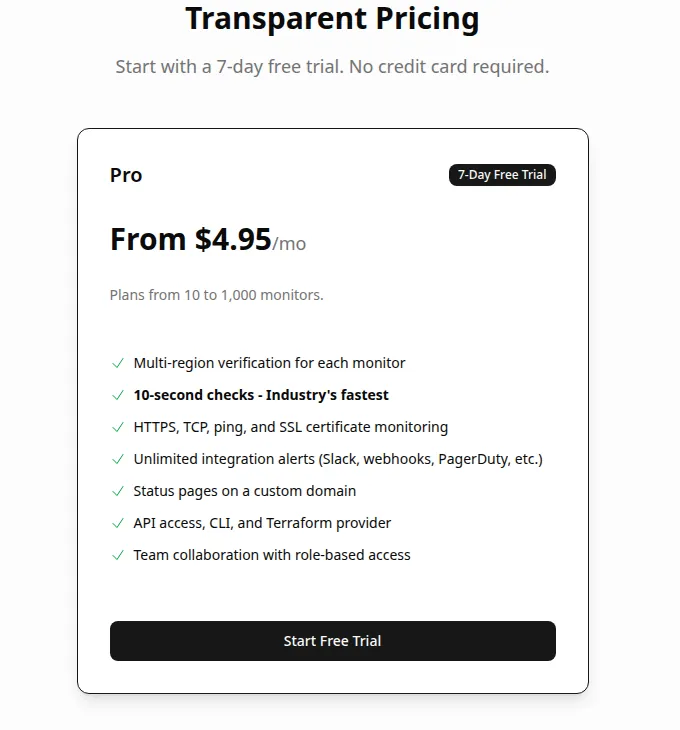
- Uptime Monitor if you want the fastest checks for the least money. Its single Pro plan starts at $4.95 a month for 10 monitors, checks every 10 seconds from AWS regions on 6 continents and covers HTTPS, TCP, ping and SSL.
- PingPing if you look after a handful of websites and want one price per site with nothing to configure. 5 websites cost €6 a month. Every plan has every feature, including SSL certificate monitoring, a status page per site and unlimited team members.
Only Instatus has a permanent free plan; the other two offer card-free trials.
Uptime monitoring vs status pages: what you are buying
An uptime monitor sends a request to your site, API or server at a fixed interval. When the request fails or the response is wrong, it alerts you by email, Slack, SMS or webhook, so you hear about the outage before your customers do. A status page faces the other way: it tells your users that something is broken and when it is fixed, which saves your support inbox.
Most tools now do both. The balance still differs: PingPing and Uptime Monitor are monitors that publish a status page, while Instatus is a status page and incident tool with monitoring built in. Instatus can also take incidents from monitoring you already run, such as Datadog, Grafana, PagerDuty, Pingdom or UptimeRobot.
A monitor tells you that your site is down, not why. If the cause turns out to be the server itself, our hosting and cloud services and the guide to cheap VPS hosting cover the next step.
How to choose an uptime monitoring tool: what we compared
The facts below come from each provider's pricing, FAQ and terms pages, read in October 2026.
- Check interval. How long an outage can go unnoticed. 30 seconds is enough for most business sites; 10 seconds suits checkout pages and APIs.
- Price model. Instatus charges a flat price per plan with no per-seat fees, Uptime Monitor charges by number of monitors, and PingPing charges by number of websites. In the table we quote the cheapest paid tier on monthly billing. Count what you actually need to watch: a website plus its API and a database port is three monitors, while PingPing would watch only the website.
- Free plan or trial. Can you run it on your real sites before paying? Refund terms make this matter: Uptime Monitor's terms say all sales are final, and PingPing refunds only at its discretion.
- Monitor types. HTTP(S) checks are standard. Check for TCP ports, ping, DNS, cron jobs or SSL certificate expiry if you need them.
- Confirmation before alerting. A check that fails from one location may be a network blip. PingPing confirms a failure from a second location, and Uptime Monitor runs multi-region verification on every monitor; Instatus's pricing page doesn't describe its confirmation logic.
- Alert channels. Email is everywhere. SMS and phone calls are not: on Instatus they need a paid plan, on PingPing you connect your own Vonage account, and Uptime Monitor lists none.
- Status page features. Custom domain, private pages, subscriber notifications and incident history.
Instatus: status page, monitoring and on-call in one
Instatus, from Instatus, Inc., grew out of status pages. You get public, private and audience-restricted pages, with components, scheduled maintenance notices, metrics, embeddable widgets and several languages. Customers can subscribe by email, SMS, Slack, Discord, RSS and more. Monitoring covers website, API, cron, ping, TCP/UDP and DNS checks. Incident response adds on-call schedules, escalation policies and routing rules, so you can run incidents from Slack or Teams.
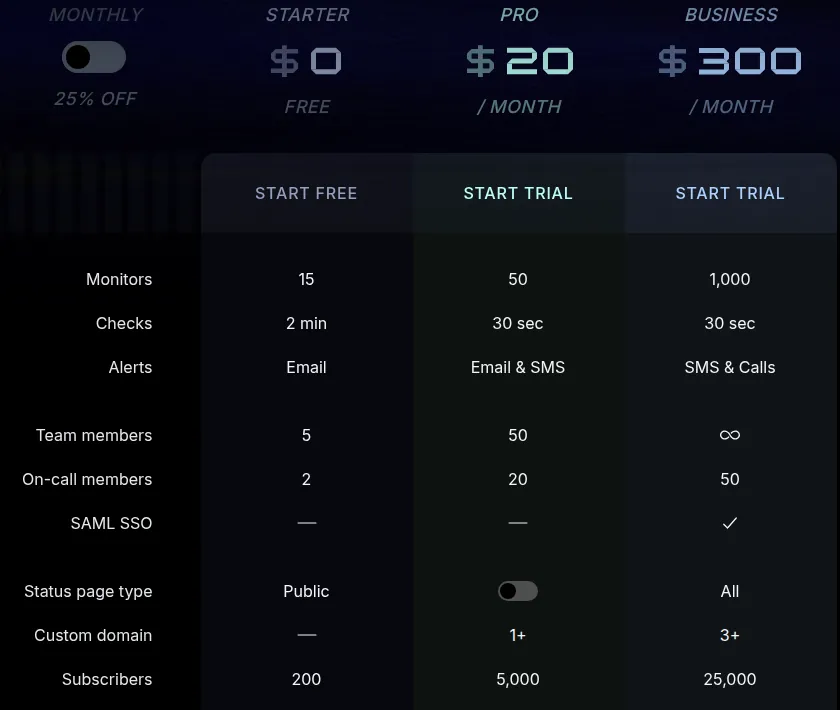
According to the Instatus pricing page, Starter is free with 15 monitors, 2-minute checks, email alerts, 5 team members, 2 on-call members and 200 subscribers. It includes a public page only and no custom domain. Pro costs $20 a month and raises this to 50 monitors, 30-second checks, email and SMS alerts, 50 team members, 5,000 subscribers and a custom domain. Business ($300 a month on monthly billing) adds 1,000 monitors, phone-call alerts, SAML SSO, every page type and 25,000 subscribers. Paying yearly takes 25% off. Pro and Business start with a trial, but its length is not stated.
Pick Instatus if you run a SaaS or API and the status page and incident updates are the main job, or if you want a free plan that covers 15 monitors. The downsides: free checks run every 2 minutes and alert by email only, the jump from Pro to Business is steep, and we found no public refund policy. Full details in our Instatus review.
Uptime Monitor: 10-second checks at the lowest entry price
Uptime Monitor is a hosted monitor built around speed. It checks every 10 seconds from AWS regions on 6 continents, and every monitor gets multi-region verification before you are alerted. Monitor types are HTTP/HTTPS (with custom headers and payloads, and response inspection), TCP port, ping and SSL certificate expiry. SSL warnings arrive 30, 14, 7 and 1 day before a certificate expires.
Alerts go to Slack, Discord, webhooks, PagerDuty, incident.io and Opsgenie with no sending limit, plus email. Email is capped: the FAQ sets the daily email allowance equal to your plan's monitor count, so a 50-monitor plan sends 50 emails a day. Extra packs of 1,000, 3,000 or 10,000 emails can be bought. Status pages are unlimited, run on your own domain with automatic SSL, keep 90 days of incident history and can be password-protected. Developers get a REST API, a CLI and a Terraform provider.
There is one self-serve plan, Pro, from $4.95 a month for 10 monitors and scaling up to 1,000. Enterprise is priced on request.
Pick Uptime Monitor if you want the shortest check interval for a few dollars, or you manage monitors as code with Terraform. The downsides: the 7-day trial is short, the terms say all sales are final with no refunds, and there are no SMS or phone-call alerts. Read our Uptime Monitor review for more.
PingPing: simple per-website monitoring with SSL checks
PingPing is built to be simple. You add a website, and PingPing checks its uptime and response time and watches its SSL certificate. If a check fails, it re-checks from a second location on the other side of the world before alerting you. You choose the interval per site, from every 30 seconds to 1–30 minutes, 1–8 hours or daily. Each website gets a multi-language status page, public or private, with an optional custom domain. Alerts go by email, Slack, Discord, Telegram and webhooks. SMS works through your own paid Vonage account.
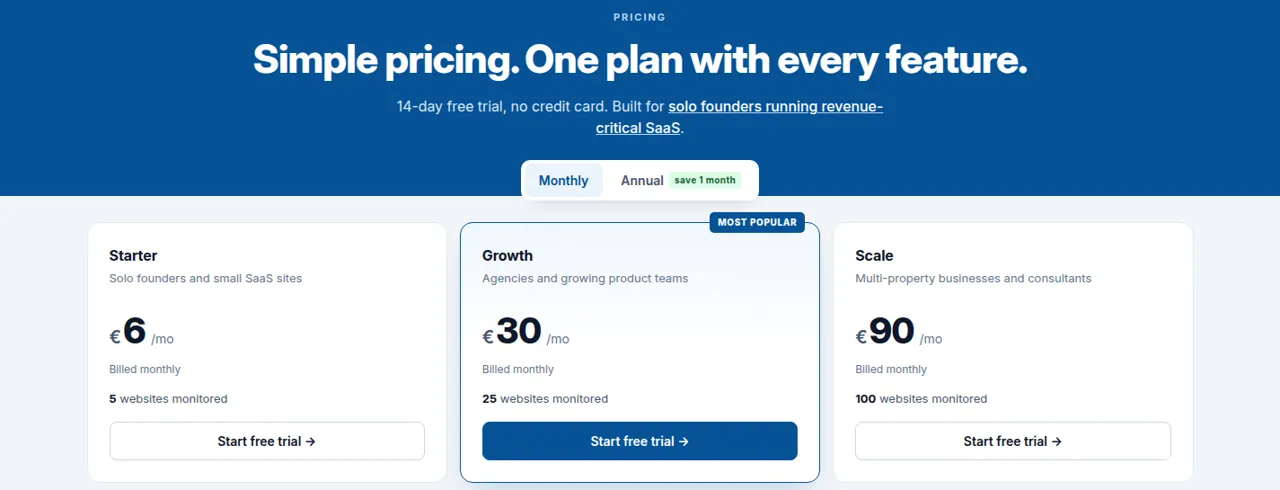
Pricing on the PingPing FAQ is by number of websites: €6 a month for 5, €12 for 10, €30 for 25, €50 for 50, €90 for 100 and €185 for 250. Yearly billing gives 12 months for the price of 11. Every plan includes every feature, the API and unlimited team members. The 14-day trial covers up to 5 websites with all features, and if you don't upgrade, monitoring stops but your data is kept. Newmatter B.V. in the Netherlands runs the service.
Pick PingPing if you are a freelancer or agency watching client websites and want a bill that depends only on the number of sites, with the whole team on alerts. The downsides: there is no permanent free plan, refunds are case by case, and it covers websites and SSL only. There are no TCP, DNS or cron checks. See our PingPing review.
Free uptime monitoring: what you really get
Among these three, only Instatus has a free-forever plan. You get 15 monitors at a 2-minute interval, email alerts and a public status page for up to 200 subscribers, with no credit card. That covers a side project or small business site.
Uptime Monitor (7 days) and PingPing (14 days) offer trials without a card. With Uptime Monitor's no-refund terms, the trial is your only risk-free test.
Among services we don't list, UptimeRobot is the best-known free option. Its free plan covers 50 monitors at a 5-minute interval with a basic status page.
Before you pay: refunds, alerts and billing
- Refunds. Uptime Monitor: all sales are final. PingPing: refunds at the operator's discretion. Instatus: we found no public refund policy. In every case, finish the free plan or trial first and pay monthly before committing to a year.
- SMS and calls. If a text message or a phone call is what wakes your on-call person, Instatus Pro (SMS) or Business (SMS and calls) is the only built-in option here. PingPing needs your own Vonage account.
- Monitor or website? Ten sites with one check each cost €12 a month on PingPing or $4.95 on Uptime Monitor; one app with ten endpoints also fits Instatus's free plan.
Frequently asked questions
What is the best website uptime monitoring tool?
It depends on what you need most. Instatus suits teams that want a free plan and a full status page with on-call. Uptime Monitor gives 10-second checks from $4.95 a month. PingPing is the simplest per-website option, from €6 a month for 5 sites with SSL monitoring.
Is there a free uptime monitor with a status page?
Yes. Instatus Starter is free forever with 15 monitors, 2-minute checks, email alerts and a public status page for up to 200 subscribers. Uptime Monitor and PingPing offer free trials of 7 and 14 days instead of a free plan.
How often should an uptime monitor check my site?
For most business sites, every 30 seconds to 1 minute catches outages quickly enough. Checkout pages and APIs benefit from shorter intervals: Uptime Monitor checks every 10 seconds. Free plans are slower; Instatus Starter checks every 2 minutes.
What is a status page and do I need one?
A status page is a public (or private) page that tells your users whether your service works, lists incidents and announces maintenance. If customers depend on your site or API, it cuts support requests during outages. All three tools here include one.
Which uptime monitor sends SMS alerts?
Instatus Pro adds SMS, and Business adds phone calls. PingPing can send SMS through your own paid Vonage account. Uptime Monitor lists no SMS or call alerts, but sends to PagerDuty, Opsgenie and incident.io, which can call your phone.
Can I monitor SSL certificate expiry?
Yes. Uptime Monitor warns 30, 14, 7 and 1 day before a certificate expires, and PingPing watches each website's certificate and warns before it expires.