
Signeasy review: simple eSignatures and contract management
Signeasy lets you sign documents yourself and send contracts for legally binding eSignatures from the web, iPhone, iPad, Android, Google Workspace and Microsoft apps. It suits freelancers, small businesses and teams that want a simpler, cheaper alternative to the big eSignature suites; plans start at $10 a month billed yearly, with a 14-day free trial without a credit card and a 100-day money-back guarantee on yearly plans.
No extra sign-up bonus — the provider's standard offer applies.
Disclosure: this is an affiliate link. If you sign up through it, we may earn a commission at no extra cost to you. The bonus and terms are set by Signeasy and can change — check them on the official site before you sign up.
How to get started
- Open Signeasy through the link on this page and click Start eSign Trial.
- Sign up for the 14-day free trial; no credit card is required.
- Upload a PDF or Word document, add signature and date fields, and send it by email; signers don't need an account.
- Track the status and send reminders; the completed contract gets a tamper-proof trust seal.
- Before the trial ends, choose Personal, Business or Business Pro, monthly or yearly.
What is Signeasy?
Signeasy is an eSignature and contract management service that says it is trusted by 48,000+ businesses. It covers three jobs:
- eSignatures: sign documents yourself, send them for signature by email, sign in person, use multi-document envelopes, and collect legally binding signatures on any device. Signers pay nothing and need no account.
- Templates and workflows: reusable templates shared with your team, reminders, approval workflows, requests for supporting documents from signers, and bulk send (add-on).
- Intelligent Contract Management (newer product, priced separately): a searchable contract repository, shared workspaces, renewal reminders, AI key-term extraction and AI search across your contracts.
It works inside Google Workspace (Gmail, Drive, Docs, Sheets), Microsoft Outlook, Teams and SharePoint, HubSpot and Teamtailor, and has an eSignature API for embedding signing into your own app. Signeasy lists ESIGN and UETA, eIDAS, SOC 2, GDPR, HIPAA and FDA 21 CFR Part 11 compliance.
Who Signeasy is for
- Freelancers and sole proprietors who sign a few documents themselves and send a handful of contracts each month.
- Small businesses and sales teams sending offers, NDAs and agreements from Gmail, Outlook or HubSpot.
- HR, procurement and legal teams that need templates, roles and an archive of signed contracts.
- Healthcare and life-science teams that need HIPAA or 21 CFR Part 11 workflows (add-ons).
- Developers embedding signing into an app through the API.
Compare another affordable option in the BoldSign review, or collect data before a contract with the Typeform review. More tools are on our business software page.
Signeasy pricing
eSignature plans, USD per seat (October 2026):
| Plan | Billed yearly | Billed monthly | Main limits and features |
|---|---|---|---|
| Personal | $10/month ($120/year) | $15/month | Sign unlimited documents, send 5 contracts a month, mobile apps, Google and Microsoft apps |
| Business | $20/month ($240/year) | $30/month | Unlimited sending, team templates, reminders, admin dashboard, AI term extraction, 2FA, 24/7 email support |
| Business Pro | $30/month ($360/year) | $40/month | Roles and permissions, usage tracking, signer attachments, signer 2FA, SharePoint and HubSpot, approval workflows, priority support |
| Build Your Plan | custom | custom | For 5+ seats or high volume: SSO, HIPAA, bulk send, SMS, dedicated success manager |
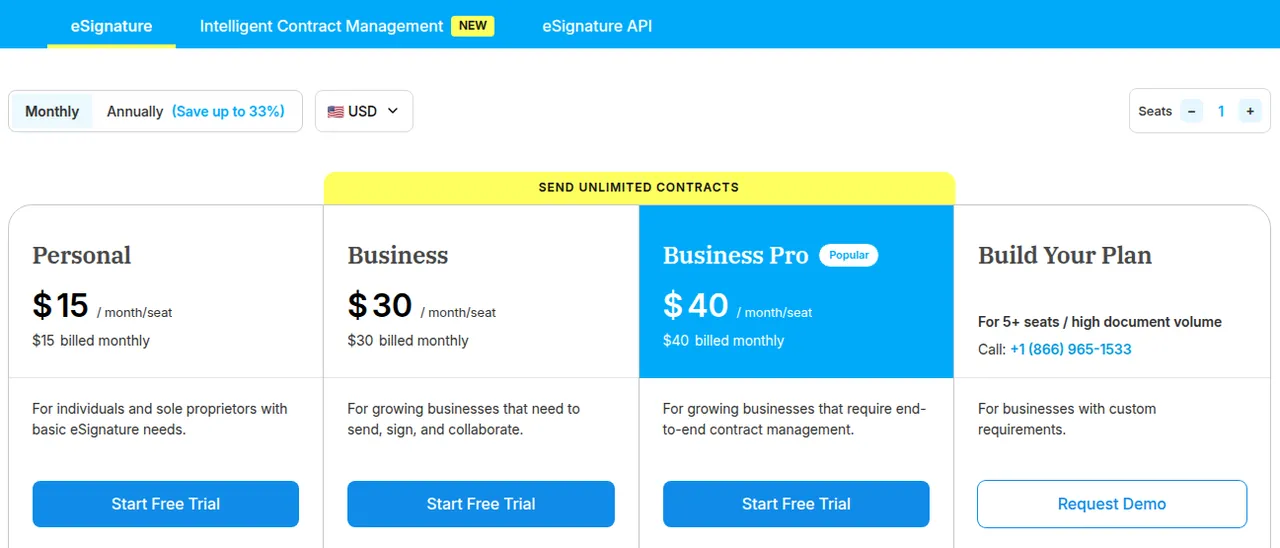
Yearly billing saves up to 33%. Add-ons (SMS sending, SSO, bulk send, HIPAA, 21 CFR Part 11) are quoted on request. The eSignature API has a free sandbox with 100 signature requests, then Intermediate at $125 a month billed annually ($1,499 a year) for 1,000 requests and Advanced at $250 a month billed annually ($2,999 a year) for 2,000 requests. Fair-usage rules apply to unlimited plans.
Why choose Signeasy
Signeasy keeps eSignatures simple and affordable: Business sends unlimited contracts for $20 a seat a month on yearly billing, and the people you send to sign for free. It fits into the tools you already use, so you can send a contract from Gmail or Outlook without switching apps. The 100-day money-back guarantee on yearly plans removes most of the risk of committing for a year, and Signeasy offers free template migration with hands-on help if you switch from another service.
Good to know: billing, refunds and limits
- Auto-renewal: monthly and yearly plans renew automatically unless you turn auto-renewal off; after cancelling, the plan stays active until the end of the paid period.
- Refunds: the 100-day money-back guarantee covers the Personal, Business and Business Pro yearly plans; after 100 days there are no partial refunds.
- Personal plan limit: only 5 contracts sent for signature a month.
- One user per account: each user needs a unique email address; accounts are for one person's devices.
- Support: email support, 8 am to 5 pm ET and 10 am to 6 pm IST; 24/7 email support from the Business plan.
Pros and cons
Pros
- Low price: unlimited sending from $20 per seat on yearly billing
- 14-day free trial without a credit card
- 100-day money-back guarantee on yearly plans
- Works in Gmail, Google Drive, Outlook, Teams, SharePoint and HubSpot
- Signers need no account and pay nothing
Cons
- Personal plan sends only 5 contracts a month
- SSO, SMS, bulk send and HIPAA are paid add-ons
- Contract management (ICM) is priced separately
- Refund guarantee covers yearly plans only
Frequently asked questions
How much does Signeasy cost?
Personal costs $10 a month billed yearly or $15 monthly. Business is $20 per seat a month yearly or $30 monthly, and Business Pro $30 yearly or $40 monthly. Larger teams get custom pricing.
Is Signeasy free?
There is no free plan for sending, but a 14-day free trial lets you create, sign and send documents. People who only sign documents you send them never pay.
Is there a Signeasy promo code or discount?
No public promo code is listed. Yearly billing saves up to 33% compared with monthly, and tailored pricing is available for non-profits and high volumes.
Are Signeasy signatures legally binding?
Signeasy states its signatures are legally binding and lists compliance with ESIGN and UETA in the US and eIDAS in the EU, plus SOC 2 and GDPR.
Can I cancel Signeasy and get a refund?
You can cancel any time; the plan stays active until the period ends. Yearly Personal, Business and Business Pro plans have a 100-day money-back guarantee.
Is Signeasy a good DocuSign alternative?
For small teams that need straightforward signing, templates and reminders at a lower per-seat price, yes. Signeasy publishes its own comparison pages against DocuSign, Adobe Sign and others.
Compare Signeasy
- BoldSign vs Signeasy: which e-signature software should you choose?
Looking for e-signature software that costs less than DocuSign? Pick BoldSign if you want a free plan, the lowest per-user price or a cheap API: it starts at $0 for 25 envelopes…
 1Office
 Audiorista
 Bluedot
 BoldSign