Movavi vs Filmora: which easy video editor should a beginner choose?
Pick Movavi Video Editor if you want the simplest desktop editor that runs on a modest PC, or if you only need it for a month ($10.95). Pick Wondershare Filmora if you want more room to grow (keyframes, camera tracking, text-based editing, AI generation), mobile apps as well as desktop, or a one-time license from US$79.99. Both have a free version that watermarks exports. Below: prices, free versions, features, hardware needs and refund rules, for beginners, YouTubers and small businesses choosing their first editor.
Comparison at a glance
| Service | Best for | Starting price | Free plan / trial | Key limit | Review & sign-up |
|---|---|---|---|---|---|
| Movavi | Beginners on modest PCs who want quick, simple edits | $10.95 for 1 month; $35.95/yr Video Editor Plus (promo) | Free version: watermark, 60-second export cap | Many templates and Effects add-on cost extra; refunds only in listed cases | Movavi review →Get Movavi → |
| Wondershare (Filmora etc.) | Creators who want room to grow, mobile apps or a one-time license | US$49.99/yr Basic; US$79.99 one-time Perpetual | Free version: all editing tools, watermark on export | No monthly individual plan; needs 8 GB RAM; AI features use credits | Wondershare (Filmora etc.) review →Get Wondershare (Filmora etc.) → |
Disclosure: the sign-up buttons in this table are affiliate links. If you sign up through one, we may earn a commission at no extra cost to you. Commissions don't decide which services we include or what we say about them.
Movavi or Filmora: the short answer
Both are desktop video editors for Windows and Mac built for people who don't want to learn professional software. Both let you cut, trim, add titles, music and transitions, generate subtitles automatically and clean up noisy audio. The difference is in the details:
- Pick Movavi Video Editor if you want the gentlest learning curve, a light install and the cheapest way to finish one project. The monthly plan is $10.95, the Windows version needs only 4 GB of RAM and a dual-core CPU, and templates built from ready-made Blocks get a video done fast.
- Pick Filmora if you expect to grow into more advanced editing or want to edit on your phone too. Filmora 16 adds keyframes with curves, camera tracking, dual timelines, text-based editing and AI tools that generate video from text or images. It also has iOS, iPad and Android apps, and a perpetual license for US$79.99.
If you edit short vertical clips for social media only, a dedicated AI clipping tool may suit you better than either: see our guide to the best AI video clipping tools.
What we compared
Every fact here comes from Movavi's and Wondershare's own product, pricing and refund pages, read on October 29, 2026. We don't run benchmarks or score the editors; the verdicts rest on stated plans, features and terms.
- Price and billing. Monthly, yearly and one-time options.
- Free version. What you can test before paying.
- Ease of use and templates. How quickly a first-timer gets a finished video: templates, one-click tools, auto subtitles.
- Room to grow. Keyframes, tracking, color tools and AI features you may want after the first few videos.
- Hardware and platforms. Minimum requirements matter for a beginner on an older laptop.
- Refunds and cancelling. Both companies say "money-back guarantee", but both limit it to specific cases, so read this before you buy.
Prices compared
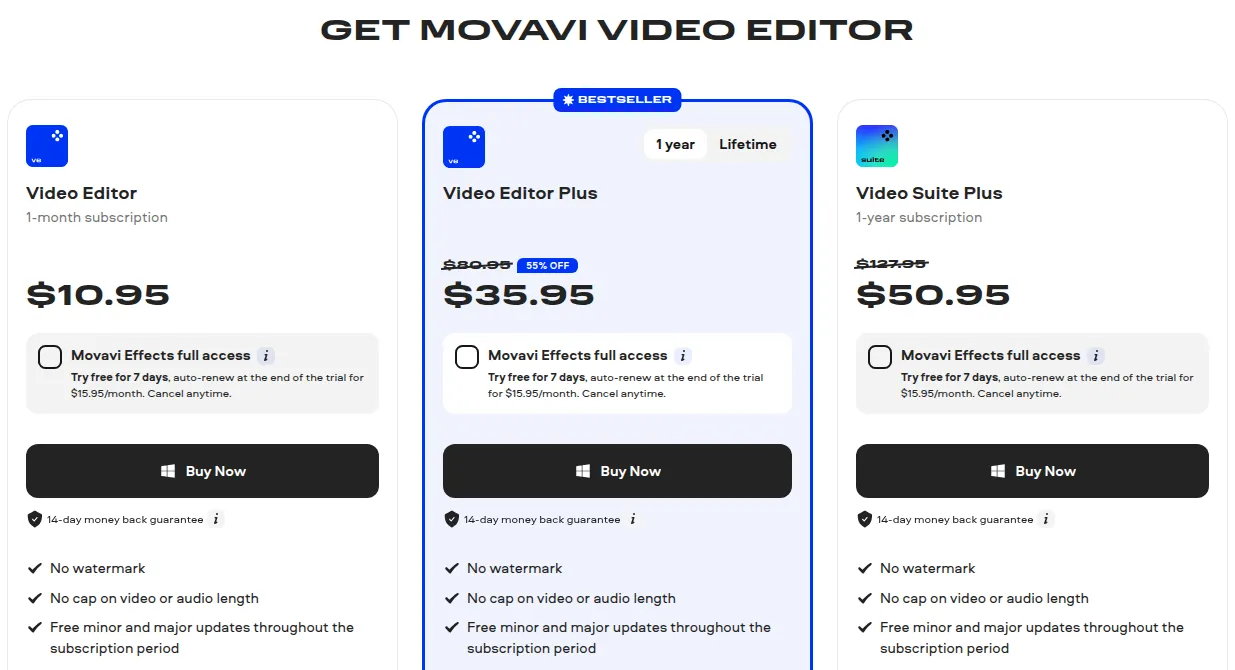
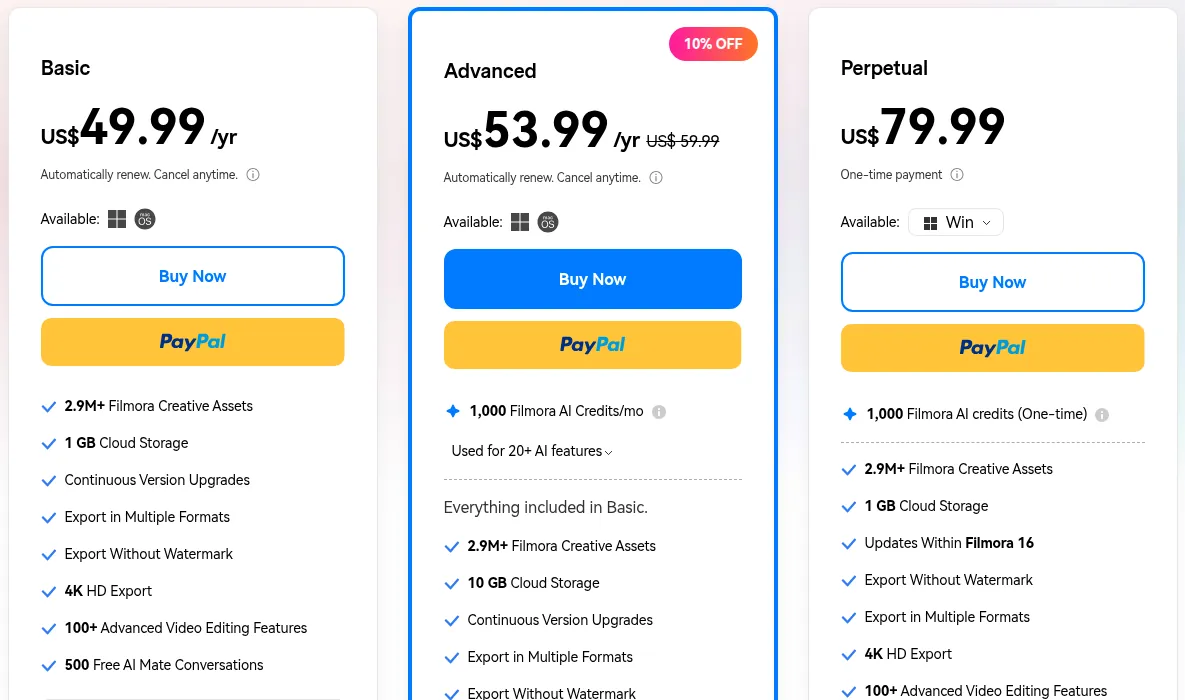
Prices in USD on the Movavi purchase page and the Filmora pricing page on October 29, 2026:
| Option | Movavi Video Editor | Filmora |
|---|---|---|
| Monthly | $10.95 for 1 month (Video Editor) | no monthly plan for individuals listed |
| Yearly, entry | $35.95/yr Video Editor Plus (55% off $80.95, until November 1, 2026) | US$49.99/yr Basic |
| Yearly, top | $50.95/yr Video Suite Plus (list $127.95) | US$53.99/yr Advanced (list US$59.99), 1,000 AI credits a month |
| One-time | lifetime option for Video Editor Plus, price shown at checkout | US$79.99 Perpetual (Filmora 16, one platform) |
What the numbers mean for you:
- One project, done in a few weeks: Movavi's $10.95 month is the cheapest way to export without a watermark. Filmora has no monthly individual plan on its pricing page.
- Editing all year: at today's promotional price Movavi Video Editor Plus ($35.95) is cheaper than Filmora Basic (US$49.99). The discount is time-limited (list price $80.95), so compare at checkout.
- Paying once: Filmora's US$79.99 perpetual license is clearly priced, but it covers Filmora 16 only, on one platform; future major versions cost extra. Movavi offers a lifetime option for Video Editor Plus but didn't show its price on the purchase page we read.
Extras cost more on both. Movavi's optional Effects add-on is free for 7 days, then $15.95 a month unless you cancel, and many templates need a separate Movavi Templates subscription. Filmora's heavier AI use runs on credits: Advanced includes 1,000 a month, which expire when the next batch arrives.
Free versions: what you can test
Both editors can be downloaded and tried for free, and both put a watermark on what you export.
- Movavi Video Editor free version, depending on the build: a watermark on exported clips, video capped at 60 seconds (or half the audio length), and some advanced export features locked. Movavi's FAQ says you need the full version after 7 days.
- Filmora free version: you can use the editing tools, but exports carry a Filmora watermark, and cloud storage and the full Creative Assets library need a paid plan.
In practice Movavi's 60-second cap means you can test the workflow, not finish a real video. Filmora's free version doesn't advertise a length cap, so you can edit a full project and judge the result, watermark aside.
Ease of use and features
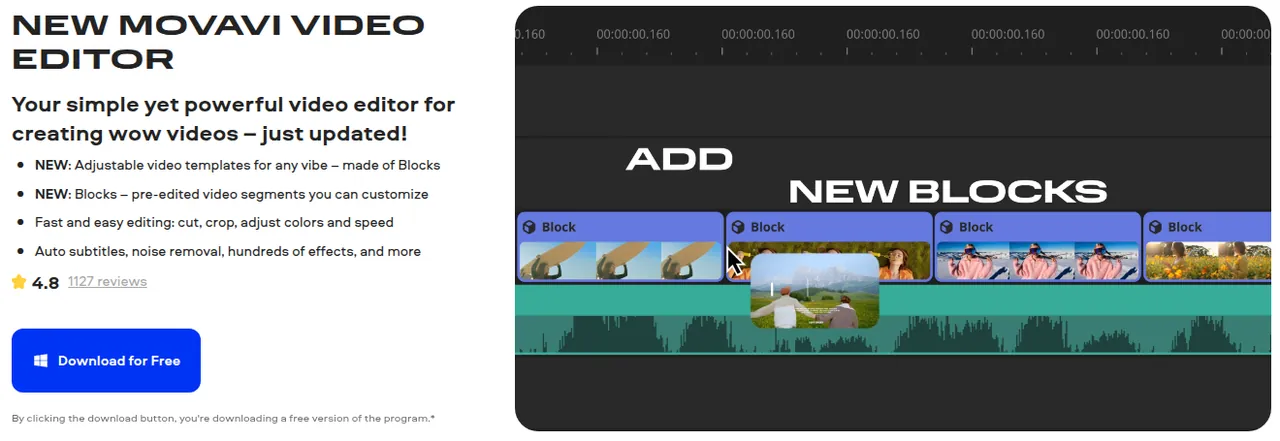
Movavi Video Editor is built around speed for beginners. You get a simple timeline with cut, crop, rotate, speed and color presets; one-click automatic subtitles in almost any language with word-by-word highlighting; AI noise removal for wind and traffic; silence removal with an adjustable threshold; auto-tracked cropping for reframing; and motion tracking to pin an emoji or caption to a moving object. Templates are made of Blocks, pre-edited segments such as intros, countdowns and collages that you drop on the timeline and customize. Movavi cites 10,000+ effects and 1,500+ music tracks, and the Mac page lists chroma key, keyframe animation, stabilization and reverse video. Free weekly video tutorials help first-timers. More in our Movavi Video Editor review.
Filmora 16 keeps a beginner-friendly timeline but goes further. Its feature list includes keyframes with curves, camera tracking, dual timelines, color correction, stabilization and noise reduction, audio ducking, auto beat sync and silence detection. On the AI side there are speech to text, text-based editing (cut the video by editing its transcript), auto captions, AI audio denoise, a vocal remover, a voice changer, video translation and generation of video from text or images. Wondershare cites 2.9M+ Creative Assets (templates, stock media, effects, music, LUTs, titles), included with paid plans. More in our Wondershare review.
The trade-off: Movavi has fewer controls to learn, so a first video comes together quickly. Filmora gives you more to grow into, but its newest AI features use credits, and its larger toolset takes longer to explore.
Hardware and platforms
This is where an older laptop decides for you.
| Movavi Video Editor (Windows) | Filmora (Windows) | |
|---|---|---|
| OS | Windows 10/11, 64-bit | Windows 7, 8.1, 10, 11 (x64); Windows 10/11 on ARM |
| CPU | dual-core 1.5 GHz | Intel 6th Gen or AMD Ryzen 3 1300X or higher |
| RAM | 4 GB | 8 GB |
| Graphics | Intel HD Graphics 2000 or equivalent | GTX 1050 Ti, MX550, Radeon RX 500 or Intel UHD 630 with 2 GB VRAM |
| Disk | 400 MB to install, 600 MB to work | at least 10 GB free to install |
Movavi's minimums are far lower, so it is the safer choice on a budget or older Windows PC. Filmora asks for a more recent processor and graphics, in exchange for 4K and 8K export and heavier AI features (see the Filmora tech specs).
Platforms. Both run on Windows and macOS. Filmora also has mobile apps for iOS, iPadOS and Android, so you can start on your phone. A Filmora Basic or Advanced subscription covers both Windows and Mac; the perpetual license is for one platform. Movavi sells Windows and Mac versions from the same purchase page.
Refunds and cancelling
Both say "money-back guarantee" on their pricing pages; both limit it in the actual policy.
- Movavi shows a 14-day money-back guarantee, but its refund policy calls subscriptions generally non-refundable and accepts specific cases: a technical problem Support can't solve within 14 days, a duplicate purchase, activation issues without a reply in 24 hours, an incompatible Effects pack or a discontinued program. Changing your mind or disliking the trial's features is not a reason. You can cancel anytime and keep access until the billing period ends.
- Wondershare gives up to 30 days from the initial payment for most direct purchases, again for specific cases: a duplicate or wrong purchase, an accidental add-on, an unsolved critical technical issue, or where consumer law requires it. Change of mind and dissatisfaction with AI output alone are excluded. Cancel at least 24 hours before the period ends; renewal charges are generally not refunded. EU residents may have a 14-day right of withdrawal.
The practical advice is the same for both: use the free version on your own footage first, and treat the purchase as final.
Verdict: which one fits you
Choose Movavi Video Editor if you are new to editing, want the fastest path from footage to a finished family, travel or school video, have an older or lower-spec Windows PC, or need the editor for one month only ($10.95). Its real downsides: the free version caps exports at 60 seconds, many templates and the Effects add-on are paid extras, the best yearly price is a time-limited promotion, and refunds exclude a change of mind.
Choose Filmora if you plan to edit regularly and want room to grow: keyframes, camera tracking, text-based editing, AI generation, a large asset library and apps for iPhone, iPad and Android. It is also the clearer choice if you want to pay once (US$79.99). Its real downsides: no monthly individual plan, higher hardware requirements, AI features beyond the basics run on credits, and the perpetual license covers Filmora 16 on one platform only.
To see other editors, design and audio tools, browse the best design, video and audio tools, and if you want AI to create the video for you, see the best AI video generators.
Frequently asked questions
Is Movavi better than Filmora?
Neither is better for everyone. Movavi is simpler and runs on lower-spec PCs, and it has a one-month plan. Filmora has more advanced tools, AI features, mobile apps and a clearly priced perpetual license.
Which is cheaper, Movavi or Filmora?
For a single month Movavi is cheaper at $10.95, since Filmora lists no monthly individual plan. For a year Movavi Video Editor Plus was $35.95 on a promotion valid until November 1, 2026, against US$49.99 for Filmora Basic; at Movavi's list price of $80.95 Filmora is cheaper. To pay once, Filmora Perpetual costs US$79.99.
Which is the easiest video editor for beginners?
Both are made for beginners. Movavi has fewer controls, ready-made template Blocks and weekly video tutorials, so a first video usually comes together faster. Filmora is still approachable but has more tools to explore.
Are Movavi and Filmora free?
Both have free versions that add a watermark to exports. Movavi's free version also caps video at 60 seconds and locks some export features; Filmora's free version lets you use the editing tools but keeps cloud storage and the full asset library for paid plans.
Does Filmora or Movavi work on a low-end laptop?
Movavi's Windows version needs a 1.5 GHz dual-core CPU, 4 GB of RAM and 400 MB of disk to install. Filmora asks for an Intel 6th Gen or Ryzen 3 1300X processor, 8 GB of RAM, a discrete or recent integrated GPU and 10 GB of disk, so Movavi is the safer choice on older hardware.
Can I buy Movavi or Filmora with a one-time payment?
Filmora sells a perpetual license for US$79.99, valid for Filmora 16 on one platform; future major versions cost extra. Movavi offers a lifetime option for Video Editor Plus; check its price at checkout.