Movavi Video Editor review: easy video editing for Windows and Mac
Movavi Video Editor is a desktop video editor that lets beginners and everyday creators cut, polish and caption videos without a steep learning curve. It runs on Windows and macOS, has one-click AI tools such as automatic subtitles and noise removal, and has a free version to try. Paid plans start at $10.95 for one month.
No extra sign-up bonus — the provider's standard offer applies.
Disclosure: this is an affiliate link. If you sign up through it, we may earn a commission at no extra cost to you. The bonus and terms are set by Movavi and can change — check them on the official site before you sign up.
How to get started
- Open Movavi through the link on this page.
- Download the free version of Movavi Video Editor for Windows or Mac and try it on your own footage.
- Note the free version's limits: a watermark and a length cap.
- When you are ready, pick a plan on the purchase page: one month, one year, lifetime or the Video Suite.
- Activate your purchase in the app and export without a watermark.
What is Movavi Video Editor?
Movavi Video Editor is Movavi's flagship desktop app for people who want good-looking videos without learning professional software. Movavi describes it as an editor for beginners and everyday creators and says its products have 70M+ users in 190+ countries.
This Movavi Video Editor review covers features, prices and the limits to know before you buy.
Key features
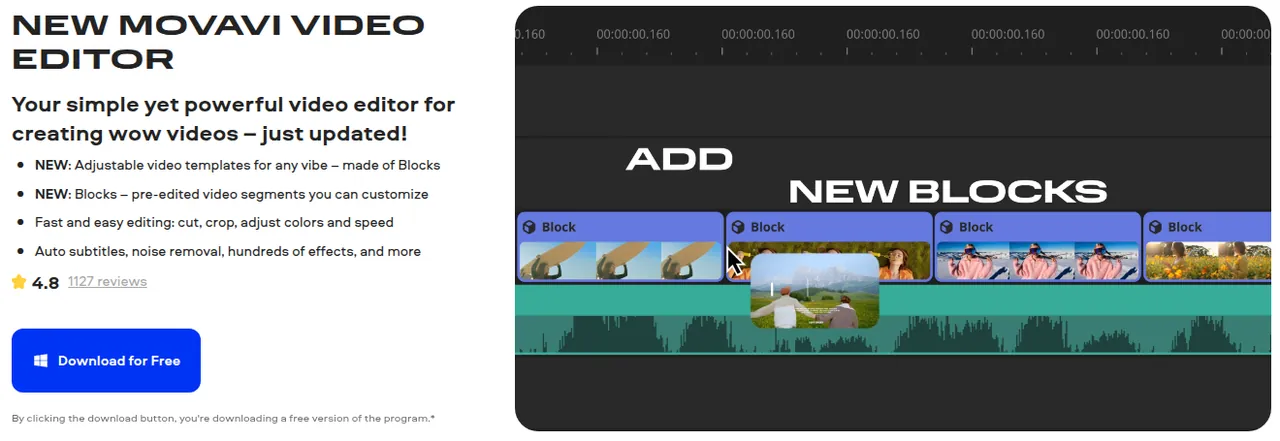
- Simple timeline editing. Cut, crop, change speed, use slow motion and apply color correction presets, with unlimited timeline tracks.
- One-click AI tools. Automatic subtitles with word-by-word highlighting, AI background removal without a green screen, video and audio denoise, auto silence removal, auto-tracked cropping for reframing and AI motion tracking to pin graphics to moving objects.
- Effects and music. Hundreds of transitions, titles and filters, plus effects such as dust, light leaks and VHS looks; Movavi cites 10,000+ effects and 1,500+ music tracks.
- Video templates. Customizable templates built from Blocks you drop onto the timeline; some are free in every theme, the rest need a separate Movavi Templates subscription.
- More advanced tools on the Mac version page: chroma key, keyframe animation, stabilization and reverse video.
- Easy sharing. Export to popular video and audio formats and upload directly to YouTube, Google Drive and Vimeo.
Who it's for
- Beginners who want to edit family videos, travel clips or school projects without a professional learning curve.
- YouTubers and social creators who need quick cuts, captions and clean audio; for turning long videos into short clips, also see the OpusClip review and the Submagic review.
- Small businesses making product videos, tutorials or ads with templates and stock music.
To compare other editing, design and streaming tools, browse the best design, video and audio tools.
Movavi Video Editor pricing
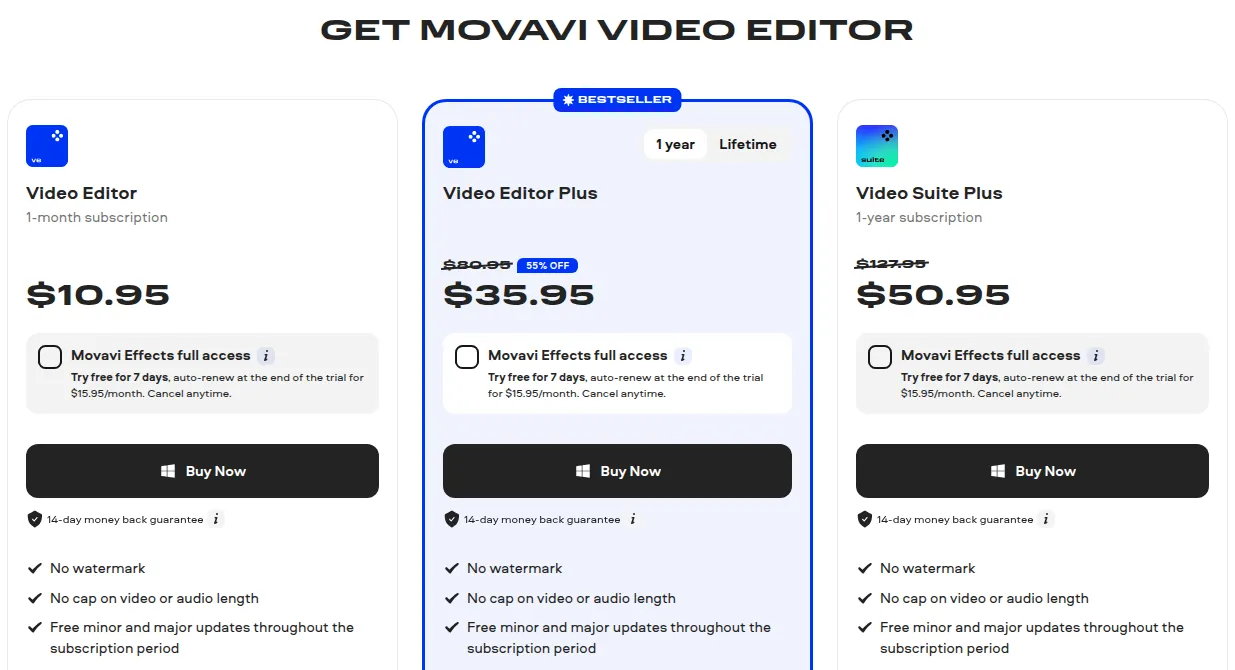
US prices on Movavi's purchase page in October 2026 (including VAT):
| Plan | Price | Term | Highlights |
|---|---|---|---|
| Video Editor | $10.95 | 1 month | Full editor, AI tools, no watermark |
| Video Editor Plus | $35.95 (listed at $80.95, 55% off) | 1 year; lifetime option offered | Adds three effects packs |
| Video Suite Plus | $50.95 (listed at $127.95) | 1 year | Editor plus the wider suite |
All plans include the AI tools, screen recording and templates, with no watermark, no length cap and free updates during the subscription. The Plus plans add three effects packs (gradients, cinematic effects with LUTs, and vintage VHS). The 55% discount on Video Editor Plus was shown as valid until November 1, 2026, so check the current price before you buy.
Movavi Effects is an optional add-on: free for 7 days, then $15.95 per month unless you cancel.
The Movavi suite in brief
Movavi Video Suite bundles the editor with file conversion, screen recording, a disc burner, a media player and stock content. If you only edit videos, Video Editor or Video Editor Plus is enough.
Good to know
- Free version limits. Depending on the build, exported clips get a watermark, video is capped at 60 seconds (or half the audio length) and some advanced export features are locked.
- Windows requirements. Windows 10/11 64-bit, a 1.5 GHz dual-core CPU, 4 GB RAM, 1280 × 768 display and administrator rights to install.
- Refunds are limited. You can apply within 14 calendar days, but only in listed cases such as technical problems Support can't solve or an accidental duplicate purchase; changing your mind is not a refund reason. App Store and Google Play purchases are refunded through those stores.
- Cancelling. You can cancel a subscription at any time and keep the paid version until the billing period ends.
Pros and cons
Pros
- Easy to learn for beginners and everyday creators
- One-click AI subtitles, noise removal and background removal
- Runs on Windows and macOS
- Free version lets you test before paying
- Low entry price: $10.95 for one month
Cons
- Free version adds a watermark and caps length at 60 seconds
- Refunds only in specific cases, not for a change of mind
- Some templates and effects need separate paid subscriptions
- Discounted prices are time-limited promotions
Frequently asked questions
Is Movavi Video Editor free?
Yes, there is a free version to try, but exports may get a watermark, video is capped at 60 seconds and some export features are locked.
How much does Movavi Video Editor cost?
On the US purchase page in October 2026, Video Editor cost $10.95 for one month, Video Editor Plus $35.95 for one year (discounted from $80.95) and Video Suite Plus $50.95 for one year. A lifetime option is also offered.
Is there a Movavi promo code or discount?
We don't have a promo code. Movavi runs its own discounts on the purchase page, such as 55% off Video Editor Plus until November 1, 2026.
Does Movavi Video Editor work on Mac?
Yes, it is available for both Windows and macOS.
Is Movavi legit and safe?
Movavi Software Limited publishes its prices, a refund policy and help-center articles, and you can test the free version first. Refunds are limited to specific cases within 14 days.
How do I cancel Movavi or get a refund?
You can cancel a subscription at any time and keep access until the billing period ends. Refunds can be requested within 14 calendar days only for listed reasons, such as unsolved technical problems or a duplicate purchase.
- https://www.movavi.com/videoeditor/
- https://www.movavi.com/video-editor-plus/buy-now.html
- https://www.movavi.com/mac-video-editor/
- https://www.movavi.com/video-suite/
- https://help.movavi.com/kb/subscription-issues/request-a-refund-movavi-refund-policy
- https://help.movavi.com/kb/license-usage-rules/ai-features-in-movavi
- https://www.movavi.com/tools/video-background-remover/
Compare Movavi
- Movavi vs Filmora: which easy video editor should a beginner choose?
Pick Movavi Video Editor if you want the simplest desktop editor that runs on a modest PC, or if you only need it for a month ($10.95). Pick Wondershare Filmora if you want more…
Movavi alternatives
 Buzzsprout
$20 Buzzsprout credit when you upgrade to any paid plan
Podcast hosting from $0, plus a $20 credit when you upgrade
CCaptivate
Podcast hosting from $19/month with unlimited shows and a 30-day trial
DDepositphotos
334M stock photos, vectors, videos and music; unlimited images from $25/month
GGetillustrations
Royalty-free SVG, PNG and AI illustration packs with a free tier
Buzzsprout
$20 Buzzsprout credit when you upgrade to any paid plan
Podcast hosting from $0, plus a $20 credit when you upgrade
CCaptivate
Podcast hosting from $19/month with unlimited shows and a 30-day trial
DDepositphotos
334M stock photos, vectors, videos and music; unlimited images from $25/month
GGetillustrations
Royalty-free SVG, PNG and AI illustration packs with a free tier