Wondershare review: Filmora, PDFelement and what each plan costs
Wondershare makes desktop software for everyday creative and office work, led by the Filmora video editor and the PDFelement PDF editor. Both have free versions plus yearly plans or a one-time perpetual license, and suit creators, small businesses, students and office workers.
No extra sign-up bonus — the provider's standard offer applies.
Disclosure: this is an affiliate link. If you sign up through it, we may earn a commission at no extra cost to you. The bonus and terms are set by Wondershare (Filmora etc.) and can change — check them on the official site before you sign up.
How to get started
- Open Wondershare through the link on this page; there is no code to type.
- Pick the product you need (Filmora for video, PDFelement for PDFs) and download the free version to try it.
- When you are ready, choose a plan on the product's pricing page: yearly, multi-year or perpetual, Windows or Mac.
- Check the final price at checkout, then sign in with your Wondershare ID in the app to activate the license.
What Wondershare offers
Wondershare has built creative and productivity software since 2003, with offices in Vancouver, Tokyo and several cities in China. The two products most people buy are:
- Filmora: a video editor for Windows and Mac, with mobile apps for iOS and Android;
- PDFelement: an all-in-one PDF editor for desktop, mobile and web.
The wider family includes UniConverter (media conversion and enhancement), EdrawMax (diagrams), EdrawMind (mind maps), Recoverit (lost file recovery), Repairit (repair broken videos and photos), Dr.Fone (phone management) and MobileTrans (phone-to-phone transfer).
Filmora: video editing made approachable
Filmora 16 combines a timeline editor with AI tools, so you can cut quickly and still refine details. Highlights from the official site:
- rough cut tools: remove pauses, edit from text, trim clips;
- advanced editing: keyframes and curves, motion tracking, dual timelines, multi-camera editing, masks and compositing;
- picture and color: stabilization, noise reduction, color correction and grading with HSL, curves and 3D LUTs;
- sound and captions: text-to-speech voiceovers, voice enhancement, auto captions (speech-to-text in 27 languages);
- AI creation: generate video from text, images or audio, and extend clips;
- delivery: reframe for different aspect ratios, export several versions at once, Final Cut Pro 7 XML export;
- a Creative Assets library of 2.9M+ templates, effects, music, stock media and more.
It fits YouTubers and social creators, small businesses making product or promo videos, and teachers recording tutorials. The free edition includes the basic editing features but adds a watermark to exports. If you mainly need short vertical clips with captions, our Submagic review covers a dedicated tool; for other editors see best design, video and audio tools.
Filmora pricing
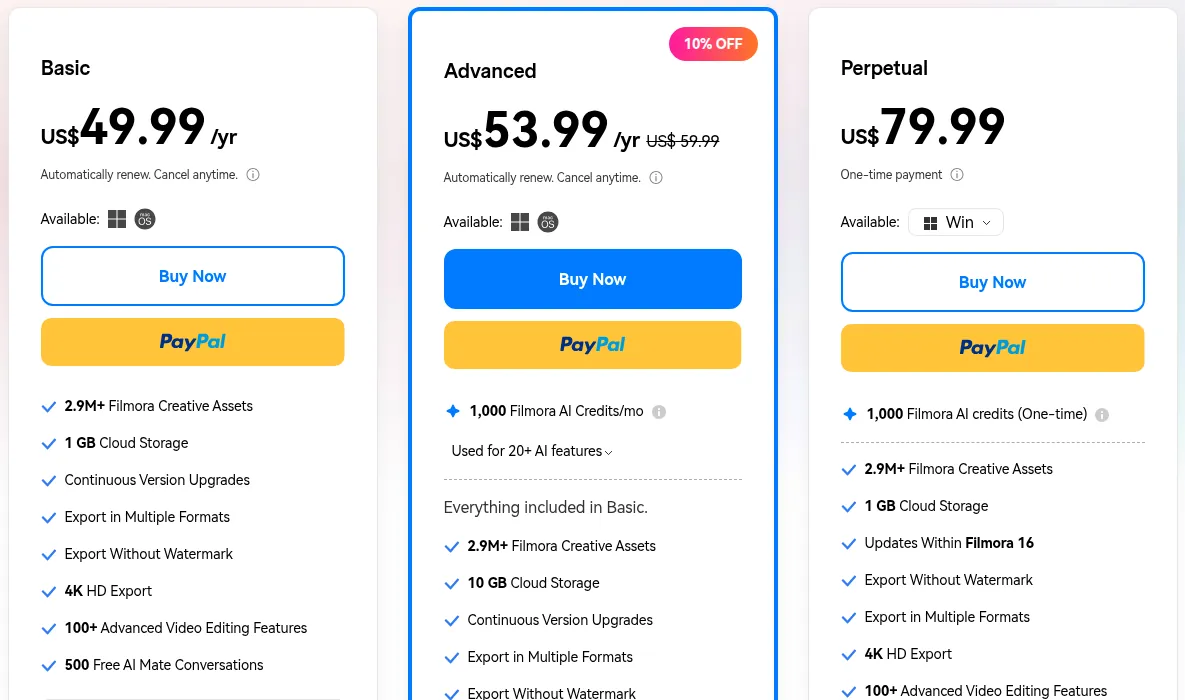
| Plan | Price at writing | What you get |
|---|---|---|
| Basic | US$49.99/yr | No watermark, 4K export, 1 GB cloud, all version upgrades |
| Advanced | US$53.99/yr (list US$59.99) | Basic plus 1,000 AI credits a month and 10 GB cloud |
| Perpetual | US$79.99 one-time | Use Filmora forever, 1,000 one-time AI credits, updates within Filmora 16 |
The yearly plans renew automatically and can be cancelled anytime; one Basic or Advanced license works on both Windows and Mac. A perpetual license is tied to one platform and covers updates to Filmora 16 only, not future major versions. Prices on the page carry time-limited discounts, so check the current figure before you buy.
PDFelement: edit PDFs like Word
PDFelement 13 is Wondershare's answer to expensive PDF suites. You can edit text and images in place, convert PDFs to and from Word, Excel and images, run OCR on scans in 26 languages, create and fill forms, compress, merge, compare versions, redact sensitive data and send documents for certificate-based e-signatures. Built-in AI summarizes, translates and answers questions about your documents, within a usage quota. If e-signatures are your main need, compare our BoldSign review.
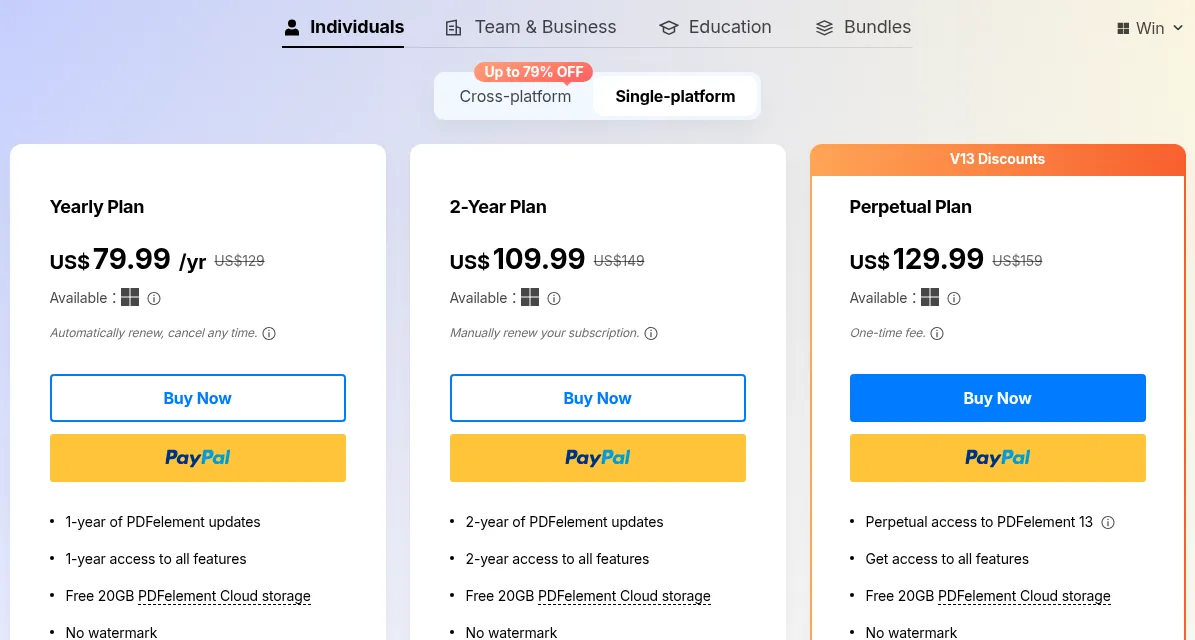
Single-platform Windows plans at the time of writing: Yearly US$79.99/yr (auto-renews), 2-Year US$109.99 (manual renewal) and Perpetual US$129.99 for PDFelement 13; all include 20 GB of PDFelement Cloud and no watermark. Cross-platform and team plans also exist. A registered 14-day free trial needs no credit card but watermarks saved files.
Refunds and good to know
- 30-day money-back guarantee, but with conditions: the refund policy covers cases like a duplicate or wrong purchase or an unresolved critical technical issue, not a change of mind or dissatisfaction with AI output. EU residents may have a 14-day right of withdrawal.
- Renewals: cancel at least 24 hours before the period ends; renewal charges for a subscription you forgot to cancel are generally not refunded.
- AI credits: monthly Filmora credits expire when the next batch is issued, and used credits are not refundable.
- Purchases through app stores or resellers are refunded by that seller.
- Support is by live chat and email, with email replies within 24 hours.
Pros and cons
Pros
- Free versions of Filmora and PDFelement to try before paying
- Perpetual one-time licenses as well as yearly plans
- One Filmora subscription covers both Windows and Mac
- Broad feature sets with AI tools built in
Cons
- Free and trial versions add a watermark
- Money-back guarantee excludes change of mind
- Perpetual licenses are platform-specific and exclude future major versions
- Heavier AI use needs credits or paid add-ons
Frequently asked questions
Is there a Wondershare promo code or coupon?
No public promo code is published. The pricing pages already show time-limited discounts, which are applied automatically at checkout, and the link on this page needs no code.
Is Filmora free?
You can download Filmora and use its basic editing features for free, but exported videos carry a watermark. Paid plans start at US$49.99 a year.
Is Wondershare legit and safe?
Wondershare has sold software since 2003 and publishes its terms, privacy and refund policies, with live chat and email support. The caveat is the refund policy: it covers specific cases, not a change of mind.
Should I choose a subscription or a perpetual license?
A subscription includes every major upgrade and, for Filmora, works on Windows and Mac. A perpetual license is a one-time payment for the current major version on one platform; later major versions cost extra.
How do I cancel Wondershare or get a refund?
You can cancel a subscription anytime before the next charge. Refund requests go through Wondershare Account Center, My Orders, Order History, within 30 days of payment for most products, if your case meets the policy.
- https://www.wondershare.com/
- https://www.wondershare.com/about/
- https://filmora.wondershare.com/
- https://filmora.wondershare.com/shop/buy/buy-video-editor.html
- https://pdf.wondershare.com/
- https://pdf.wondershare.com/store/windows-individuals.html
- https://www.wondershare.com/refund-policy.html
- https://filmora.wondershare.com/buy/filmora-stt.html
Compare Wondershare (Filmora etc.)
- Movavi vs Filmora: which easy video editor should a beginner choose?
Pick Movavi Video Editor if you want the simplest desktop editor that runs on a modest PC, or if you only need it for a month ($10.95). Pick Wondershare Filmora if you want more…
Wondershare (Filmora etc.) alternatives
 Buzzsprout
$20 Buzzsprout credit when you upgrade to any paid plan
Podcast hosting from $0, plus a $20 credit when you upgrade
CCaptivate
Podcast hosting from $19/month with unlimited shows and a 30-day trial
DDepositphotos
334M stock photos, vectors, videos and music; unlimited images from $25/month
GGetillustrations
Royalty-free SVG, PNG and AI illustration packs with a free tier
Buzzsprout
$20 Buzzsprout credit when you upgrade to any paid plan
Podcast hosting from $0, plus a $20 credit when you upgrade
CCaptivate
Podcast hosting from $19/month with unlimited shows and a 30-day trial
DDepositphotos
334M stock photos, vectors, videos and music; unlimited images from $25/month
GGetillustrations
Royalty-free SVG, PNG and AI illustration packs with a free tier