Best AI clip makers to turn long videos into shorts
Looking for the best AI clip maker or an OpusClip alternative? OpusClip has the most complete free plan, Vizard gives the most processing minutes for the price, Klap charges per clip with the easiest refunds, and Submagic is the pick for captions on short videos. Prices, free plans and limits compared for creators and marketers who want short clips from long videos.
Comparison at a glance
| Service | Best for | Starting price | Free plan / trial | Key limit | Review & sign-up |
|---|---|---|---|---|---|
| OpusClip | Starting free, then scheduling and team features | $15/mo (Starter, 150 min); Pro $14.50/mo yearly | 60 min/month free; 7-day Pro trial with 90 min | Paid fees generally non-refundable; free media kept 3 days | OpusClip review →Get OpusClip → |
| Vizard | Clipping many hours of long recordings | $29/mo (Creator, 600 min); $14.50/mo yearly | 60 min/month free, 720p with watermark | Refunds only for unused services within 7 days | Vizard review →Get Vizard → |
| Klap | A predictable number of clips each month | $29/mo (Basic, 100 clips); $14/mo yearly | 1 video free, preview and edit only | Downloading and posting need a paid plan | Klap review →Get Klap → |
| Submagic | Styled captions in many languages on short videos | $19/mo per member (Starter); $12/mo yearly | Free trial, no card; length not stated | Max video length 2 min on Starter, 30 min on Business | Submagic review →Get Submagic → |
Disclosure: the sign-up buttons in this table are affiliate links. If you sign up through one, we may earn a commission at no extra cost to you. Commissions don't decide which services we include or what we say about them.
Which AI clip maker should you pick?
All four tools take a long video and give you vertical clips with captions for TikTok, YouTube Shorts and Instagram Reels. They differ in how they charge and where they put their effort:
- OpusClip if you want the best-known option with a real free plan: 60 processing minutes a month, and a 7-day Pro trial with 90 minutes for new users. Starter is $15 a month, Pro $29 (or $14.50 a month billed yearly).
- Vizard if you clip a lot of long recordings and want the most minutes per dollar: Creator gives from 600 minutes a month for $29 monthly or $14.50 a month billed yearly, and the free plan keeps 60 minutes a month.
- Klap if you think in finished clips rather than minutes: Basic gives 100 clips a month for $14 billed yearly, and it has the friendliest refund terms of the four.
- Submagic if captions are the main job and your source videos are short: captions in 123 languages and transcript editing, but the pricing page caps video length at 2 minutes on Starter.
Moving away from OpusClip? Vizard works and bills most like it; Klap prices per clip.
What an AI clipping tool does (and what it doesn't)
An AI clipping tool reads the transcript of a long video (a podcast, webinar, interview or stream), picks the moments that stand on their own, cuts them into 9:16 clips, keeps the speaker in frame and adds styled captions. It saves you the hunt for good moments and the reframing, not the judgement: you still choose what to publish and check the captions.
Speech drives the results: Klap says it works best with podcasts, interviews, educational videos and reviews, and the same logic applies to all four. And you need the rights to the video you clip; the terms of these services put that on you.
How to choose an AI clip maker: what we compared
Facts come from the providers' pricing, help and terms pages, read in October 2026:
- Price model. OpusClip and Vizard sell processing minutes (credits), Klap sells clips, Submagic sells credits per video. In the table we quote the cheapest paid plan, with the billing period stated, because yearly billing halves the price at OpusClip Pro, Vizard and Klap. Translate units into your workload: four one-hour podcasts a month is 240 minutes, more than OpusClip Starter's 150 but well within Vizard Creator's 600; three clips a day is about 90 clips, within Klap Basic's 100. More tools are among the best AI tools.
- Free plan or trial. Whether you can test on your own footage, and whether you can download what you make. This matters because refunds are strict at two of the four.
- Limits that bite. Minutes or clips per month, maximum video length and upload size, export resolution, watermark and how long your projects are kept.
- Publishing and teams. Direct posting and scheduling, connected social accounts, team seats and an API if you want to automate.
- Refunds. How long you have to change your mind after paying.
OpusClip: the free plan with the widest feature set
OpusClip is a web app from Opusclip Inc. in Mountain View, California. ClipAnything picks clips from any genre, ReframeAnything tracks moving subjects when resizing, and captions are multilingual. Paid plans add a virality score and filler removal; Pro adds scheduling, AI B-roll and export to Premiere Pro and DaVinci Resolve.
On the OpusClip pricing page, Free gives 60 processing minutes a month, uploads up to 10 GB per video and exports up to 1080p, but media expires after 3 days and animated caption templates carry a watermark. Starter costs $15 a month (monthly only) for 150 minutes and removes the watermark. Pro costs $29 a month, or $14.50 a month billed annually ($174 a year), for 300 credits a month with unused credits rolling over for 2 months, a team workspace with 2 seats and 6 social account connections. Business is custom-priced. New users also get a 7-day Pro trial with 90 minutes of processing, and the trial buttons say no credit card is required.
Pick OpusClip if you want to start free and grow into scheduling and team features. The downside: paid fees are generally non-refundable, so use the free plan and trial before paying. More in our OpusClip review.
Vizard: the most minutes for the money
Vizard, from Vizard, Corp., is a browser-based clipper and editor. It reframes to vertical, adds captions with emoji, AI B-roll and AI-written post captions and hashtags, lets you cut by deleting words from the transcript, and translates captions into 100+ languages.
Billing is simple: 1 credit = 1 minute of video, charged once per project. The Vizard pricing page lists Free with 60 credits a month, uploads up to 60 minutes and 1 GB, 720p exports up to 10 minutes long, and projects kept for 3 days. Creator starts at 600 credits a month for $29 monthly or $14.50 a month billed yearly ($174), with 4K exports of any length, uploads up to 600 minutes and 30 GB, no watermark, 100 GB of storage and 6 social accounts. Business is $39 monthly or $19.50 a month yearly ($234) and adds a shared workspace, team seats, a brand kit and 20 social accounts.
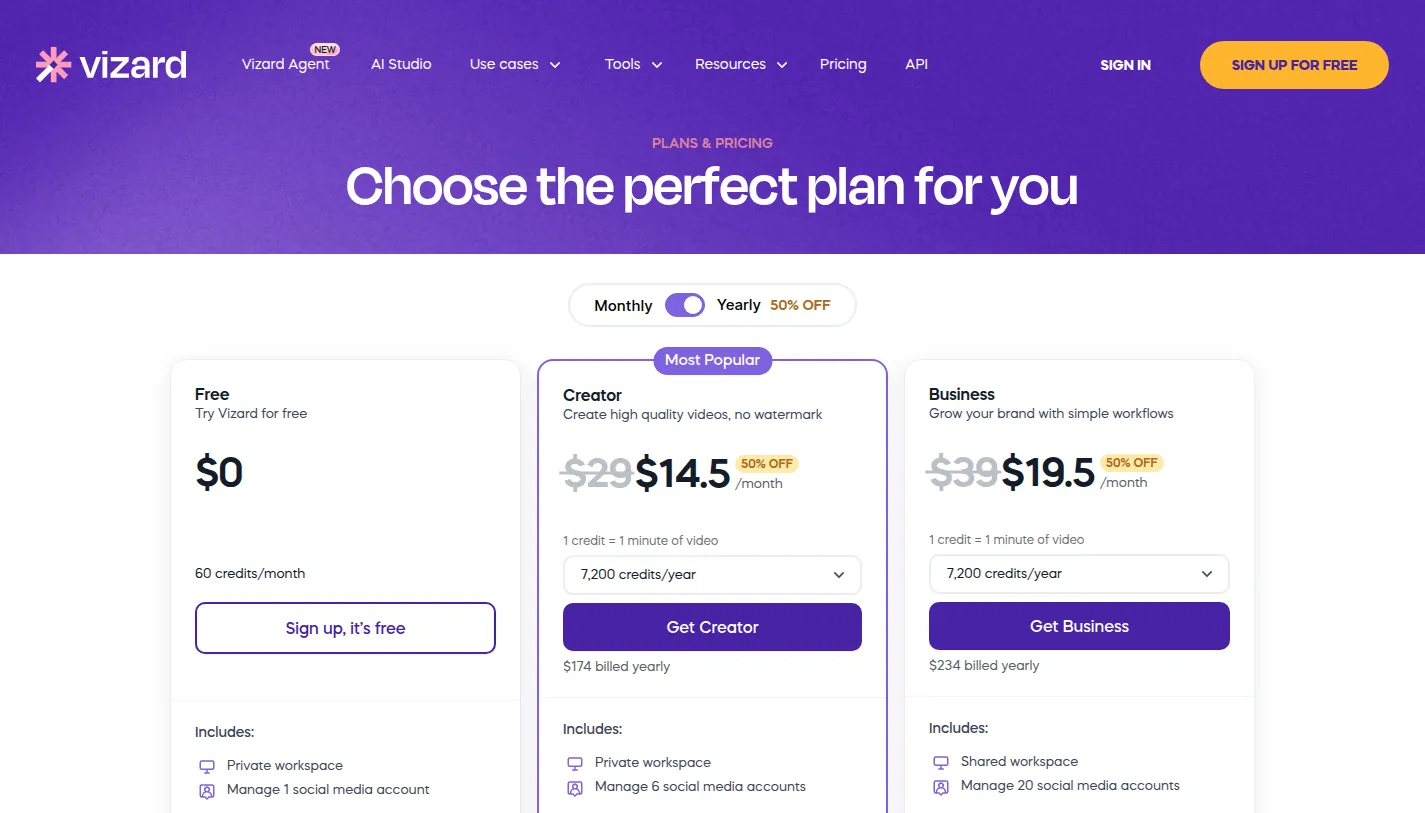
Pick Vizard if you clip hours of footage a month: at the same $29 monthly price, Creator gives 600 minutes against 300 on OpusClip Pro. The downside: the free plan exports at 720p with a watermark, and refunds cover only unused services within 7 days of purchase. Details in our Vizard review.
Klap: pay per clip, with generous refunds
Klap is run by ZIGG SAS, a French company. You paste a YouTube link or upload a file, and it picks topics, cuts vertical clips, reframes them (AI Reframe 2 adds split-screen, screencast and gaming layouts) and adds captions in 52 languages, with your own fonts, colors and logos. You can publish or schedule to TikTok, YouTube, Instagram and LinkedIn with unlimited connected accounts, plus an API and Zapier, Make and n8n integrations.
The Klap pricing page charges by clips generated: Basic gives 100 clips a month for $14, Pro 300 clips for $39 and Pro+ 1,000 clips for $94, all per month billed yearly. On monthly billing the homepage lists $29, $79 and $189. The free start is one video with no credit card: you can preview and edit its clips, but downloading and posting them needs a paid plan.
Pick Klap if you post a steady number of clips and want a price you can predict per clip, or if refund terms matter: you can ask for a refund before the end of your first month, and for up to three consecutive months you did not use. The downside: the free trial does not let you download, and the low prices need a yearly commitment. See our Klap review.
Submagic: the caption specialist
Submagic is an AI editor built around captions: 123 languages, ready-made caption styles, transcript-based editing that removes silences and bad takes, B-roll and auto-zoom. Magic Clips turns a YouTube link or an uploaded file into several shorts, and you can schedule posts from the editor.
The Submagic pricing page prices each plan per member: Starter $19 a month or $12 billed annually (45 credits, about 15 videos, videos up to 2 minutes, 1080p), Pro $39 or $23 (120 credits, about 40 videos, up to 5 minutes) and Business $69 or $41 (300 credits, about 100 videos, up to 30 minutes, 4K at 60 fps). You can try it free with no credit card; the trial length is not stated.
Pick Submagic if you already have short videos and want the best-looking captions in many languages. The downside for long videos: the maximum video length (2, 5 or 30 minutes by plan) is far below what the other three accept, and plans are priced per member. More in our Submagic review.
Free AI clip makers: what you really get
If you searched for a free AI clip maker, this is what each free option includes on the official pages:
| Tool | Free allowance | Download? | Main catch |
|---|---|---|---|
| OpusClip | 60 min a month, plus 7-day Pro trial with 90 min | Yes, up to 1080p | Watermark on animated captions; media kept 3 days |
| Vizard | 60 min a month | Yes, 720p | Watermark; exports up to 10 min; projects kept 3 days |
| Klap | 1 video | No, preview and edit only | Downloading and posting need a paid plan |
| Submagic | Free trial, no card | Not stated | Trial length not stated |
Only OpusClip and Vizard give a free monthly allowance.
Before you pay: refunds, limits and storage
- Test free first. Refund rules differ a lot: OpusClip says paid fees are generally non-refundable, Vizard refunds only unused services within 7 days, Klap refunds within the first month and for up to three months of non-use, and Submagic's pricing page does not describe a refund policy.
- Check your longest video. Vizard's free plan accepts uploads up to 60 minutes; Submagic caps video length at 2 to 30 minutes by plan.
- Download what you need. Free projects expire after 3 days on OpusClip and Vizard, and OpusClip projects become inaccessible 3 days after you cancel a paid plan.
Frequently asked questions
What is the best AI clip maker?
It depends on how you work. OpusClip has the most complete free plan, Vizard gives the most minutes for the price (600 a month on Creator), Klap charges per clip and has the most flexible refunds, and Submagic is strongest at captions but limits video length.
What are the best OpusClip alternatives?
Vizard works the same way, with minute-based credits and a free plan of 60 minutes a month, but gives 600 minutes on Creator for the price of OpusClip Pro. Klap charges per clip instead of per minute. Submagic suits short videos that need captions more than clipping.
Is there a free AI tool to turn long videos into shorts?
Yes. OpusClip and Vizard both give 60 processing minutes a month for free. OpusClip exports up to 1080p with a watermark on animated captions; Vizard exports at 720p with a watermark. Klap lets you try one video but you need a paid plan to download.
How long can my source video be?
Vizard accepts uploads up to 60 minutes on Free and 600 minutes on paid plans. OpusClip lists uploads up to 10 GB per video on Free and 30 GB on paid plans. Submagic's pricing page caps video length at 2 minutes on Starter, 5 on Pro and 30 on Business.
Which AI clipping tool is cheapest?
Billed yearly, the entry plans are close: Submagic Starter $12 a month, Klap Basic $14, OpusClip Pro and Vizard Creator $14.50. On monthly billing OpusClip Starter is the lowest at $15 for 150 minutes. Compare by your own minutes or clips per month.