How to choose a travel eSIM: how it works, phone compatibility and plans
A travel eSIM gives you mobile data abroad without a plastic SIM or a roaming bill: buy a plan online, install it at home, switch it on when you land. This guide explains how it works, how to check your phone, how to pick between local, regional and global plans, and when roaming with your own carrier is still the better choice, with Airalo's fixed packages and Drimsim's pay-per-MB SIM as examples.
Comparison at a glance
| Service | Best for | Starting price | Free plan / trial | Key limit | Review & sign-up |
|---|---|---|---|---|---|
| Airalo | Fixed-price data packages for one country, a region or worldwide | From €4.00 per package (popular countries) | No free plan; refund within 14 days if not activated | Many plans data-only; some countries need ID verification | Airalo review →Get Airalo → |
| Drimsim | Pay-per-MB data across 190 countries on one SIM or eSIM | Per MB by country (US: €0.01/MB); classic SIM €10 | No free plan; no monthly fee | Rates can change without notice; €3/month after 360 days unused | Drimsim review →Get Drimsim → |
Disclosure: the sign-up buttons in this table are affiliate links. If you sign up through one, we may earn a commission at no extra cost to you. Commissions don't decide which services we include or what we say about them.
The short answer: which travel eSIM should you get?
A travel eSIM is a prepaid data plan you download to your phone instead of inserting a plastic SIM card. You buy it online, install it before you leave, and your phone uses it for mobile data abroad while your home SIM stays in place for calls and texts.
Two models cover most trips:
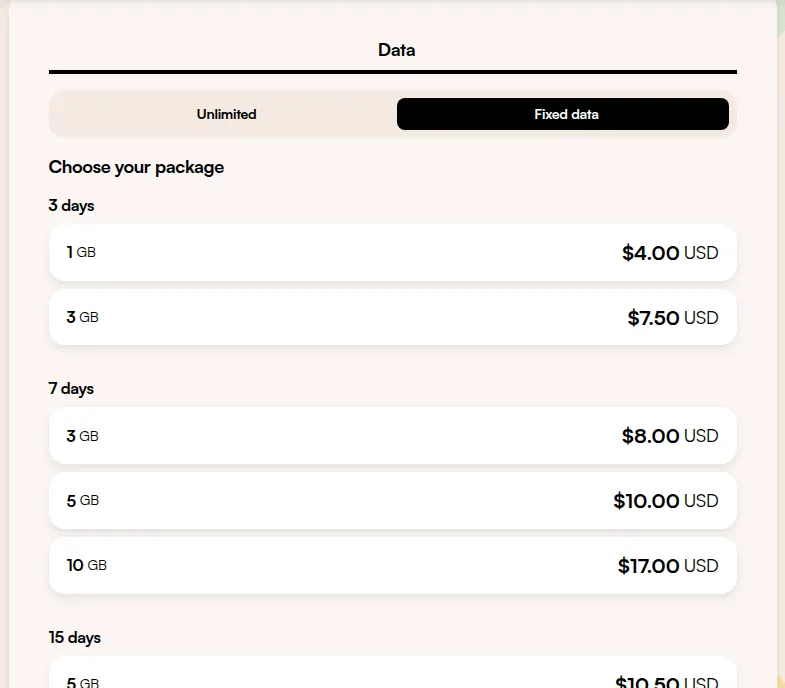
- A fixed package (Airalo): you pay up front for a set amount of data, or unlimited data, for a set number of days in one country, a region or worldwide. The price is known before you travel. Popular countries start at €4.00.
- Pay per MB (Drimsim): you top up a balance and data is charged by the megabyte at each country's rate, with no monthly fee. It suits light users and people crossing many borders, but the bill depends on how much you use.
Either way, first check that your phone can take an eSIM at all.
How a travel eSIM works
An eSIM is a SIM chip built into the phone. Instead of swapping a card, you download a profile from the provider, usually by scanning a QR code, opening a link or using the provider's app. Once installed, the eSIM appears as a second line in your phone's mobile settings.
Most travel eSIMs are data-only: you get mobile internet, but no local phone number. Your home number can stay active on the other line, so you still receive calls and SMS (your home carrier's roaming charges still apply to those). Messaging and calling apps work over the eSIM's data as usual.
When you arrive, the eSIM connects to a partner network in that country. Travel eSIMs often run as roaming connections themselves, which is why data roaming usually has to be on for the eSIM line (but not for your home SIM, see below). Airalo notes that some of its eSIMs require data roaming to work, so read the installation details of your plan.
Does my phone support eSIM?
Two conditions must both be true: the phone is eSIM-capable, and it is unlocked (not tied to one carrier). A carrier-locked phone may refuse a travel eSIM even if the hardware supports it.
iPhone. Apple lists eSIM support from the iPhone XS, XS Max and XR onwards. To check the lock, go to Settings > General > About and look at Carrier Lock: "No SIM restrictions" means the iPhone is unlocked. Some recent iPhone models sold in some countries are eSIM-only and have no SIM tray at all. Apple notes that only a few recent iPhone models sold in mainland China support eSIM.
Android. Support varies by model and by the market it was sold in. A few general checks, as described in Airalo's help centre:
- Samsung Galaxy: Settings > Connections > SIM Manager. An "Add eSIM" option means the phone likely supports eSIM.
- Google Pixel: Settings > Network & internet > SIMs > Add SIM. If it offers to download or set up an eSIM, the phone is eSIM-capable. Google says the Pixel 3a and later can use an eSIM.
- Other Android phones: dial
*#06#. An eSIM-capable phone shows its EID, the eSIM identifier.
To check whether an Android phone is unlocked, the simplest test is to put in a SIM from a different carrier and see if it connects and can make a call. When in doubt, ask the carrier that sold you the phone. Both Airalo and Drimsim tell you to confirm compatibility before buying: Drimsim says its eSIM works on recent iPhones and Android devices only, and offers a physical SIM if yours does not qualify.
Local, regional or global plans
Package-based providers sell three kinds of coverage:
- Local eSIM: one country. Usually the cheapest per GB, best when you spend the whole trip in one place.
- Regional eSIM: a group of countries under one plan, for example Airalo's Europe eSIM covering 41 countries. Best for a road trip or rail trip across borders.
- Global eSIM: many countries across continents. Convenient for a round-the-world trip or frequent flying, usually at a higher price per GB.
A pay-per-MB SIM such as Drimsim takes a different approach: one SIM covers 190 countries, and each country has its own rate (the United States page lists €0.01 per MB). You don't choose a region in advance, but you should check the rate for each destination before you go, because Drimsim's terms allow it to change rates without notice.
Data amount, validity and top-ups
A package has two limits: data (for example 1 GB, 10 GB or unlimited) and validity (for example 7, 15 or 30 days). Whichever runs out first ends the plan, so match both to your trip.
- Validity start. On most Airalo plans, validity starts when the eSIM first connects to a supported network in its coverage area, so you can install it at home days ahead. Some plans start counting as soon as they are installed: the policy is shown in each package's details.
- Unlimited plans cost more. On Airalo, 7 days of unlimited data costs €24.50 in Japan and €25.00 for the 41-country Europe plan.
- Top-ups. If you run out, a rechargeable Airalo eSIM can be topped up from My eSIMs in the app or on the website, with no new installation. Not every eSIM is rechargeable; Airalo shows this under "Additional information" before you buy. Without a top-up option you buy a new eSIM.
- Pay-per-MB balances work differently: there is no validity window, you top up the balance in the Drimsim app. Drimsim debits a €3 monthly fee after 360 days without any network session, so a forgotten balance slowly runs down.
Hotspot, phone numbers and ID checks
- Hotspot. Sharing your eSIM data with a laptop or tablet works on Airalo when your device and the network support it; if your plan lists an APN, you may need to enter it for the hotspot too. Drimsim says tethering is allowed and data sharing is not limited.
- Phone number. Many Airalo plans are data-only; plans labelled "Data, Voice & Text" add calls and SMS. Drimsim's pages describe mobile data only. If you need a local number for bookings or deliveries, filter for a voice plan or keep your home number active.
- ID verification. Some destinations require identity checks for SIM cards. Airalo asks for eKYC verification (uploading a document such as a passport) before purchase for some countries, so do it at home, not at the airport.
- Refunds. Read them before buying, because eSIMs are digital goods. Airalo lets you withdraw within 14 days of purchase as long as the eSIM is not activated, and refunds for a wrong purchase come back as Airmoney credit. Drimsim refunds balance payments only if claimed within 14 days of payment.
When to install and activate your eSIM
- Before the trip: check compatibility and unlock status, complete any ID verification, and buy the plan.
- At home, on Wi-Fi: install the eSIM. Airalo recommends installing as early as possible while you have a stable connection; you can do it outside the coverage area. Label the new line (for example "Travel") so you can tell the lines apart. Don't delete the eSIM after installing: a deleted profile may not be reinstallable, so check with the provider first.
- On arrival: before turning off airplane mode, set the travel eSIM as your mobile data line, turn on data roaming for the eSIM line, and turn off data roaming for your home SIM. On iPhone that is Settings > Cellular, where you can also disable Allow Cellular Data Switching so the phone doesn't fall back to your home SIM. On Android it is Settings > Network & internet > SIMs.
- During the trip: watch your remaining data in the provider's app and top up before it runs out.
Travel eSIM vs roaming with your home carrier
Roaming means using your home SIM abroad on a partner network, billed by your home carrier. Depending on your plan and the destination, it can be included at no extra cost, sold as a daily pass, or charged per MB at a high rate. Prices differ so much between carriers and countries that the only reliable number is the one in your own carrier's roaming terms for your destination.
A travel eSIM is usually worth it when:
- your plan has no roaming included for that country, or charges a daily fee that adds up over a long trip;
- you want a fixed price you know before you leave, with no bill afterwards;
- you need a lot of data or hotspot use that your roaming allowance doesn't cover.
Roaming can be the better choice when your plan already includes the destination, when you need your own number for calls and texts, or when your phone is locked or not eSIM-capable.
Compare the two providers in the table below, then read the details in our Airalo review and Drimsim review, or browse more travel eSIMs and travel services.
Frequently asked questions
What is the best eSIM for travel?
It depends on the trip. A fixed package such as Airalo suits most travellers who want a known price for one country or region. A pay-per-MB SIM such as Drimsim suits light users who cross many borders and want one SIM everywhere.
How does a travel eSIM work?
You buy a data plan online and install it by scanning a QR code or through the provider's app. It appears as a second line on your phone; abroad you set it as your data line while your home SIM stays installed for calls and texts.
Is an eSIM cheaper than roaming?
Often, but not always. If your phone plan already includes roaming in your destination, you may not need an eSIM. If roaming is charged per day or per MB, a prepaid eSIM gives you a fixed price before you travel.
Does my phone support eSIM?
iPhones from the XS and XR onwards support eSIM, and on Android you can look for an Add eSIM option in SIM settings or dial *#06# to see an EID. The phone must also be unlocked; on iPhone, Settings > General > About > Carrier Lock should say No SIM restrictions.
When should I install my travel eSIM?
Before you leave, on Wi-Fi. On most Airalo plans validity starts only when the eSIM connects to a network at your destination, but check the plan details because some start on installation.
Will I keep my phone number with a travel eSIM?
Yes, your home SIM stays in the phone and can still receive calls and texts, at your carrier's roaming rates. Most travel eSIMs are data-only, so the eSIM itself does not give you a new local number unless the plan includes voice and text.
Can I use a travel eSIM as a hotspot?
Usually yes. Airalo supports hotspot where the device and network allow it, and Drimsim says tethering is allowed with no data-sharing limit. Some plans need an APN entered for the hotspot to work.
- Airalo homepage and prices
- Airalo Europe eSIM
- Airalo: when can I install my eSIM
- Airalo: check if an Android device supports eSIM
- Airalo: avoiding roaming charges
- Airalo: personal hotspot
- Airalo: topping up an eSIM
- Airalo: calls and texts with an eSIM
- Airalo: identity verification
- Airalo terms of use
- Drimsim homepage
- Drimsim United States rates
- Drimsim terms of service
- Apple: Set up eSIM on iPhone
- Apple: Unlock your iPhone for a different carrier
- Google: Use dual SIMs on a Pixel phone