Best crypto tax software: Koinly, CoinLedger, CoinTracking, Coinpanda and Divly compared
If you bought, sold, swapped or earned crypto, you probably need a report of your gains and income for your tax return. Crypto tax software builds it from your exchange and wallet history. In short: Koinly to review your gains free first, CoinLedger for US filers using TurboTax, CoinTracking for portfolio tracking plus reports in 100+ countries, Coinpanda for heavy DeFi use or back years, and Divly for local-language reports in Europe. Prices, free plans and limits compared.
Not tax advice. Tax rules differ by country; check yours or ask a tax adviser.
Comparison at a glance
| Service | Best for | Starting price | Free plan / trial | Key limit | Review & sign-up |
|---|---|---|---|---|---|
| Koinly | Reviewing your full gains free before paying | $49 per tax year (Newbie) | Import and gains review free, up to 10,000 transactions | Newbie covers 100 transactions | Koinly review →Get Koinly → |
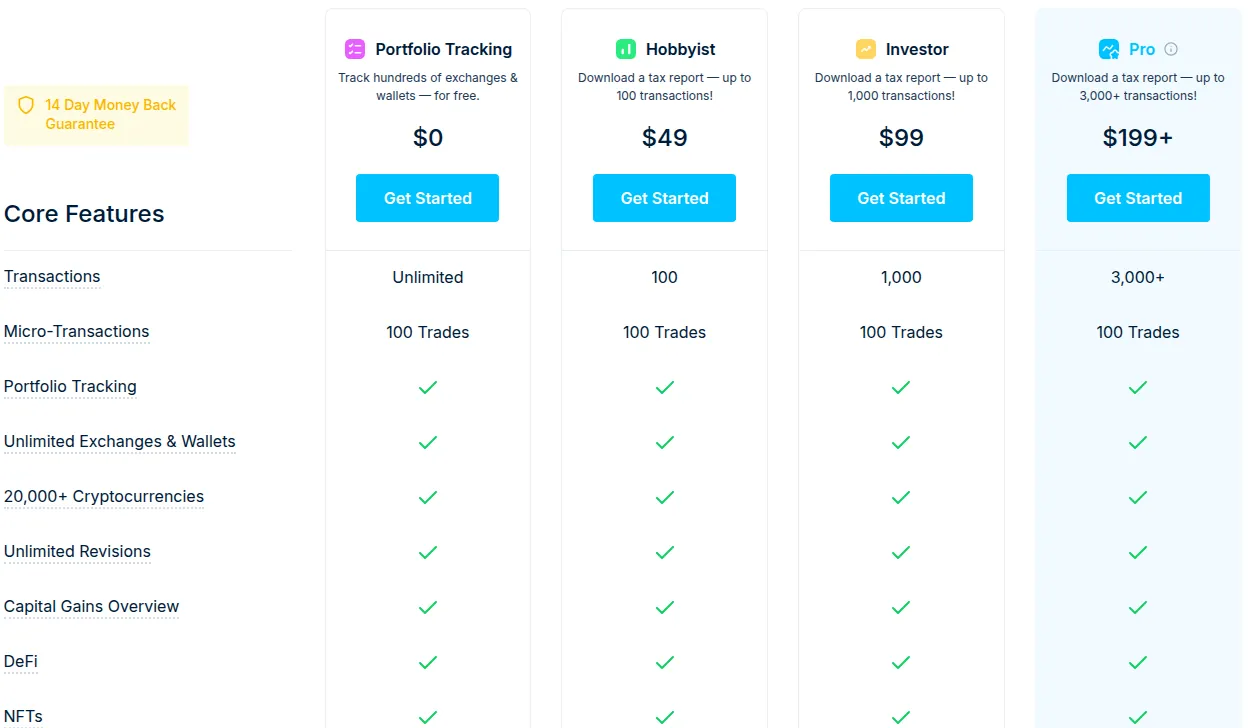
| CoinLedger | US filers importing into TurboTax and similar | $49 one-time per report (Hobbyist) | Free import, portfolio tracking and gains overview | Hobbyist covers 100 transactions | CoinLedger review →Get CoinLedger → |
| CoinTracking | Portfolio tracking plus tax reports for 100+ countries | $49 per year (Starter) | 7-day trial with unlimited imports, no card | Starter covers 200 transactions | CoinTracking review →Get CoinTracking → |
| Coinpanda | DeFi users and catching up on several tax years | $79 per year (Hodler) | Free import, review and gains preview | Hodler covers 100 transactions; $0.69 per 100 extra | Coinpanda review →Get Coinpanda → |
| Divly | Filers in Europe who want a local-language report | €39 per tax year (Essential) | Free tracking up to 25,000 transactions | Listed European countries only; Essential covers 100 transactions | Divly review →Get Divly → |
Disclosure: the sign-up buttons in this table are affiliate links. If you sign up through one, we may earn a commission at no extra cost to you. Commissions don't decide which services we include or what we say about them.
The short answer
All five tools pull in your transaction history, work out gains and income, and hand you a report. They differ in how they charge, how many transactions the entry plan covers, and which country formats they produce.
- Pick Koinly if you want to see your full gains calculation before paying. Reviewing gains is free for up to 10,000 transactions; you pay per tax year only to download reports.
- Pick CoinLedger if you file in the US and want a report that drops straight into TurboTax, TaxAct, H&R Block Desktop or TaxSlayer. Reports are a one-time purchase from $49.
- Pick CoinTracking if you want a portfolio tracker as well as tax reports, or file outside the main English-speaking markets: it states reports for 100+ countries.
- Pick Coinpanda if you have a lot of DeFi activity or several years to catch up on: each yearly plan includes tax reports for all years.
- Pick Divly if you pay tax in one of its European countries and want a report in your language that follows your tax authority's guidance, from €39 per tax year.
Every tool here lets you check your data before you pay, so try two with your real history and compare.
What crypto tax software does, and what it doesn't
Crypto tax software is a calculator and report generator. You connect exchanges and wallets by API, address or CSV; the tool matches transfers between your own accounts, finds the cost basis of every coin you sold or swapped, and sorts the result into capital gains and income. You then download reports in the format your tax office expects, such as IRS Form 8949 in the US.
It does not file your return or decide how your country treats a given transaction; you or your accountant review the report and file it. CoinLedger's terms say its information is no substitute for professional advice, and CoinTracking says it gives no tax advice. Treat any report as a draft.
How to choose crypto tax software
- Your transaction count. Every plan here is sized by transactions, and each buy, sell, swap, send or receive usually counts as one. Count yours for the tax year before you look at prices.
- Pricing model. Koinly and Divly charge per tax year, CoinLedger sells each report as a one-time purchase, and CoinTracking and Coinpanda bill yearly. For several unreported years, Coinpanda includes all years in every plan, and Koinly says one larger plan can cover several years.
- Free preview. All five let you import data for free. Koinly, CoinLedger, Coinpanda and Divly keep import free; CoinTracking gives 7 days of unlimited imports, then only shows your existing portfolio.
- Your country's report format. A ready-made form saves the most time. Check that the tool names your country's form, not just "international reports".
- Integrations and DeFi. With DeFi, NFTs or less common chains, confirm your exact platforms import before you pay. Vendor counts range from 200+ wallets and exchanges (Divly) to 900+ plus 2,000+ DeFi protocols (Coinpanda).
- Refund terms. Koinly, CoinLedger and Coinpanda refund only for bugs they cannot fix, and only if you have not downloaded a report yet. Test first, buy second.
Prices compared
Entry and mid-tier plans, as listed on each vendor's pricing page or help center in October 2026 (USD; Divly in euros):
| Koinly | CoinLedger | CoinTracking | Coinpanda | Divly | |
|---|---|---|---|---|---|
| Billing | Per tax year | One-time per report | Per year | Per year | Once per tax year |
| Free tier | Import and gains review up to 10,000 transactions | Portfolio tracking, import, preview | 7-day unlimited import trial, then portfolio view only | Import, review and gains preview | Tracking up to 25,000 transactions |
| Entry plan | Newbie $49, 100 transactions | Hobbyist $49, 100 transactions | Starter $49, 200 transactions | Hodler $79, 100 transactions | Essential €39, 100 transactions |
| Next plan | Hodler $99, 1,000 | Investor $99, 1,000 | Pro $169, 3,500 | Trader $149, 1,000 | Essential €99, 1,000 |
| Higher plans | Trader (3,000) and Pro (10,000), prices on its pricing page | Pro $199+, 3,000+ | Expert from $259, Unlimited $899 | Pro $249 (3,000), Satoshi $389 (20,000) | €199 (10,000), €399 (100,000); expert review from €99 |
Koinly: best if you want to see your numbers before paying
Koinly's free plan lets you import up to 10,000 transactions, calculate gains and review the results without paying. You pay only when you download reports, per tax year: Newbie is $49 for up to 100 transactions and Hodler $99 for up to 1,000, with Trader and Pro tiers above.
Reports are tailored by country. Koinly lists IRS Form 8949, Schedule D and Schedule 1 plus TurboTax and TaxAct files for the US, the HMRC Capital Gains Summary for the UK, the ATO MyTax report for Australia, CRA Schedule 3 for Canada, and reports for several European countries. It cites 800+ integrations.
The downside: if you import more than 10,000 transactions on the free plan, all calculations stop until you buy a plan that covers them. Refunds are narrow: within 7 days, before any report is generated, and only for a bug Koinly cannot fix. Details in our Koinly review.
CoinLedger: best for US filers using tax software
CoinLedger, formerly CryptoTrader.Tax, is built around the US filing workflow. Its core output is IRS Form 8949, and its reports import into TurboTax Online and Desktop, TaxAct, H&R Block Desktop and TaxSlayer. The homepage says it also supports the UK, Canada, Australia and more.
Pricing is simple: Hobbyist $49 for up to 100 transactions, Investor $99 for up to 1,000 and Pro from $199 for 3,000+. Each report is a one-time purchase, covers any year from 2010 to 2025, and recalculations are unlimited. Every plan includes unlimited syncs and 1,000+ integrations, including DeFi and NFTs. The free tier covers import, portfolio tracking and a capital gains overview.
The downside: the advertised 14-day money-back guarantee comes with conditions in the help center: no report downloaded, and a verifiable bug or product limitation preventing an accurate report. Outside the US, check your country's format first. More in our CoinLedger review.
CoinTracking: best for tracking plus reports in many countries
CoinTracking, run since 2012 by CoinTracking GmbH near Munich, is as much a portfolio tracker as a tax tool: 25+ portfolio reports and live prices sit next to a tax calculator that, by its own count, covers 100+ countries. It imports from 400+ exchanges and wallets, including DeFi and NFT activity.
Plans are billed per year: Starter $49 (€39) for 200 transactions, Pro $169 (€129) for 3,500 with auto-sync and API access, Expert from $259 (€219) for 20K, 50K or 100K, and Unlimited $899 (€769). Starter's 200 transactions are the most generous entry tier here. It advertises a 14-day money-back guarantee, and you can pay with crypto (Bitcoin payments get 5% off).
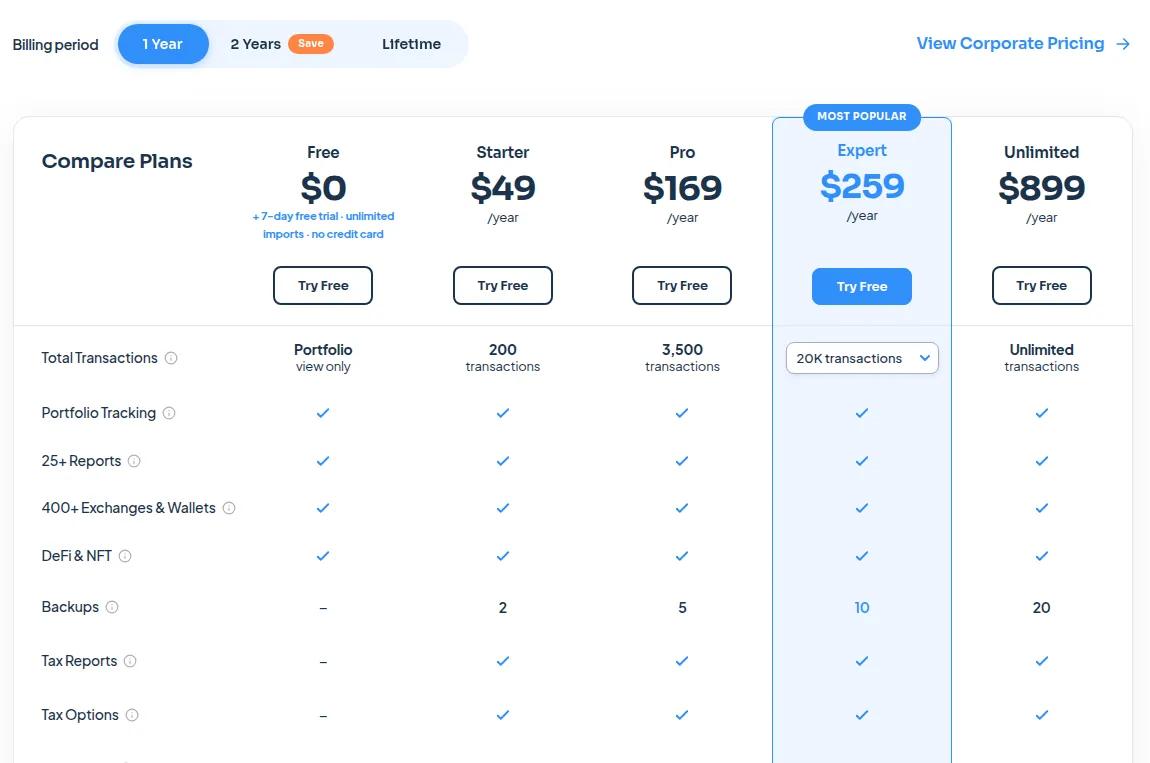
The downside: the free period is a 7-day trial; after it, there are no new imports or tax reports without a paid plan. See our CoinTracking review.
Coinpanda: best for DeFi users and back years
Coinpanda states support for 900+ wallets and exchanges, 150+ blockchains and 2,000+ DeFi protocols, with tax reports for 65+ countries. Country forms in its help center include IRS Form 8949, Schedule D and Schedule 1 (US), CRA Schedule 3 (Canada), Formulaire 2042C (France), Skatteverket K4 (Sweden) and Skatteetaten RF-1159B (Norway).
All plans are yearly: Hodler $79 (100 transactions), Trader $149 (1,000), Pro $249 (3,000) and Satoshi $389 (20,000). Each includes tax reports for all years, and only the previous calendar year's transactions count toward the limit; above it you pay $0.69 per 100 extra or upgrade.
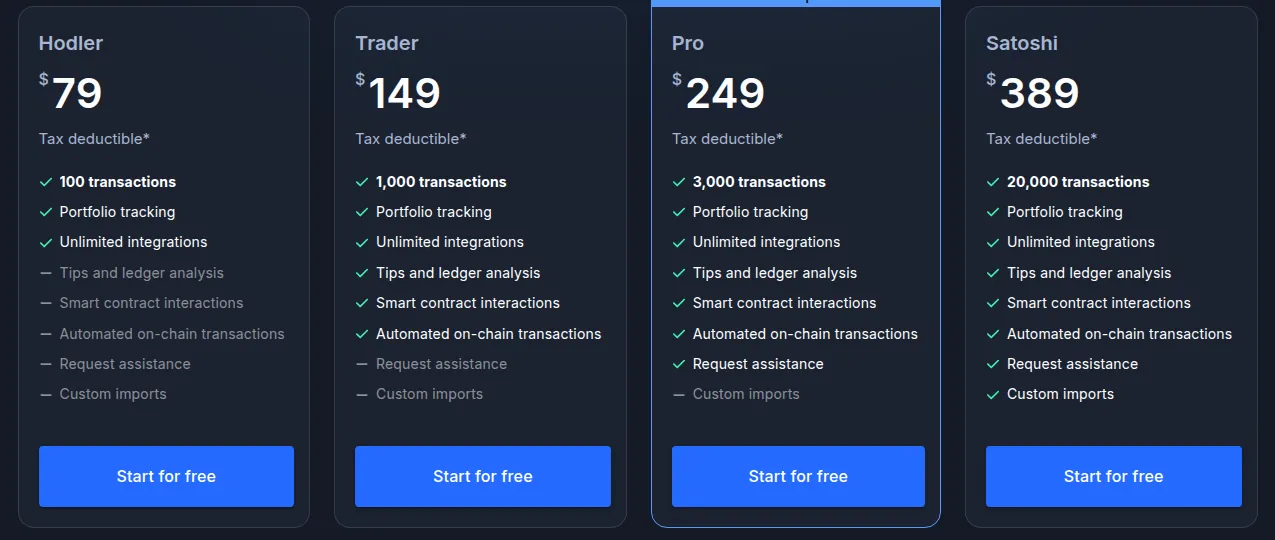
The downside: its entry plan costs more than the others' for the same 100 transactions, and refunds require all three conditions: within 7 days, a technical bug support could not fix, and no report downloaded. Read our Coinpanda review.
Divly: best for European tax reports
Divly, run by Ragnaros AB in Stockholm, is built for Europe: reports come in your country's official language and follow your local tax authority's guidance. The homepage lists Belgium, Denmark, Estonia, Finland, France, Germany, Italy, the Netherlands, Norway, Poland, Spain, Sweden and the UK, with more countries coming. It needs only an email, no KYC.
There is no subscription: you pay once per tax year, and only that year's transactions count. Essential is €39 for up to 100 transactions, €99 for 1,000 and €199 for 10,000. Peace of Mind (from €99) adds an expert review, and Full Service (from €599) has an expert prepare your taxes with you. Tracking up to 25,000 transactions is free.
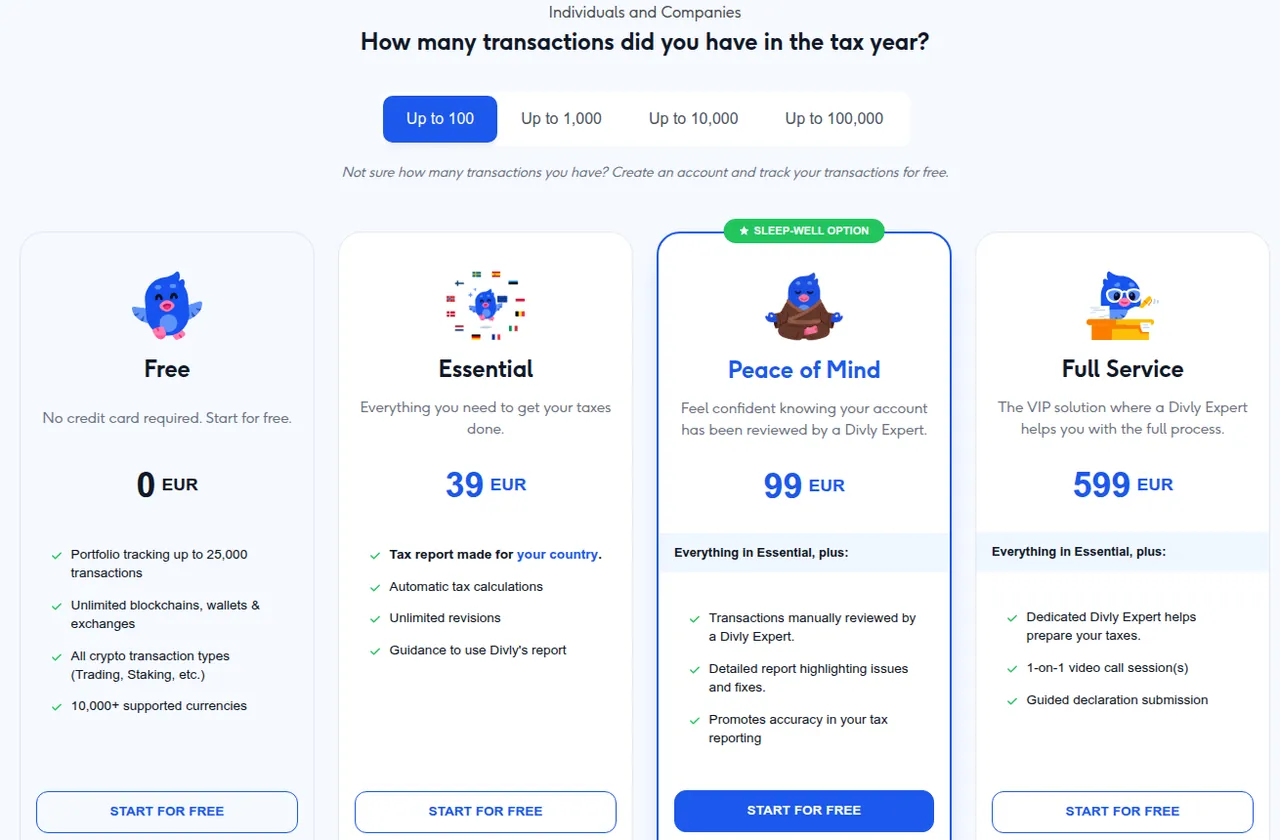
The downside: outside its listed countries there is no tailored report, so US, Canadian and Australian filers are better served by the others, and even Full Service leaves the filing to you. See our Divly review.
How to get an accurate crypto tax report
- Connect everything, including old exchanges and wallets: a missing account shows up as coins with no cost basis.
- Fix transfer and cost-basis warnings before you trust the totals.
- Compare the free preview in a second tool if the numbers look off.
- Buy the plan that fits your count only once the data is clean, because downloading a report usually ends your right to a refund.
- Ask your accountant which format they want before you download.
For more tools in this space, including wallets and portfolio apps, see our crypto tools category.
Frequently asked questions
What is the best crypto tax software?
It depends on where you file and how much you trade. CoinLedger fits US filers who use TurboTax or similar, CoinTracking states reports for 100+ countries, Coinpanda suits heavy DeFi users, Divly writes local-language reports for its European countries, and Koinly lets you review your full gains free before paying. Try two with your real data.
Is there free crypto tax software?
All five tools here let you import transactions for free, and CoinTracking gives a 7-day trial. Downloading the actual tax report requires a paid plan with each of them.
How much does crypto tax software cost?
Entry plans start at $49 for Koinly (per tax year, 100 transactions), CoinLedger (one-time, 100 transactions) and CoinTracking (per year, 200 transactions), $79 per year for Coinpanda (100 transactions) and €39 per tax year for Divly (100 transactions). Prices rise with your transaction count.
Does crypto tax software file my taxes for me?
No. These tools generate reports and forms from your transaction history; you or your accountant review them and file. CoinLedger, CoinTracking and Divly also sell paid services where their team prepares the report with you.
Which crypto tax software works with TurboTax?
CoinLedger imports into TurboTax Online and Desktop, TaxAct, H&R Block Desktop and TaxSlayer. Koinly also lists TurboTax and TaxAct export files among its US reports.
- Koinly pricing
- Koinly help: how pricing works
- Koinly help: tax plans
- Koinly refund policy
- Koinly tax reports by country
- CoinLedger homepage
- CoinLedger pricing
- CoinLedger refund policy
- CoinLedger terms and conditions
- CoinTracking homepage
- CoinTracking pricing
- CoinTracking terms of service
- CoinTracking Full-Service
- Coinpanda homepage
- Coinpanda pricing
- Coinpanda refund policy
- Coinpanda tax reports
- Divly pricing
- Divly homepage
- Divly expert services