Best web scraping APIs: pricing, credits and free plans compared
Scrape.do suits most generic scraping: 1,000 free credits a month and 250,000 credits for $29. Scrapingdog suits Google and marketplace data, with ready-made JSON endpoints and a cheaper Google search request, but only 100 free credits. This guide shows how credit multipliers change the real price per page, what each free tier covers and how to scrape public data responsibly.
Comparison at a glance
| Service | Best for | Starting price | Free plan / trial | Key limit | Review & sign-up |
|---|---|---|---|---|---|
| Scrape.do | Generic page scraping with a generous free tier | $29/mo (Hobby, 250,000 credits) | 1,000 credits/month, 5 concurrent, no card | Requests stop when credits run out; refunds within 3 days only | Scrape.do review →Get Scrape.do → |
| Scrapingdog | Google, Amazon and other ready-made JSON endpoints | $40/mo (Lite, 200,000 credits) | 100 credits, 1 concurrent, no card | No refunds once used; geo-targeting costs 10 credits | Scrapingdog review →Get Scrapingdog → |
Disclosure: the sign-up buttons in this table are affiliate links. If you sign up through one, we may earn a commission at no extra cost to you. Commissions don't decide which services we include or what we say about them.
Which web scraping API should you pick?
If you want the biggest free allowance and the lowest price for ordinary page fetches, start with Scrape.do: 1,000 free credits a month with 5 concurrent requests, and a $29 Hobby plan with 250,000 credits. If most of your work is Google results, Amazon listings or other popular sites and you would rather receive ready-parsed data than raw HTML, look at Scrapingdog: its dedicated endpoints cover Google, Amazon, Walmart, eBay, YouTube and more, and its Light Google SERP endpoint costs 5 credits against 10 for a Google request through Scrape.do's general API.
Both services charge only for successful responses, both let you start without a credit card, and both bill the same way: a monthly pot of credits, with heavier requests costing more credits. That last point matters more than the headline price, so the rest of this guide shows how to compare them on what your requests actually cost.
What a web scraping API does, and when you need one
A web scraping API sits between your code and the site you want to read. You send it a URL (or a search query, for dedicated endpoints) together with your API key, and it returns the page HTML or structured JSON. Behind that one request the provider runs the infrastructure that usually takes the most time to maintain yourself: a pool of rotating proxies, headless browsers for JavaScript-heavy pages, header and fingerprint management, retries and CAPTCHA handling.
You probably need one if:
- you collect public prices, product data or search results on a schedule and are tired of maintaining proxies and browser farms;
- your scraper works on simple sites but pages built with JavaScript come back empty;
- you need results as seen from a specific country.
You probably don't need one if the site offers an official API or data export for what you want, or if you only fetch a handful of pages from a site that serves plain HTML. In both cases a direct request is simpler and cheaper.
If you want to manage proxies yourself instead of paying per request, our guides to the best residential proxies and what a residential proxy is explain that route.
How to choose a scraping API: what we compared
- Price per successful request, not per credit. Both services sell credits, and a request can cost 1 credit or 25+. Divide the plan price by the credits your typical request uses to get a real cost per thousand pages.
- Credit multipliers. JavaScript rendering, premium or residential IPs, country targeting and some protected domains multiply the cost. Check the multiplier for the exact targets you plan to read.
- Free plan or trial. Enough free credits to run your real targets through the API before paying is the best test you can do.
- Concurrency. The number of simultaneous requests caps how fast you can work through a list of URLs, whatever your credit balance.
- Ready-made endpoints. Parsed JSON for Google, Amazon and similar sites saves you writing and maintaining parsers.
- What happens at the limit. Whether unused credits roll over, and whether requests stop or keep billing when you run out.
- Refunds and cancellation. Scraping APIs are prepaid, so read the refund terms before choosing a large plan.
The table at the top of this page lists the entry plan, free allowance and main limit of each service in the same units.
Scraping API pricing: credits are not pages
Here is what the entry paid plans buy once multipliers are applied, using each provider's published credit costs:
| Request type | Scrape.do Hobby ($29, 250,000 credits) | Scrapingdog Lite ($40, 200,000 credits) |
|---|---|---|
| Basic request, rotating proxy (1 credit each) | 250,000 | 200,000 |
| JavaScript rendering (5 credits each) | 50,000 | 40,000 |
| Rendering + residential/premium IPs (25 credits each) | 10,000 | 8,000 |
| Google results (Scrape.do 10, Scrapingdog Light SERP 5) | 25,000 | 40,000 |
| Amazon product page (1 credit each on both) | 250,000 | 200,000 |
So for generic pages Scrape.do gives more requests per dollar at the entry level, while for Google searches Scrapingdog's Light SERP endpoint works out cheaper: about $1.00 per thousand searches on Lite against about $1.16 on Scrape.do Hobby.
Two other cost details:
- Scrape.do publishes fixed per-domain costs for protected sites: for example
google.*at 10 credits,linkedin.comat 30,shopee.*at 100 andsainsburys.co.ukat 200. AScrape.do-Request-Costheader on every response shows what you were charged. - Scrapingdog prices by endpoint: 1 credit for a rotating-proxy request or Amazon search, 5 for JS rendering and most Google endpoints, 10 for premium proxies, country targeting or the AI parser, 25 for JS rendering with premium proxies, and up to 50 for the profile scraper. Note that country targeting alone costs 10 credits.
Mid-tier plans are close: Scrape.do Pro is $99 for 1,250,000 credits, Scrapingdog Standard is $90 for 1,000,000. Both charge ten months for twelve on annual billing.
Scrape.do: the bigger free tier and cheaper generic requests
Scrape.do's main product is a general Web Scraping API: you pass a URL and your token, and it handles proxy rotation, headless rendering on request (render=true), residential and mobile IPs (super=true), sticky sessions and geo-targeting in 160+ countries. It also offers Ready Scraper APIs that return parsed JSON for sites such as Google Search, Amazon and YouTube, plus markdown output for feeding pages into AI tools.
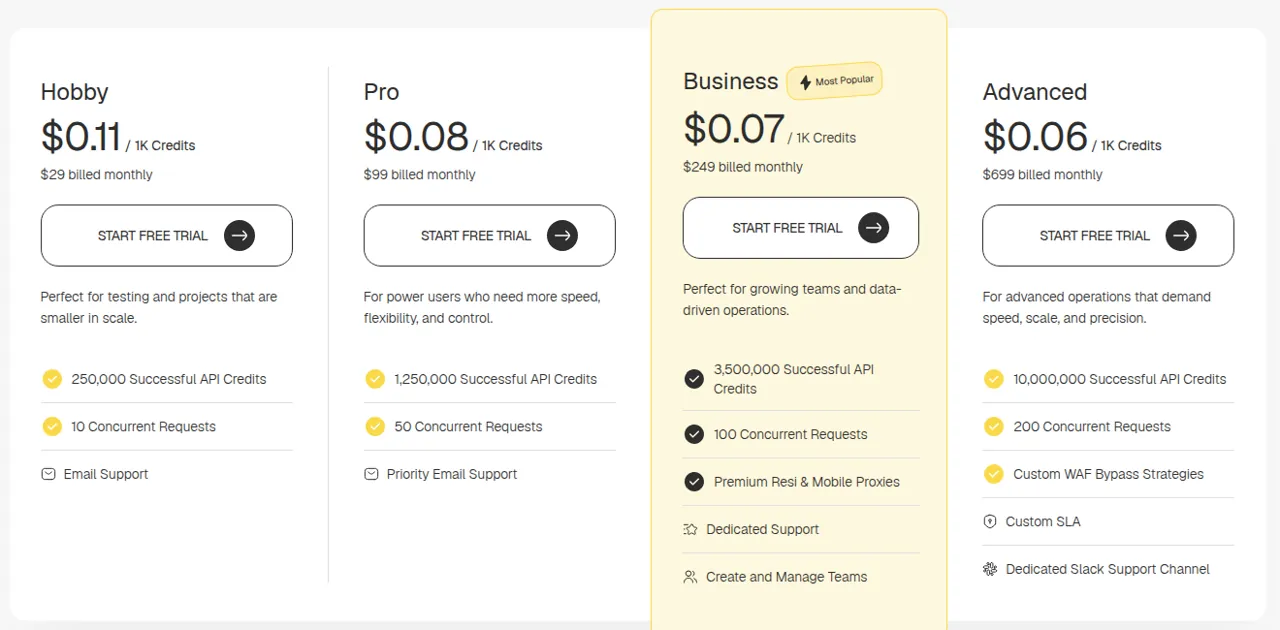
Pick Scrape.do if you scrape many different sites through one generic API, want the free plan to carry a real test (1,000 credits and 5 concurrent requests every month), or want geo-targeting available on every plan, the free one included. According to its pricing page, every plan includes residential and mobile proxies, JavaScript rendering and geo-targeting, with premium residential and mobile proxies from Business ($249) up.
The downside: there is no pay-as-you-go overage. When monthly credits run out, requests stop until you upgrade or buy more credits. Refunds cover only the first subscription, within 3 days, for unused credits. You can cancel any time from the dashboard. Details in our Scrape.do review.
Scrapingdog: ready-made endpoints for popular sites
Scrapingdog combines a general scraping API (rotating proxies, headless Chrome, CAPTCHA handling) with a long list of dedicated endpoints that return structured data: Google SERP, Maps, News, Shopping, Scholar, Trends, Jobs and AI Mode; Amazon, Walmart, eBay and Flipkart; YouTube, TikTok and others; plus a screenshot API and an AI parser. Every plan, including the free one, can call every API.
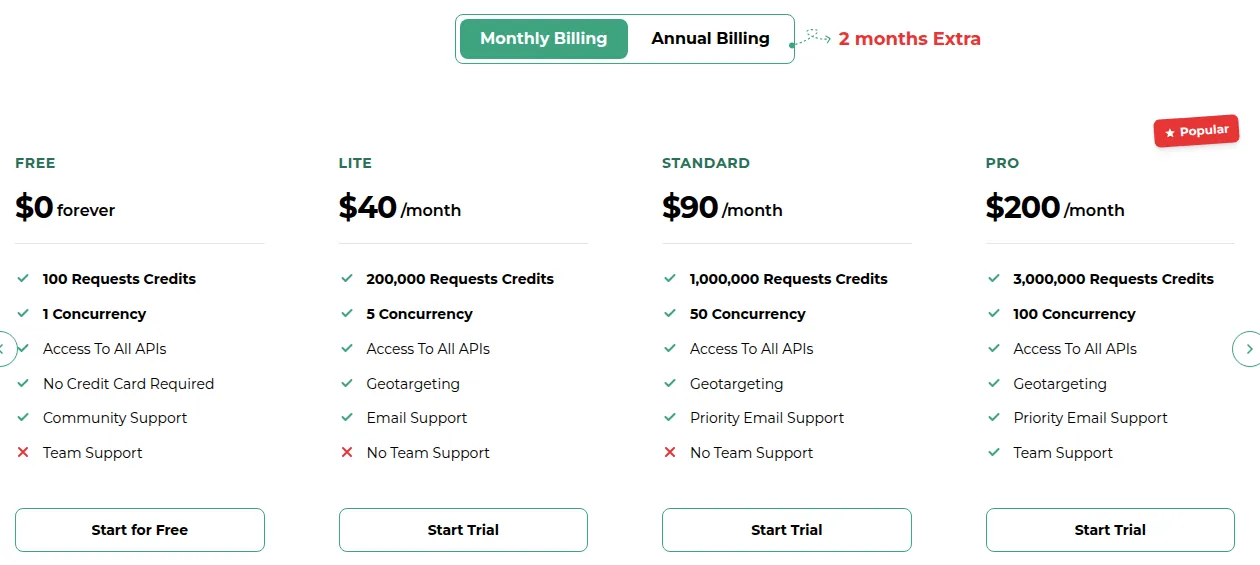
Pick Scrapingdog if you track Google rankings or marketplace listings and want JSON instead of writing parsers, or if you expect to scale far: its pricing page lists plans from Lite at $40 up to $30,000 a month, with unused credits rolling over from Standard ($90) upward.
The downside: the free plan is small, 100 credits with 1 concurrent request, which is only a few dozen Google searches. The terms say there are no refunds once the service has been provided, and unused credits expire when you cancel or downgrade. Country targeting costs 10 credits per request and starts on Lite. More in our Scrapingdog review.
Free web scraping APIs: what you really get
Neither free tier is meant for production, but both are enough to answer the only question that matters before paying: does this API return the data you need from your target sites?
- Scrape.do Free: 1,000 successful credits a month, 5 concurrent requests, no credit card. That is 1,000 basic requests, 200 rendered ones or 40 rendered requests on residential IPs.
- Scrapingdog Free: 100 credits, 1 concurrent request, no credit card, access to all APIs. That is 20 Google Light SERP searches or 100 Amazon product pages.
A good test: pick ten URLs that represent your hardest targets, run them through both, and check the cost of each response (Scrape.do's cost header, Scrapingdog's endpoint price list) together with whether the data came back complete. Failed, blocked and timed-out requests are not charged on either service.
Other scraping APIs worth knowing
The market is larger than these two. ScraperAPI, ScrapingBee, Zyte and Bright Data are well-known alternatives with their own free trials and credit systems; they bill on the same credits-with-multipliers model, so the comparison method above works for them too.
For other tools for running an online business, see our business software category.
Scraping responsibly
A scraping API changes how requests reach a site, not what you are allowed to collect. Before you scale up:
- Read the target site's terms and robots.txt. Many sites state what automated access they allow; respect those rules, and prefer an official API or data feed when the site offers one.
- Collect public data only. Don't scrape content behind logins you are not entitled to, and be careful with personal data: laws such as the GDPR apply to names, profiles and contact details even when they are publicly visible.
- Keep the load reasonable. Fetch only what you need, at a pace that doesn't strain the site, and cache results instead of re-downloading them.
- Know the providers' rules. Scrape.do's terms allow the service only for lawful purposes and ban uses such as card testing, vulnerability scanning and credential cracking. Scrapingdog's terms make you responsible for compliance with local laws and bar using its data to disclose private or sensitive personal information.
Typical legitimate uses are price and availability monitoring, SEO rank tracking, market research and building datasets from public pages. If a project depends on getting around a site's explicit refusal, it is the wrong project for a scraping API.
Frequently asked questions
What is the best web scraping API?
It depends on your targets. Scrape.do gives more requests per dollar for generic pages and a 1,000-credit monthly free plan. Scrapingdog is better value for Google searches and offers parsed JSON endpoints for Google, Amazon, Walmart and other popular sites.
How much does a web scraping API cost?
Entry plans cost $29 a month at Scrape.do (250,000 credits) and $40 at Scrapingdog (200,000 credits). A basic request costs 1 credit, but JavaScript rendering costs 5 and rendering with residential or premium IPs costs 25, so the same plan can mean 250,000 pages or 10,000.
Is there a free web scraping API?
Both have free tiers without a credit card. Scrape.do gives 1,000 successful credits a month with 5 concurrent requests; Scrapingdog gives 100 credits with 1 concurrent request and access to all its APIs. They are meant for testing, not production volumes.
Do failed requests cost credits?
No, on either service. Scrape.do counts 2xx, 400, 404 and 410 responses as successful and charges nothing for failures; Scrapingdog credits back failed, blocked and timed-out requests.
Which scraping API is cheapest for Google search results?
At the entry level, Scrapingdog: its Light SERP endpoint costs 5 credits, which works out to about $1.00 per thousand searches on Lite. A Google request through Scrape.do's general API costs 10 credits, about $1.16 per thousand on Hobby.
Is web scraping legal?
Collecting public data is common and often lawful, but it depends on the site's terms, the kind of data and your country's laws, especially for personal data under rules such as the GDPR. Check the target's terms and robots.txt, prefer official APIs where they exist, and get legal advice for sensitive projects.