Best hardware wallets: Ledger, Cypherock X1 and CoolWallet compared
A hardware wallet keeps the keys to your crypto on a small device instead of an exchange or your phone, so nothing moves until you approve it by hand. In short: pick Ledger if you want the widest choice of models, from the $69 Nano S Plus to the $399 Stax, with a free app on desktop and mobile. Pick Cypherock X1 if a paper seed phrase worries you most: it splits your key into five pieces and any two restore it. Pick CoolWallet for a credit-card-sized wallet: the $149 Pro confirms on its own screen, the $69 Go is two NFC cards.
Crypto-assets are highly volatile and largely unregulated in many countries. You can lose all the money you put in. Not investment advice.
Comparison at a glance
| Service | Best for | Starting price | Free plan / trial | Key limit | Review & sign-up |
|---|---|---|---|---|---|
| Ledger | Picking a model by budget and phone, including iPhone (Nano X and up) | $69 (Nano S Plus); up to $399 (Stax) | No trial; free Ledger Wallet app; 14-day withdrawal for consumers | Nano S Plus doesn't work with iPhone; no Chromebook support | Ledger review →Get Ledger → |
| Cypherock | Holders who don't want a paper seed phrase | $99 (X1 Basic bundle) | No trial; free cySync desktop app; orders non-refundable | No mobile app for X1 yet; any 2 of 5 shards open the wallet | Cypherock review →Get Cypherock → |
| CoolWallet | Phone users who want a card-sized wallet | $69 (Go, 2 cards); $149 (Pro) | No trial; free CoolWallet app; returns within 7 days | Go has no screen; no desktop app | CoolWallet review →Get CoolWallet → |
Disclosure: the sign-up buttons in this table are affiliate links. If you sign up through one, we may earn a commission at no extra cost to you. Commissions don't decide which services we include or what we say about them.
The short answer
All three brands keep your private keys offline and make you confirm every transaction on hardware you hold. They differ in how you back up the wallet, which phones it works with, and what happens if you change your mind.
- Pick a Ledger if you want to choose by budget and phone: the $69 Nano S Plus covers desktop and Android; from the $99 Nano X up, models work with the iPhone app.
- Pick Cypherock X1 if you don't want your savings to depend on one sheet of paper: the key is split across a vault and four cards, and any two restore it.
- Pick CoolWallet if you want a wallet that fits in your card slot and works with your phone: the Pro ($149) over Bluetooth with its own screen, the Go ($69) by NFC tap with a backup card.
- Pick a Ledger touchscreen model (Nano Gen5, Flex or Stax) if you want a larger screen to read transactions and a Ledger Recovery Key in the box.
The backup section below is where they differ most.
What a hardware wallet does, and what it doesn't
Your crypto lives on the blockchain; the wallet holds the private key that lets you spend it, on hardware that never exposes it to your computer or phone.
What a hardware wallet does not do:
- It does not protect your backup. Anyone who gets your recovery phrase (or two Cypherock shards) can restore your wallet elsewhere. Most losses happen here.
- It does not stop you approving a scam. Check the address and amount on the device every time.
- It is not an exchange. Buying, swapping and staking in companion apps are run by third-party providers with their own fees.
How to choose a hardware wallet
- Backup model. The classic backup is a 12- or 24-word phrase on paper: simple, but a single point of failure. Alternatives are multi-part backups (Cypherock's 2-of-5 shards), backup cards (Ledger's Recovery Key, CoolWallet Go) and paid recovery (Ledger Recover).
- Your phone and computer. The Nano S Plus does not work with iPhone; Ledger doesn't support Chromebooks; Cypherock X1 has no mobile app yet; CoolWallet is phone-only.
- Screen and verification. You approve transactions by reading them on the device, so a larger screen helps; a screenless device can't show you what you sign.
- Coins you hold. For anything beyond the major coins, check the vendor's coin list first.
- Full price. Add shipping and any import duties to the sticker price.
- Returns and warranty. Policies range from a 14-day withdrawal right to no refunds at all.
- Where you buy. Order from the official store, never a used or marketplace device.
Ledger, Cypherock X1 and CoolWallet at a glance
From the official stores and policies, October 2026 (USD):
| Ledger | Cypherock X1 | CoolWallet | |
|---|---|---|---|
| Price range | $69 (Nano S Plus) to $399 (Stax) | $99 Basic, $179 Standard, $249 Pro bundles | $69 (Go, 2 cards), $149 (Pro) |
| Backup in the box | Recovery Sheets; Recovery Key on Nano Gen5, Flex, Stax | 4 X1 Cards holding key shards | Go: backup card; Pro: written phrase |
| Recovery rule | Recovery phrase, or Recovery Key on touchscreen models | Any 2 of 5 shards (vault + 4 cards) | Recovery phrase, or Go backup card + pairing password |
| Apps | Ledger Wallet: Windows, macOS, Linux, iOS, Android | cySync desktop app; no mobile app yet | CoolWallet app: iOS, Android |
| Security design | Secure Element, CC EAL6+ (Nano X: EAL5+) | Key split by Shamir's Secret Sharing; open-source firmware and software | Secure element, CC EAL 6+; screen on Pro only |
| Returns | 14-day right of withdrawal for consumers | Orders can't be cancelled or refunded | Within 7 days of receipt |
| Warranty | Two-year statutory guarantee for consumers | 1 year (bundles add extended warranty) | Pro 1 year, Go 2 years |
Ledger: best for choosing a model to fit your budget and phone
Ledger, a Paris company, sells five current models. Each keeps keys on a certified Secure Element; three wrong PIN entries reset it.
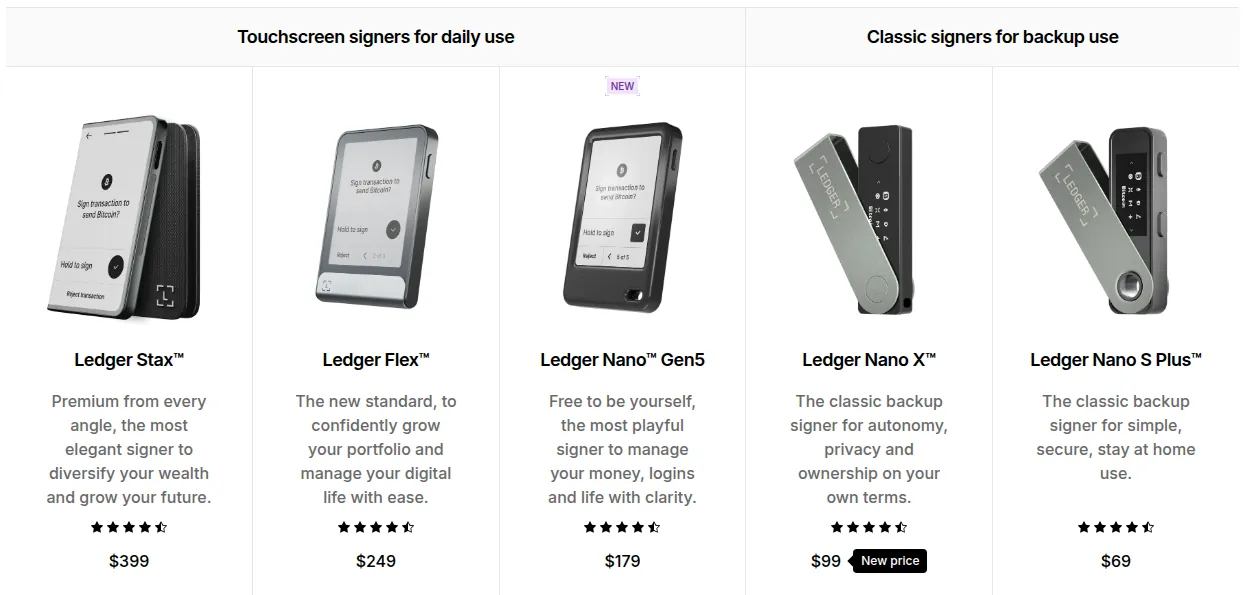
- Nano S Plus, $69: small OLED screen, USB-C only. Desktop and Android, not iPhone.
- Nano X, $99: adds Bluetooth and a battery, so it works with the iPhone app.
- Nano Gen5, $179: 2.8" E Ink touchscreen, Bluetooth, NFC and a Recovery Key.
- Flex, $249: 2.8" E Ink touchscreen under Gorilla Glass.
- Stax, $399: 3.7" curved E Ink touchscreen with wireless charging.
All use the free Ledger Wallet app on desktop, iOS and Android, which handles 500+ coins and works with MetaMask, Phantom and other wallets.
The downside: the classic backup is still a recovery phrase on paper; ID-based Ledger Recover is an optional paid subscription. Ledger doesn't ship to Russia. More in our Ledger review.
Cypherock X1: best if you don't want a paper seed phrase
Instead of one recovery phrase, Cypherock X1 uses Shamir's Secret Sharing to split your private key into five shards: one in the X1 Vault (the device) and four on NFC X1 Cards. Any two unlock the wallet.
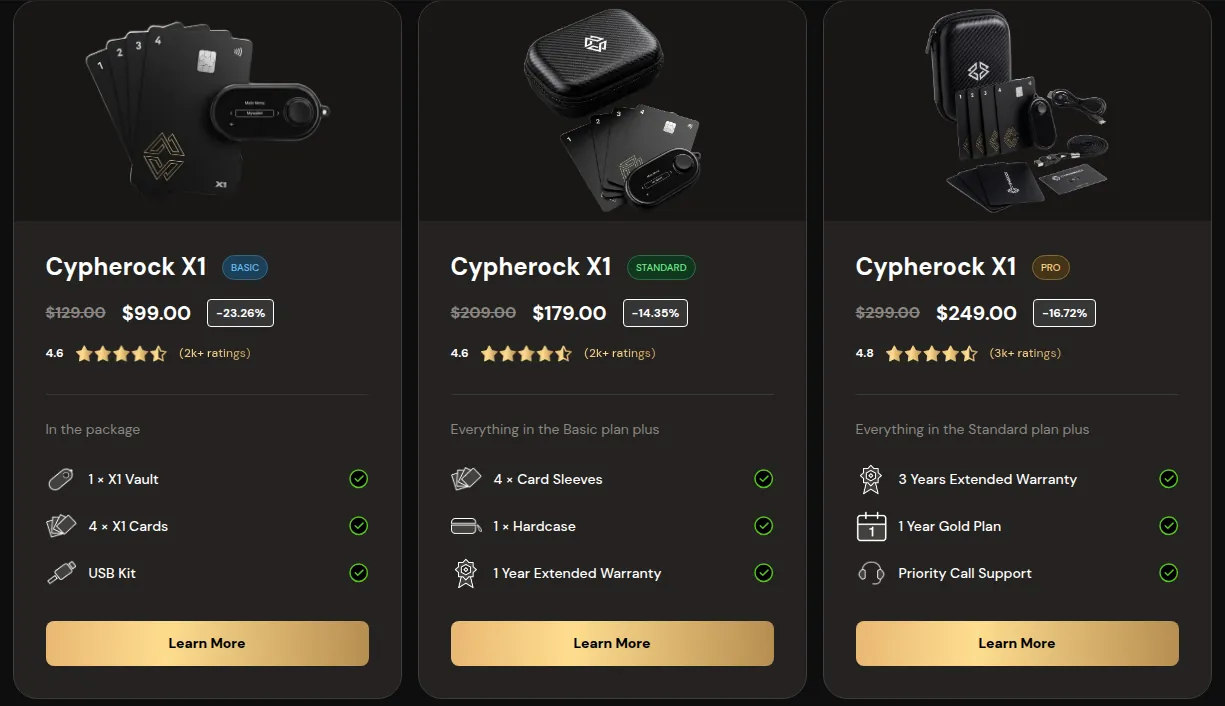
- Lose the vault: any 2 of the 4 cards restore your wallets on a new vault.
- Lose a card: the vault plus one card still opens the wallet; replace the full card set, because new wallets need all four.
- Already have a wallet: X1 imports seed phrases and holds up to 4 wallets.
Firmware and software are open source, WalletConnect covers DeFi and NFTs, and X1 supports Bitcoin, Ethereum and major chains including Solana.
The downsides: two shards open the wallet, so store the cards apart. There is no mobile app yet, orders can't be cancelled or refunded, and outside US Standard shipping you pay import duties yourself. Details in our Cypherock X1 review.
CoolWallet: best for a wallet the size of a bank card
CoolWallet, made by CoolBitX in Taiwan, builds hardware wallets into 0.8 mm cards. Both models keep keys on a CC EAL 6+ secure element and work with the CoolWallet app on Android and iOS, which supports 35+ blockchains including Bitcoin, Ethereum, Solana, XRP Ledger and Cardano.
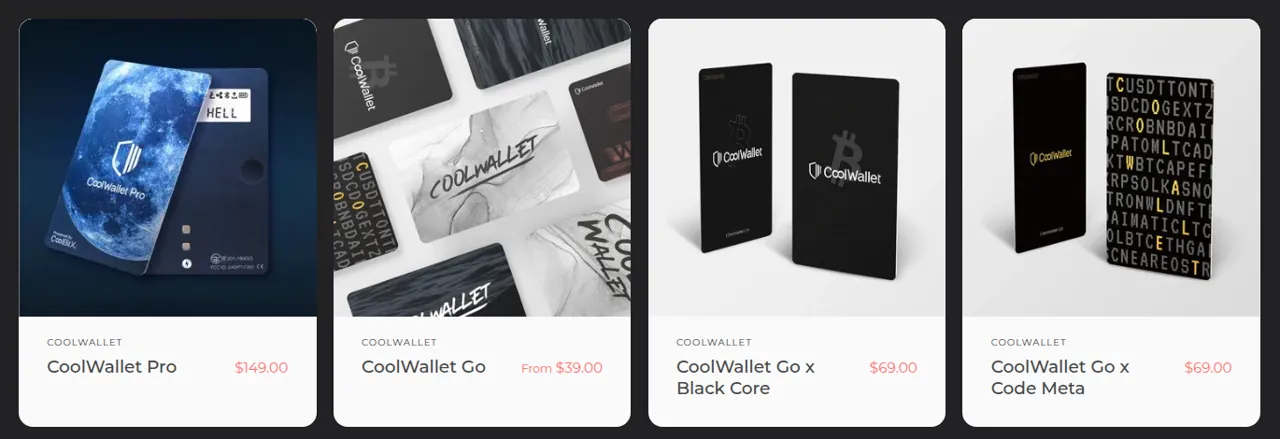
- CoolWallet Pro, $149: a card with a small screen and a button, connected by encrypted Bluetooth; you confirm each transaction on the card. Backup is a written recovery phrase. 1-year warranty.
- CoolWallet Go, $69: two cards, primary and backup, that sign by NFC tap with no battery or screen. The backup card can replace a written phrase; restoring it needs an 8-digit pairing password that CoolWallet cannot reset. 2-year warranty.
The downside: CoolWallet itself says the Go, with no screen, can't show you what you sign and is less secure than the Pro. Shipping is extra below $299, and duties and taxes are always yours. See our CoolWallet review.
Seed phrase, shards or paid recovery: which backup suits you
- A recovery phrase on paper (every Ledger, CoolWallet Pro). Easy to understand and works with any compatible wallet. Risk: it is one item that can be found or destroyed.
- Ledger Recovery Key (Nano Gen5, Flex, Stax). A card in the box that restores onto a Ledger device.
- Ledger Recover (optional, paid). Encrypted fragments of your phrase are held by Coincover, Ledger and EscrowTech, two of three are needed to restore, and you prove who you are with a government ID.
- Cypherock 2-of-5 shards. No single piece reveals the key, and losing up to three pieces still leaves you two to restore with. Risk: someone who finds two pieces has your wallet.
- CoolWallet Go backup card. A second card restores the wallet together with your 8-digit pairing password. Risk: lose both cards, or the password, without a written phrase and the funds are gone.
If you know you'll lose a slip of paper, prefer shards or a backup card; if you'd rather keep one well-hidden backup, a classic phrase is enough.
Buying safely: shipping, duties and returns
- Ledger: Flex and Stax showed free shipping; other models show shipping and taxes at checkout. Consumers can withdraw within 14 days of delivery, and transit damage must be reported within 8 days.
- Cypherock: shipping runs from $5 (India) to $19 for US Standard and $25 to $29 elsewhere. US Standard is shipped with duties paid; on other routes the recipient pays them. Damage in transit must be reported within 7 days.
- CoolWallet: international delivery takes about 7 to 10 days after dispatch; shipping is free over $299, while duties and local taxes are always on the buyer. Returns are accepted within 7 days of receipt, complete and in the original packaging.
Set the device up yourself: a wallet that arrives with a recovery phrase already filled in is a scam.
Other hardware wallets worth knowing
- Cypherock X0: a $39 limited edition for NFC phones that keeps one shard in the phone and four on cards.
- Trezor: Safe 3, Safe 5 and Safe 7 models with open-source security and a multi-share backup option; check its site for prices.
For more self-custody and crypto card options, see crypto wallets and cards. If you'll also need to report your trades, our guide to the best crypto tax software compares tools that import wallet history.
Frequently asked questions
What is the best hardware wallet for beginners?
If you can keep one backup safe, a Ledger Nano S Plus ($69), Nano X ($99) or CoolWallet Pro ($149) is a simple start. If you worry about losing a paper seed phrase, Cypherock X1 removes it: any two of five shards restore your wallet.
What are the best Ledger alternatives?
Cypherock X1 is the main alternative if you want to avoid a single paper backup, with the key split across a vault and four cards. CoolWallet suits phone users who want a card-sized wallet. Trezor is another well-known brand with open-source security and a multi-share backup option.
What happens if my hardware wallet breaks or is lost?
Your coins stay on the blockchain. With a Ledger, restore them on another Ledger with your recovery phrase, or the Recovery Key on touchscreen models. With Cypherock X1, any two of the four cards restore your wallets on a new vault. With CoolWallet, use your phrase or, for the Go, the backup card and pairing password.
Does a hardware wallet work with iPhone?
Ledger Nano X, Nano Gen5, Flex and Stax work with the iPhone app; the Nano S Plus does not. CoolWallet Pro and Go work with the CoolWallet app on iOS and Android. Cypherock X1 has no mobile app yet.
Can I return a hardware wallet?
Ledger gives consumers 14 days after delivery to withdraw. CoolWallet takes returns within 7 days of receipt. Cypherock orders can't be cancelled or refunded, though transit damage reported within 7 days is replaced and a 1-year warranty covers defects.
- Ledger hardware wallet comparison
- Ledger Nano S Plus
- Ledger Nano X
- Ledger Stax
- Ledger Recover
- Ledger sales terms
- Cypherock homepage
- Cypherock store
- Cypherock FAQ
- Cypherock shipping policy
- Cypherock cancellation and replacement policy
- Trezor model comparison
- CoolWallet Pro
- CoolWallet Go
- CoolWallet refund policy
- CoolWallet shipping policy