Sembly AI review: meeting notes, tasks and client-ready deliverables
Sembly AI records your Zoom, Google Meet, Microsoft Teams and Webex meetings, writes the notes and tasks, then drafts the proposal, status report or deck that follows, in your client's branding. It is built for consultants, agencies and other client-facing teams. Start on the $0 Free Trial plan; paid plans start at $10 per month billed annually.
No extra sign-up bonus — the provider's standard offer applies.
Disclosure: this is an affiliate link. If you sign up through it, we may earn a commission at no extra cost to you. The bonus and terms are set by Sembly AI and can change — check them on the official site before you sign up.
How to get started
- Open Sembly AI through the link on this page; there is no promo code to enter.
- Click Start free and create your workspace on the $0 Free Trial plan.
- Connect your calendar so Sembly can join your Zoom, Google Meet, Teams or Webex meetings.
- Tell participants the meeting is recorded, then review the notes and tasks.
- Upgrade to Basic, Pro or MAX when you need unlimited meeting hours, more clients or longer history.
What is Sembly AI?
Sembly AI is an AI meeting agent from Sembly AI, Inc., a company based in New York. Beyond the transcript, it turns the meeting into the document you would otherwise write by hand.
It works in three stages:
- Record. Sembly joins scheduled Zoom, Google Meet, Microsoft Teams and Webex calls from your calendar. It can also attend meetings you skip. The iOS and Android app records in-person conversations, and media uploads work too.
- Recap. You get a transcript in 45+ languages with speakers identified by name, plus AI notes with a summary, key topics and next steps in 40+ templates. Decisions, risks and notable events are pulled out as key items, and commitments become tasks with an owner and a deadline.
- Deliver. From one meeting or many, Sembly drafts proposals, status reports, QBR decks and follow-up emails. Each one uses the client's brand package and exports as an editable .pptx or .docx file.
On Pro and higher, MCP access lets you query your meetings from clients such as Claude or Cursor.
Who Sembly AI is for
Sembly's own use cases are built around teams that work with clients:
- Consultants who need a status report or statement of work after a workshop.
- Agencies turning a client briefing into a pitch deck in the client's visual style.
- Project managers who want decisions, risks and action items from stand-ups.
- Sales and customer success teams sending a proposal after discovery or a QBR deck before a renewal.
If you only need a searchable transcript and summary, compare it with the Fireflies.ai review. For cleaner audio on the call itself, see the Krisp review. More team tools are in our best business software list.
Sembly AI pricing and free plan
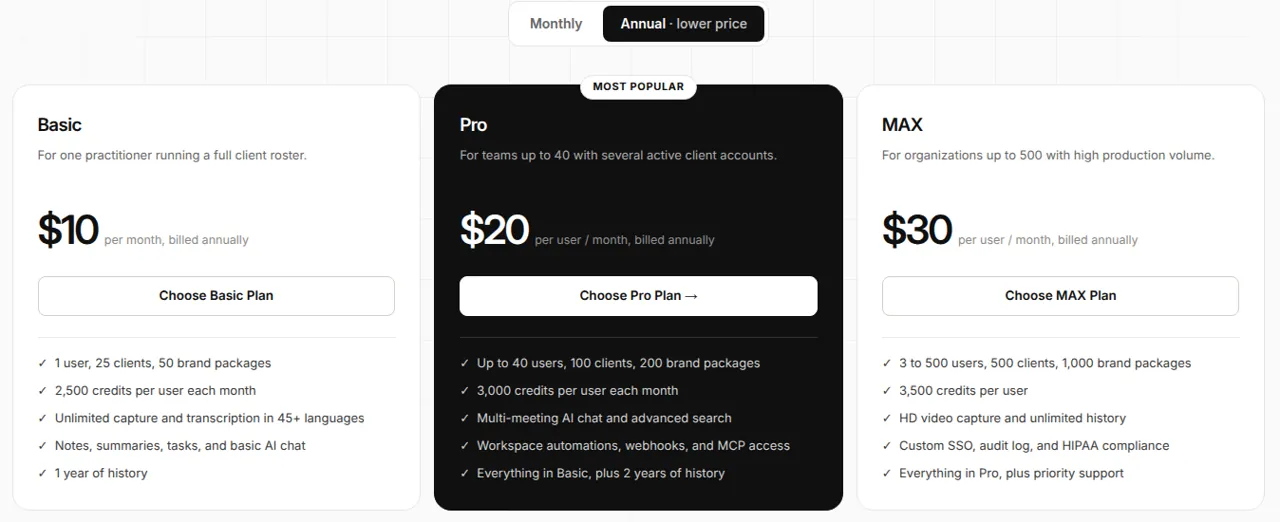
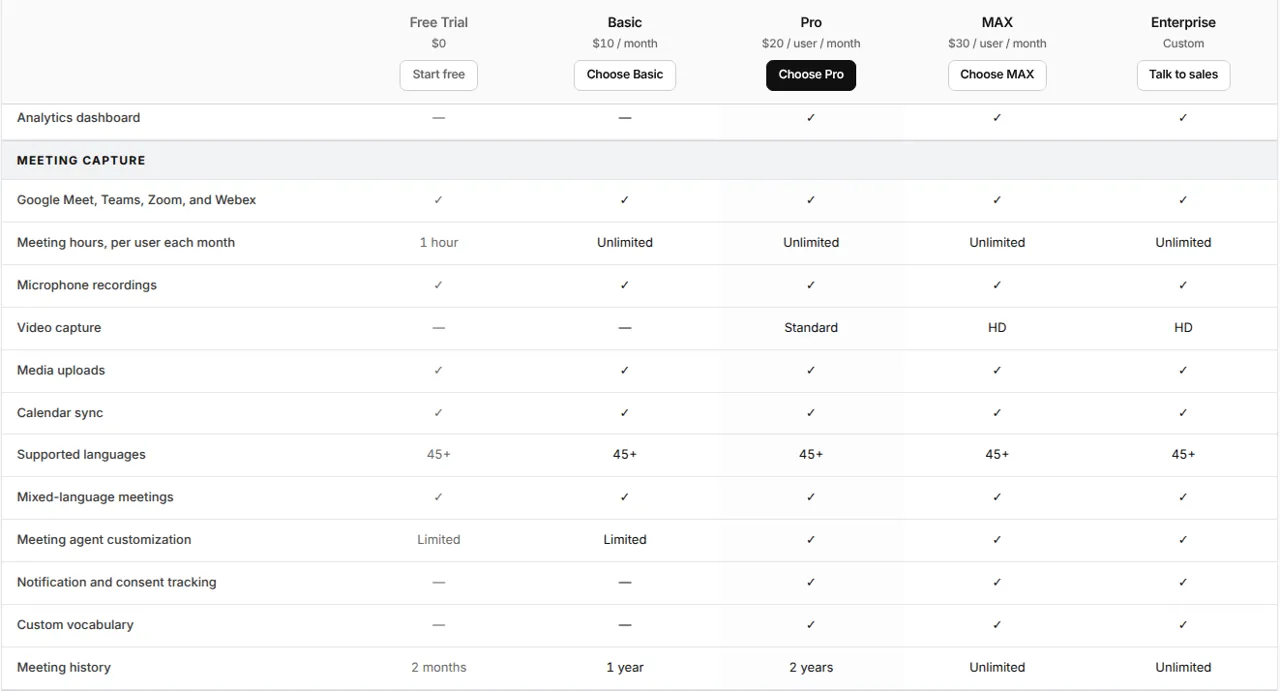
| Plan | Annual billing | Monthly billing | Users | Meeting hours | History |
|---|---|---|---|---|---|
| Free Trial | $0 | $0 | 1 | 1 hour per month | 2 months |
| Basic | $10 | $17 | 1 | Unlimited | 1 year |
| Pro | $20 per user | $29 per user | 1 to 40 | Unlimited | 2 years |
| MAX | $30 per user | $39 per user | 3 to 500 | Unlimited | Unlimited |
| Enterprise | Custom | Custom | 10+ | Unlimited | Unlimited |
What changes between tiers:
- Free Trial: 5 clients, 750 credits a month plus 1,750 one-time bonus credits.
- Basic: one user, 25 clients, 50 brand packages, 2,500 credits a month.
- Pro: 100 clients, 3,000 credits per user, custom note templates, multi-meeting AI chat, sentiment analysis, automations, webhooks and MCP access.
- MAX: 500 clients, 3,500 credits per user, custom SSO, audit log, HIPAA and priority support.
Credits pay for AI work such as generating decks. New paid workspaces get 2,500 one-time bonus credits; unused monthly credits expire at month end on Basic and Pro.
Why choose Sembly AI
The same tool that takes the notes also writes the follow-up email, the status report and the branded deck, so you are not copying a summary into PowerPoint by hand. Each client is a separate space with its own branding and history, which suits anyone serving many accounts.
Good to know before you subscribe
- Recording consent is on you. The terms make the customer responsible for getting consent from everyone in a recorded meeting and announcing the recording.
- Refunds: cancellation takes effect from the next billing cycle; the current cycle is not refundable.
- Seat limits: Basic is exactly one user, MAX needs at least 3 users, Enterprise starts at 10.
- Video: Free Trial and Basic do not capture video; Pro records standard video and MAX records HD.
Pros and cons
Pros
- Turns meetings into editable .pptx and .docx deliverables in your client's branding
- Works with Zoom, Google Meet, Microsoft Teams and Webex, plus a mobile app for in-person meetings
- Transcription in 45+ languages, including mixed-language meetings
- $0 Free Trial plan and published prices
- SOC 2 Type II and GDPR, with HIPAA on MAX and Enterprise
Cons
- No sign-up discount for users who come through a referral link
- The Free Trial plan includes only 1 meeting hour per month
- AI deliverables use credits, and unused Basic and Pro credits expire monthly
- The current billing cycle is not refunded when you cancel
Frequently asked questions
Is there a Sembly AI promo code?
Sembly does not publish a promo code or referral discount, and our link needs no code. Annual billing is the main saving: Basic drops from $17 to $10 a month, Pro from $29 to $20 per user.
Is Sembly AI free?
There is a $0 Free Trial plan with transcription, notes, tasks and basic AI chat. It is limited to 1 meeting hour per month, 5 clients and 2 months of history, with 750 monthly credits plus 1,750 one-time bonus credits.
How much does Sembly AI cost?
Basic is $10 a month billed annually or $17 monthly. Pro is $20 per user per month annually or $29 monthly, and MAX is $30 or $39 per user. Enterprise pricing is custom and starts at 10 users.
Is Sembly AI legit and safe?
Sembly is run by Sembly AI, Inc. in New York, with published terms of service, a Trust Center with security documents and email support. It states SOC 2 Type II certification and GDPR compliance, with HIPAA on MAX and Enterprise. One caveat: the current billing cycle is not refundable when you cancel.
Which meeting platforms does Sembly support?
Zoom, Google Meet, Microsoft Teams and Webex. You can also record in-person meetings with the mobile app or upload audio and video files.
Compare Sembly AI
- Best AI meeting assistants: Fireflies.ai vs Sembly AI vs Krisp
An AI meeting assistant joins your calls, writes the transcript and hands you a summary with action items, so you can stop typing notes. Fireflies.ai is the free-plan notetaker…
 1Office
 BoldSign