Krisp review: AI noise cancellation, accent conversion and meeting notes
Krisp removes background noise, voices and echo from your calls and takes AI meeting notes without sending a bot into the meeting. Because it works at the audio level, it fits Zoom, Google Meet, Microsoft Teams, Slack Huddles and other call apps. A 7-day free trial needs no credit card, and paid plans start at $8 per user per month billed annually.
No extra sign-up bonus — the provider's standard offer applies.
Disclosure: this is an affiliate link. If you sign up through it, we may earn a commission at no extra cost to you. The bonus and terms are set by Krisp and can change — check them on the official site before you sign up.
How to get started
- Open Krisp through the link on this page; there is no promo code to enter.
- Start the 7-day free trial; no credit card is required.
- Connect your Google or Outlook calendar, then install Krisp for Mac or Windows.
- In your call app, select Krisp Microphone as input and Krisp Speaker as output.
- Before the trial ends, pick Core or Advanced, monthly or annual, to keep access.
What Krisp does in your meetings
Krisp is a voice AI app from Krisp Technologies, Inc., a Delaware corporation based in Berkeley, California. It sits between your microphone and your call app, so it works with whatever app you join from.
- Noise cancellation. Removes background noise, nearby voices and room echo, on your side and on what you hear from others.
- Accent conversion. Speaker-side conversion softens your accent live; listener-side conversion makes others easier for you to understand.
- AI note taker. Bot-free transcripts and recordings (transcript-only, audio or video), AI summaries, action items and an AI chat over your meetings. A bot can still join if you prefer.
- Languages. Transcripts and summaries in 16 languages: English on-device, plus 15 more server-side, including Spanish, French, German, Russian and Portuguese.
- Workflow. Notes and action items go to Slack, HubSpot, Salesforce, Notion and Zapier. You can add up to 750 custom vocabulary terms and upload recordings.
- Mobile app. Records and transcribes in-person meetings, even offline. Noise cancellation is not in the mobile app yet.
Who Krisp is for
- Remote and hybrid workers taking calls from home, cafés or open offices.
- Sales and customer success teams who want clean audio plus notes pushed to their CRM; Salesforce is on the Advanced plan.
- Non-native speakers and international teams who benefit from accent conversion in both directions.
- Anyone who dislikes meeting bots, since notes are taken without a bot joining the call.
If what you mainly need is client deliverables after the call, see the Sembly AI review; for a bot-based notetaker with a free plan, see the Fireflies.ai review. Other assistants are in our best AI tools list.
Krisp pricing and free trial
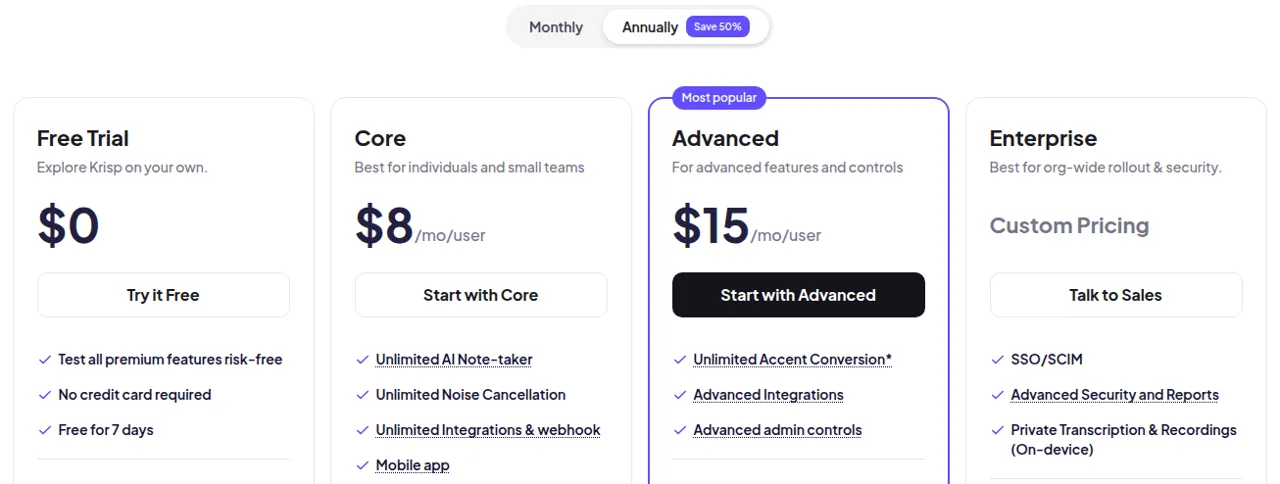
| Plan | Annual billing | Monthly billing | Storage | Accent conversion |
|---|---|---|---|---|
| Free Trial | $0 for 7 days | $0 for 7 days | — | Limited |
| Core | $8 per user / month | $16 per user / month | 10 GB | 1 hr/day |
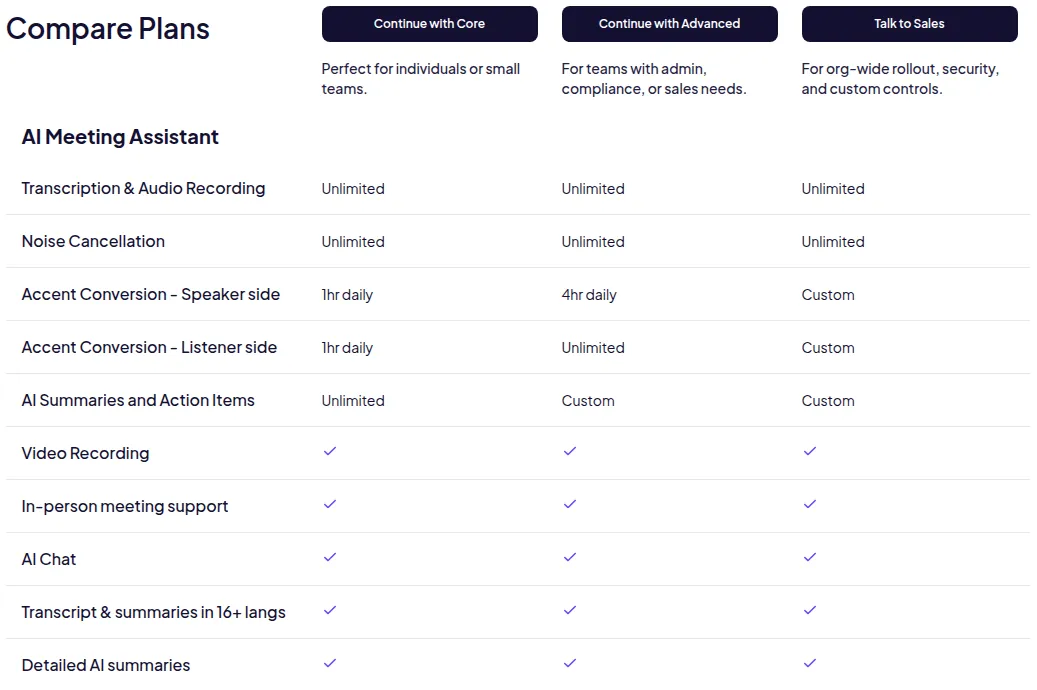
| Advanced | $15 per user / month | $30 per user / month | 60 GB | 4 hr/day speaker side, unlimited listener side |
| Enterprise | Custom | Custom | Unlimited | Custom |
What each tier adds:
- Core: unlimited note taker, noise cancellation, integrations and webhooks, the mobile app, AI chat and MCP integration.
- Advanced: manager view, company deal grouping, trimming and comments, Salesforce and ConnectWise, team-level webhooks.
- Enterprise: SSO/SCIM, on-device private transcription and recordings, a super admin role, a dedicated account manager and HIPAA compliance.
Teams of more than 50 members can ask for a volume discount.
Why choose Krisp
Krisp fixes the call itself, not only the notes after it. Noise and echo removal runs on both sides of the conversation and works with every call app; Krisp says the same technology powers noise cancellation on Discord. You get notes without a bot in the meeting and accent help that ordinary notetakers don't offer, in one subscription. Krisp also states AES-256 encryption at rest and PCI-DSS compliance.
Good to know: billing, trial and limits
- No free plan after the trial. When the 7-day trial ends without a paid plan, access stops; you keep 90 days to export your content.
- Refunds: subscriptions renew automatically, and fees are non-refundable except where the terms say otherwise, so cancel before the renewal date.
- Calendar: sign-up asks for a Google or Outlook calendar connection by default; a zero-permission option is available.
- Payment: major credit and debit cards; mobile purchases can use Apple Pay or Google Pay.
- Recording consent: you are responsible for following recording laws when you record or transcribe calls.
Pros and cons
Pros
- Noise, voice and echo cancellation on both sides of the call
- Bot-free AI notes that work with any call app
- Accent conversion for speakers and listeners
- 7-day free trial without a credit card
- Annual billing halves the monthly price
Cons
- No sign-up discount for users who come through a referral link
- No free plan once the 7-day trial ends
- Fees are non-refundable once a subscription renews
- Noise cancellation is not yet in the mobile app
Frequently asked questions
Is there a Krisp promo code?
Krisp does not publish a promo code or referral discount, and our link needs no code. The biggest saving is annual billing: Core costs $8 instead of $16 per user per month, Advanced $15 instead of $30.
Is Krisp free?
Krisp has a 7-day free trial with all premium features and no credit card. After that you need a paid plan; access ends when the trial expires, though you can export your content for 90 days.
How much does Krisp cost?
Core is $8 per user per month billed annually or $16 monthly. Advanced is $15 annually or $30 monthly. Enterprise is priced on request.
Does Krisp work with Zoom, Google Meet and Microsoft Teams?
Yes. Krisp works at the audio level, so it works with Zoom, Google Meet, Microsoft Teams, Slack Huddles and other call apps. Select Krisp Microphone and Krisp Speaker in the app's audio settings.
Is Krisp safe and legit?
Krisp is made by Krisp Technologies, Inc., a Delaware corporation based in Berkeley, California, with published terms of use and a help center. It states SOC 2 Type II, GDPR and HIPAA compliance and that meeting data is not used for AI training. One caveat: fees are generally non-refundable.
Can I use Krisp only for noise cancellation?
Yes. Noise cancellation is part of every plan, and you can switch off the meeting assistant if clean audio is all you need.
Compare Krisp
- Best AI meeting assistants: Fireflies.ai vs Sembly AI vs Krisp
An AI meeting assistant joins your calls, writes the transcript and hands you a summary with action items, so you can stop typing notes. Fireflies.ai is the free-plan notetaker…
 Akool
Akool