getimg.ai review: one studio for AI images, video and audio
getimg.ai is a browser-based creative AI studio that puts image, video, music and speech models from Google, OpenAI, Black Forest Labs, ByteDance, Kling and others behind one credit balance. Plans start at $15 a month. It suits marketers, e-commerce sellers and content creators who want many generators and editing tools in one place instead of separate subscriptions.
Disclosure: this is an affiliate link. If you sign up through it, we may earn a commission at no extra cost to you. The bonus and terms are set by getimg.ai and can change — check them on the official site before you sign up.
How to get started
- Open getimg.ai through the link on this page and click Get started now.
- Create an account; there is no free plan, so the app asks for a subscription before you generate.
- Choose a plan on the pricing page; your 15% first-purchase discount applies to that first payment.
- Pay by card, PayPal, Apple Pay or Google Pay.
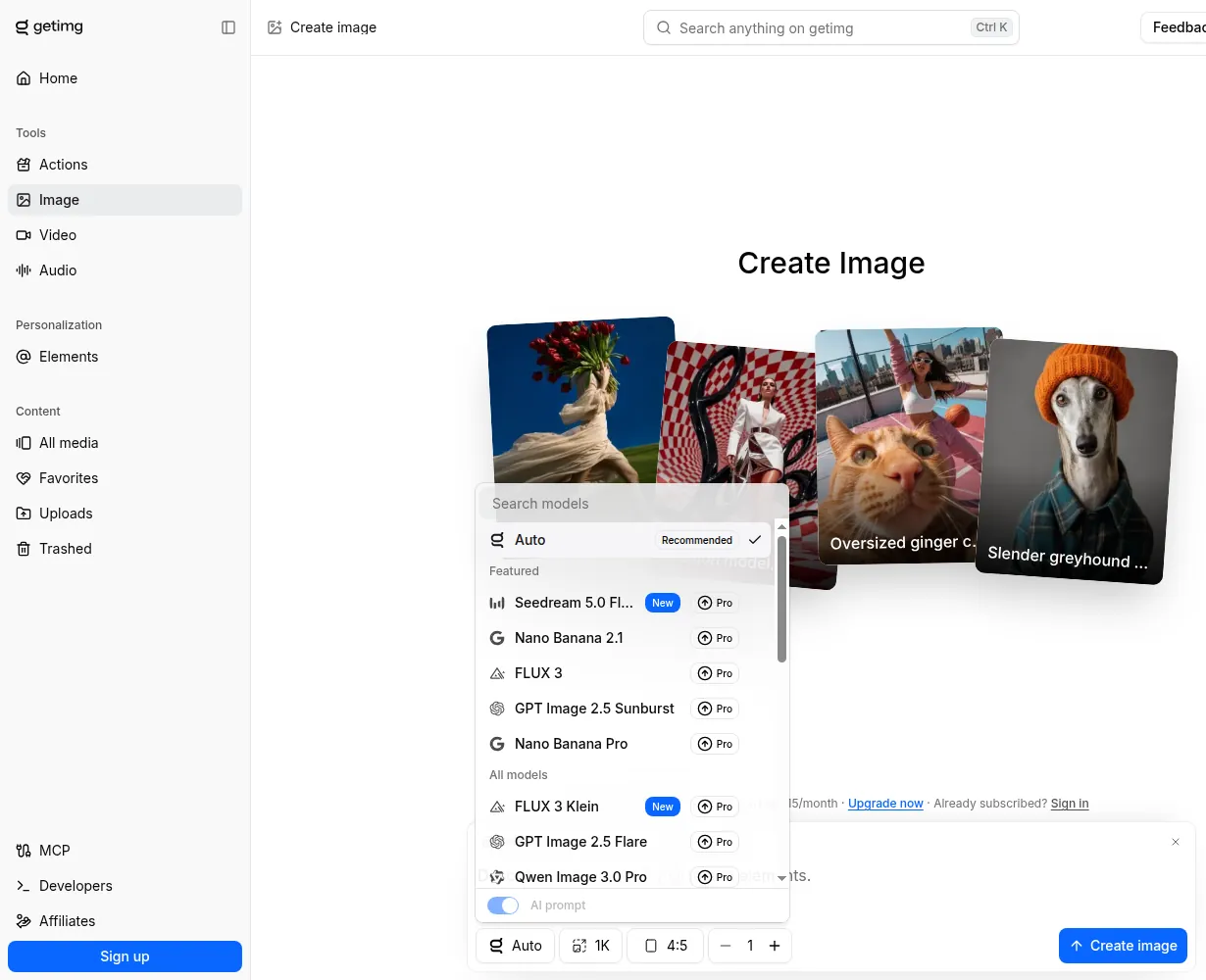
- Open Image, Video or Audio, describe what you need and leave the model on Auto or pick one yourself.
What getimg.ai does
getimg.ai is run by Webrockets Sp. z o.o., a company based in Poland. Everything happens in one web app:
- Images: text-to-image and image-to-image with models such as Seedream, Nano Banana, FLUX, GPT Image, Grok Imagine and Qwen. Auto mode picks a model and improves short prompts for you.
- Video: text-to-video, image-to-video and video-to-video with Kling, Seedance, Google Veo, Wan, MiniMax and others.
- Audio: music, text-to-speech and sound effects.
- Editing: image and video upscaling, a smart image resizer, background removal and background replacement.
- AI Actions: ready-made jobs such as headshots or product videos in one click.
- Elements: save a character, style or product and reuse it in later images.
Prompts can be written in 20+ languages. An MCP server lets you generate from Claude, ChatGPT or Cursor with your getimg.ai login.
Who it is for
- Marketing and social media teams that need images, short videos and voice-overs for campaigns.
- E-commerce sellers making product shots, lifestyle scenes and resized assets for each marketplace.
- Creators who want to try new models as they launch without a separate subscription for each.
- Agencies, which can run a private Team space per client on the business plans.
If you mainly need talking-avatar videos, compare the Akool review; for a broader marketing suite, see the Simplified review. More tools are on the AI tools page.
getimg.ai pricing
Prices exclude tax. Yearly billing saves up to 26% on Core, Plus and Ultra.
| Plan | Monthly billing | Yearly billing | Credits per month | Parallel generations |
|---|---|---|---|---|
| Entry | $15/month | $15/month ($180/year) | 8,000 | 2 |
| Core | $35/month | $26/month ($312/year) | 19,000 | 4 |
| Plus | $79/month | $59/month ($708/year) | 42,500 | 8 |
| Ultra | $199/month | $149/month ($1,788/year) | 107,500 | 10 |
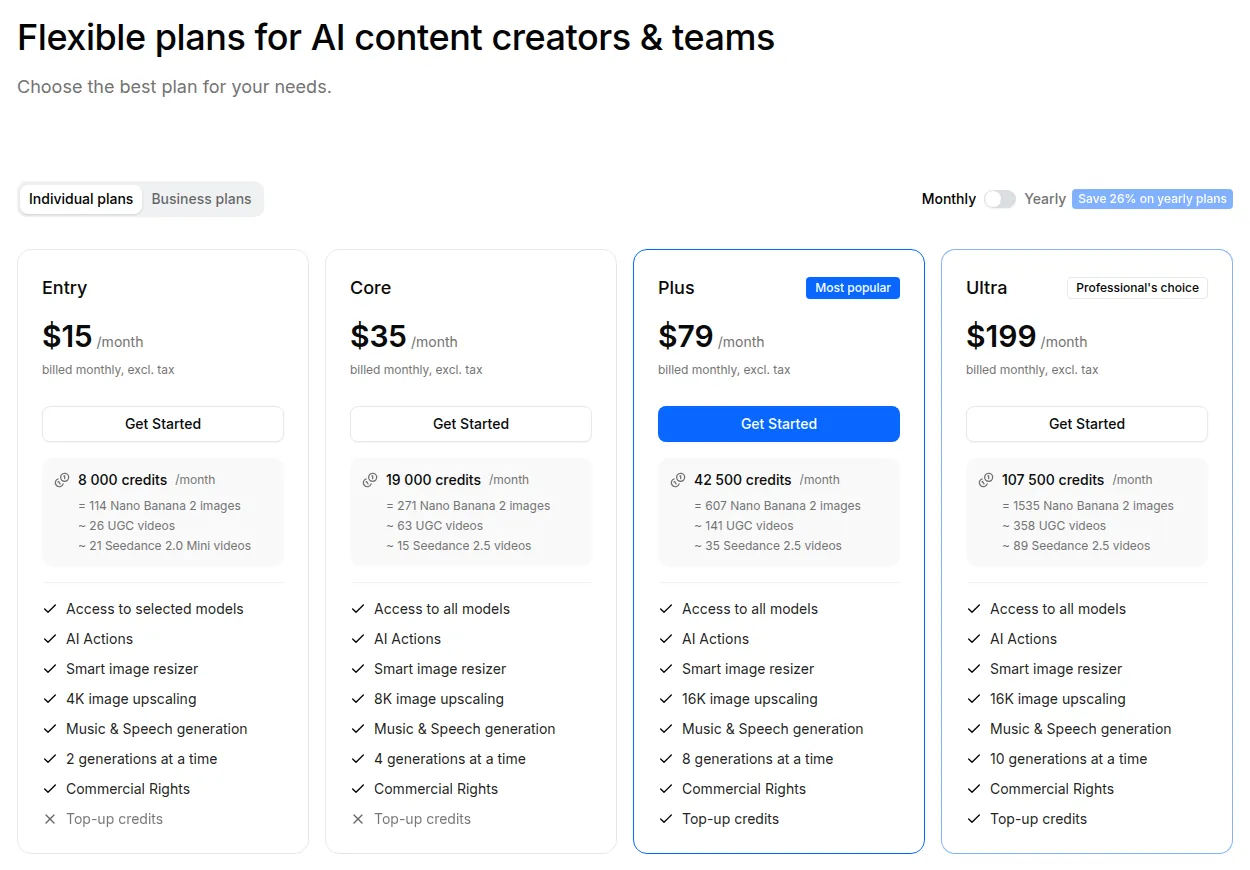
What the credits buy depends on the model. getimg.ai says Entry's 8,000 credits equal 114 Nano Banana 2 images or about 26 UGC videos, and the pricing page lists counts per model family for every plan. Entry covers a selected set of models; Core and above unlock all of them. Upscaling goes to 4K on Entry, 8K on Core and 16K on Plus and Ultra.
Business plans use the same Core, Plus and Ultra prices per seat and add shared Team spaces: up to 2 on Core, 5 on Plus and 10 on Ultra. Entry is for personal use only.
Credits, top-ups and cancelling
- Credits renew monthly on the date you signed up and do not roll over: unused credits are lost at renewal.
- Top-ups are only for Plus and Ultra, once less than 10% of the month's credits is left.
- Changing plans: upgrade or downgrade any time; upgrades are prorated by the credits you have used.
- Cancelling: cancel any time and keep using credits until the end of the billing period.
- Storage: your generation history is kept without a limit on every plan.
- Commercial use is allowed on paid plans under getimg.ai's terms; third-party rights and model-specific conditions still apply.
- API: the developer API is a separate pay-as-you-go product. Subscription credits do not cover it, and it does not need a subscription.
Pros and cons
Pros
- Image, video, music, speech and editing tools under one balance
- Many current models, with Auto mode for beginners
- Elements keep a character or product consistent
- Yearly billing cuts Core, Plus and Ultra prices by up to 26%
- 15% off the first purchase for new users via a referral link
Cons
- No free plan or free credits to test before paying
- Monthly credits do not roll over
- Entry and Core cannot buy extra credits
- Entry includes only a selection of models
- API is billed separately from the subscription
Frequently asked questions
Is getimg.ai free?
No. There is no free plan; the app asks for a subscription before generating. Plans start at $15 a month with 8,000 credits.
Is there a getimg.ai discount code?
New users who sign up through a referral link, like the one on this page, get 15% off their first purchase. Yearly billing also lowers Core, Plus and Ultra prices by up to 26%.
Do getimg.ai credits roll over?
No. Plan credits renew each month on your sign-up date and unused credits do not carry over.
Can I use getimg.ai images commercially?
Yes, on paid plans, under getimg.ai's terms. Third-party rights in your uploads and model-specific conditions still apply.
Does a getimg.ai subscription include the API?
No. The API is a separate pay-as-you-go product with its own credits and needs no subscription.
Can I cancel getimg.ai any time?
Yes. After cancelling you keep your credits until the end of the current billing period.
Compare getimg.ai
- Best AI video generators for avatar and narrated videos
Looking for the best AI video generator or an AI avatar video maker? Pick Elai.io for presenter-style training videos from scripts or slides, Fliki for voice-led videos with…
 Akool
Akool