Best backtesting software for traders: Forex Tester, TrendSpider, Quantower and TraderSync
The short answer: Forex Tester if you backtest forex by hand and want tick data and a lifetime licence, TrendSpider if you want no-code automated backtests on stocks and ETFs, Quantower if you trade futures or crypto from order flow and want to replay the market, and TraderSync if you want market replay inside your trading journal. This guide compares their data, realism, prices and trials, and explains when TradingView's free Bar Replay is enough.
Not investment advice. Trading carries a risk of losing money.
Comparison at a glance
| Service | Best for | Starting price | Free plan / trial | Key limit | Review & sign-up |
|---|---|---|---|---|---|
| Forex Tester | Manual forex backtesting with tick data in the browser | Starter $199/yr; Pro $39.99/mo | Free demo (1 month of data); 30-day refund | Starter: 69 symbols, no robots or Exit Optimizer | Forex Tester review →Get Forex Tester → |
| TrendSpider | No-code automated backtests on stocks and ETFs | Standard $54–$89/mo (list, by billing term) | 14-day trial for $19, non-refundable | Standard: 2-hour minimum backtest timeframe, 2K bars | TrendSpider review →Get TrendSpider → |
| Quantower | Futures and crypto market replay with order-flow tools | Free; Market Replay from $50/mo (Multi-Asset) | Free version; 7-day All-in-One trial | Windows only; Market Replay not in free version | Quantower review →Get Quantower → |
| TraderSync | Market replay inside a trading journal | $29.95/mo | 7-day free trial | Pro replays at 1-minute precision; auto backtests Elite-only | TraderSync review →Get TraderSync → |
Disclosure: the sign-up buttons in this table are affiliate links. If you sign up through one, we may earn a commission at no extra cost to you. Commissions don't decide which services we include or what we say about them.
The short answer
The four tools here backtest in different ways, so the right pick depends on how you trade:
- Pick Forex Tester if you backtest by hand, candle by candle, mostly on forex, and want tick data, synchronized timeframes and broker-like costs. It runs in the browser and can be bought once, for life.
- Pick TrendSpider if you trade stocks or ETFs on rules you can write down and want the software to run the test for you, without coding.
- Pick Quantower if you trade futures or crypto from the order book and want to replay the market with footprint charts and a DOM. The platform is free; Market Replay needs a paid licence.
- Pick TraderSync if you already journal your trades and want market replay in the same place, so practice trades and live trades sit side by side.
Comparing Forex Tester with TradingView? See the section below.
Manual vs automated backtesting
There are two ways to backtest, and most tools lean towards one of them.
Manual backtesting (market replay). You step through history with the future hidden and trade as if live. It suits discretionary traders whose rules include judgement. Its quality depends on the data (tick or only bar OHLC), on whether higher timeframes leak future bars, and on simulated spreads and commissions. Forex Tester, Quantower's Market Replay and TraderSync's market replay sit here.
Automated backtesting. You define entry, exit and risk rules; the software runs them over years of data and reports win rate, drawdown and the equity curve. TrendSpider's Strategy Tester is built for this; Forex Tester Pro (trading robots), Quantower (strategies written in C#) and TraderSync Elite also automate tests.
How to choose: what we compared
What decides whether a backtest is worth trusting and the tool fits your market:
- Markets and data. Which symbols are included, how far back, and at what resolution. Tick data matters for scalping; daily data is enough for swing ideas.
- Manual replay or automated tests.
- Realism. Spreads, commissions, slippage and synchronized timeframes.
- Price model and trial. Subscription or one-time licence, free plan, free or paid trial, and refund rules. USD, October 2026.
- The limit you will hit first. Symbols per plan, backtest depth and minimum timeframe, or features locked to the top tier.
- Platform. Browser, Windows-only desktop app or mobile.
Forex Tester: best for manual forex backtesting
Forex Tester Online is a dedicated backtesting simulator that runs in any browser. Per the Forex Tester pricing section, it offers up to 23 years of tick-by-tick data per symbol, up to 10 charts synchronized across symbols and timeframes (so you never see a finished daily bar while stepping through minutes), spreads, swaps and commissions and an economic calendar.
There are two plans. Starter costs $199 a year or $299 once for a lifetime licence and covers 69 symbols: 28 forex pairs, 16 stocks, 10 ETFs, 8 indices, 5 commodities and 2 crypto. Pro costs $39.99 a month, $299 a year or $499 lifetime and covers all 283 symbols, including CME futures, plus trading robots, custom indicators, the Exit Optimizer, blind testing that hides dates and prices, a prop firm challenge mode and analysis of trade history imported from MT4, MT5, TradingView or NinjaTrader. In late October 2026 a Halloween sale cut annual and lifetime prices, so check the current figure.
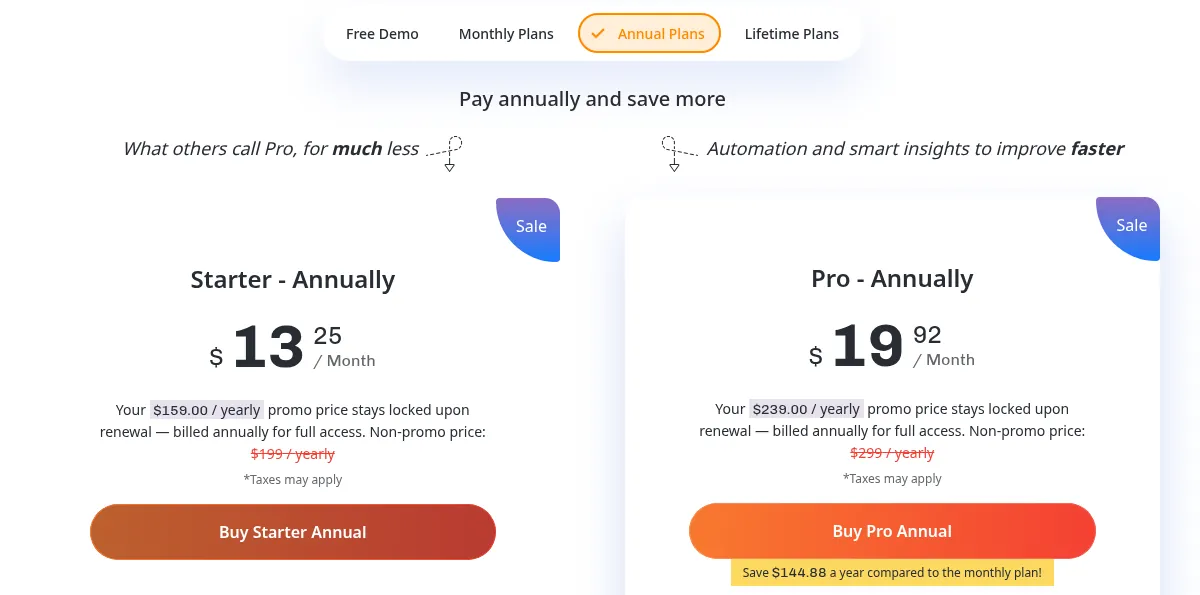
Pick Forex Tester if you are a discretionary forex trader, or you are preparing for a prop firm evaluation and want to rehearse its rules. The downside: Starter has no automation and only 69 symbols, monthly billing exists only for Pro, and the free demo gives just 1 month of data and can't save projects. There is a 30-day refund window on the first payment. More in our Forex Tester review.
TrendSpider: best for no-code automated backtests
TrendSpider is a charting and analysis platform, and its Strategy Tester is a no-code backtesting engine: you build entry, exit and risk rules visually (or describe them to its Sidekick AI assistant) and get win rate, Sharpe and Sortino ratios, maximum drawdown, the trade list and equity curve. A trade-cost setting covers commissions and slippage. The Group Strategy Tester compares strategies across up to 500 symbols, timeframes and periods at once. Per the TrendSpider strategy tools page, it backtests stocks, ETFs, futures, forex and crypto, but not options or indices directly.
Every plan includes every feature; the plan sets the depth. Standard backtests down to a 2-hour timeframe with 2,000 bars, Premium down to 5 minutes with 10,000 bars, and Enhanced and Advanced down to 1 minute with 20,000 and 30,000 bars. List prices run from $54 to $89 a month for Standard and from $91 to $149 for Premium, depending on monthly or annual billing, with promotional first-year prices on top. Real-time US stock, ETF, forex and crypto data is included for non-professionals; futures data costs $7.50 a month.
Pick TrendSpider if your strategy is rules-based and you trade US stocks or ETFs, and you want scanning and alerts in the same tool. The downside: there is no free plan, the 14-day trial costs $19 and is not refunded, intraday traders need Premium or higher, and refunds are possible only within 72 hours of a charge. See the TrendSpider review.
Quantower: best for futures and crypto market replay
Quantower is a free Windows trading platform that connects to more than 60 brokers, exchanges and data feeds, with footprint charts, volume profiles and a DOM. For backtesting it offers two routes. The Market Replay panel plays history back on any instrument from your connection, at tick, 1-minute or 1-day resolution, with a starting balance, commissions and a choice of modelling scheme, while you trade it through the normal chart and DOM panels. Coders can test and optimize C# strategies in the Backtest & Optimize panel.
Per Quantower's license comparison, Market Replay is not in the free version; the Crypto licence ($40 a month) includes it for crypto only, and Multi-Asset ($50 a month) and All-in-One ($70 a month, $588 a year or $1,690 lifetime) include it for every connection. Registered users get a 7-day All-in-One trial, and licences do not renew automatically.
Pick Quantower if you day trade futures or crypto from order flow and want to practise on the same screen you trade on. The downside: it is Windows-only, market data is paid separately to your provider, history depends on what your data feed provides, and refunds are possible only within 10 days on first orders. See the Quantower review.
TraderSync: best for replay inside your trading journal
TraderSync is a trading journal that imports trades from more than 700 brokers and platforms. It adds a market replay simulator on every plan, so you can practise a setup and then compare it with how you traded it live. Per the TraderSync pricing page, replay precision depends on the plan: Pro ($29.95 a month) replays stocks, futures, crypto and forex at 1-minute precision, Premium ($49.95) at 1 second, and Elite ($79.95) at 250 milliseconds with options, Level II, Time & Sales and screeners. Automated backtesting of stocks, forex and crypto is Elite-only. Every plan has a 7-day free trial.
Pick TraderSync if you want one tool to review real trades and rehearse new ones. The downside: there is no free plan, all payments are non-refundable, it takes credit cards only, and realistic intraday replay needs Premium or Elite. More in the TraderSync review.
Forex Tester vs TradingView
Per TradingView's pricing page in October 2026, Bar Replay is available on every plan including the free Basic plan, with trading inside replay. The free plan replays daily and higher timeframes; minute-level replay needs a paid plan (Essential: 180 days of minute history, Plus: 365 days, Premium and above: all), and tick replay is limited to 7 days on Ultimate. Its Strategy Tester runs Pine Script strategies, with deep backtesting from Premium. Paid plans start at $12.95 a month billed annually.
The difference is purpose. Forex Tester is built only for backtesting: up to 23 years of tick data, synchronized multi-timeframe charts, spreads and commissions, a journal and statistics for every test. Choose TradingView's replay if you trade daily or higher timeframes and want to start free. Choose Forex Tester if you test intraday forex systems, need years of minute or tick history without paying for a top TradingView tier, or want analytics built for backtesting.
Backtesting pitfalls to avoid
- Overfitting. Tuning rules until the past looks perfect produces strategies that fail on new data. Test on a period you did not use to build the rules.
- Frictionless results. Always add spreads, commissions and slippage; all four tools let you.
- Too few trades. A handful of winners proves little.
- No guarantee. None of these tools predicts future returns, and good backtests are no promise of live profits. Trading forex, futures, crypto and CFDs carries a high risk of loss; nothing here is investment advice.
For the rest of a trading setup, see our guide to the best tools for day traders and the best trading services.
Frequently asked questions
What is the best backtesting software?
It depends on how you trade. Forex Tester suits manual forex backtesting with tick data, TrendSpider suits automated rules-based tests on stocks and ETFs, Quantower suits futures and crypto order-flow replay, and TraderSync suits traders who want replay inside their journal.
Forex Tester vs TradingView: which is better for backtesting?
TradingView's Bar Replay is free on daily and higher timeframes, but minute-level replay needs a paid plan and tick replay only Ultimate. Forex Tester is a dedicated backtester with up to 23 years of tick data, synchronized timeframes and simulated costs. Use TradingView for higher-timeframe ideas and Forex Tester for serious intraday forex testing.
Is there free backtesting software?
Forex Tester has a free demo with 1 month of data, TradingView's free plan includes Bar Replay on daily and higher timeframes, and Quantower's free version lets you code strategies in C#. Quantower's Market Replay and TrendSpider need a paid licence; TrendSpider's trial costs $19.
Can I backtest without coding?
Yes. Manual replay in Forex Tester, Quantower or TraderSync needs no code, and TrendSpider's Strategy Tester builds automated rules visually or from a plain-English description to its AI assistant.
Does a good backtest mean a strategy will be profitable?
No. A backtest only shows how rules would have performed on past data, and over-tuned strategies often fail live. Include trading costs, test on data you did not use to build the rules, and remember that trading carries a risk of loss.
Which backtesting software is best for prop firm challenges?
Forex Tester Pro has a prop firm challenge mode with rules and targets that mirror common evaluations, and alerts when a rule is broken. Quantower connects to prop firms such as Topstep and Apex Trader Funding, so you can practise with Market Replay on the platform you will trade.
- Forex Tester Online: features and pricing
- Forex Tester terms of agreement
- TrendSpider pricing
- TrendSpider strategy development and backtesting tools
- Quantower pricing
- Quantower license comparison
- Quantower Market Replay documentation
- Quantower Backtest & Optimize documentation
- TraderSync pricing
- TraderSync billing and refund policy
- TradingView pricing and plan features