
Quantower review: multi-asset trading platform with a free version
Quantower is a Windows trading platform that connects to 60+ brokers, crypto exchanges, data feeds and prop firms, so you can chart, analyse order flow and place orders from one workspace. The free version is enough to trade with one connection; the All-in-One license unlocks every feature for $70 a month, with a 7-day full trial first.
Not investment advice. Trading carries a risk of losing money.
No extra sign-up bonus — the provider's standard offer applies.
Disclosure: this is an affiliate link. If you sign up through it, we may earn a commission at no extra cost to you. The bonus and terms are set by Quantower and can change — check them on the official site before you sign up.
How to get started
- Open Quantower through the link on this page and register a free Quantower account.
- Download the Windows app; the free version also runs without registration.
- Log in to the app with your Quantower ID and connect your broker, exchange or prop-firm account.
- Request the 7-day All-in-One trial from your account to try the paid tools.
- If you keep it, buy the All-in-One license or only the extension you need; purchases attach to your Quantower ID.
What is Quantower?
Quantower is a desktop trading platform made by Quantower LLC, a company based in Dnipro, Ukraine. It is broker-neutral: instead of being tied to one broker, it connects to more than 60 brokers, crypto exchanges, data feeds, technology providers and prop-trading firms, among them Interactive Brokers, Rithmic, Binance, Bybit, OKX, Kraken, Deribit, cTrader, OANDA and Topstep.
Inside the app you build your own workspace from 40+ panels for charting, trading, portfolio and market information:
- Charts with tick- and time-based timeframes, 40+ drawing tools and technical indicators, chart trading and alerts.
- Order-flow tools: DOM Trader, Time & Sales, cluster (footprint) charts, volume profiles, VWAP, TPO profile charts and a DOM Surface heatmap.
- Options: option chains, Greeks and an Option Analyzer for strategies.
- Automation: a free C# API and a Visual Studio extension for custom indicators and strategies, plus a Strategy Runner panel.
- Several connections at once: compare data from two providers, build synthetic symbols and spreads, or trade through more than one broker in one window (paid feature).
Who Quantower is for
- Futures day traders who read the order book and need footprint charts, volume profiles and DOM trading.
- Prop-firm traders: Quantower connects to evaluation firms such as Topstep, Apex Trader Funding, Elite Trader Funding and Take Profit Trader. See our Elite Trader Funding review.
- Crypto traders who want one terminal for several exchanges, spot and futures.
- Developers who write their own indicators and strategies in C#.
For backtesting on historical data, compare the Forex Tester review; to keep the platform running around the clock, see the ForexVPS review. More tools are on our trading platforms and brokers page.
Quantower pricing and free version
Quantower is free to start: download it, connect one broker or exchange and trade. The free version includes charts with custom timeframes, two indicators and one overlay per chart, DOM Trader, Time & Sales, chart alerts, workspaces and the C# API.
Paid licenses (USD, October 2026):
| License | What it adds | Price |
|---|---|---|
| All-in-One | Every feature and connection, new features included during the term | $70/month, $189/3 months, $336/6 months, $588/year, $1,690 lifetime |
| Multi-Asset | Volume Analysis + Advanced features, any connection | $50/month |
| Crypto | Same package, crypto exchanges only | $40/month |
| Single extensions | Volume Analysis $35, Advanced features $30, DOM Surface $30, Power Trades $25, TPO Chart $20, Options $50 | per month |
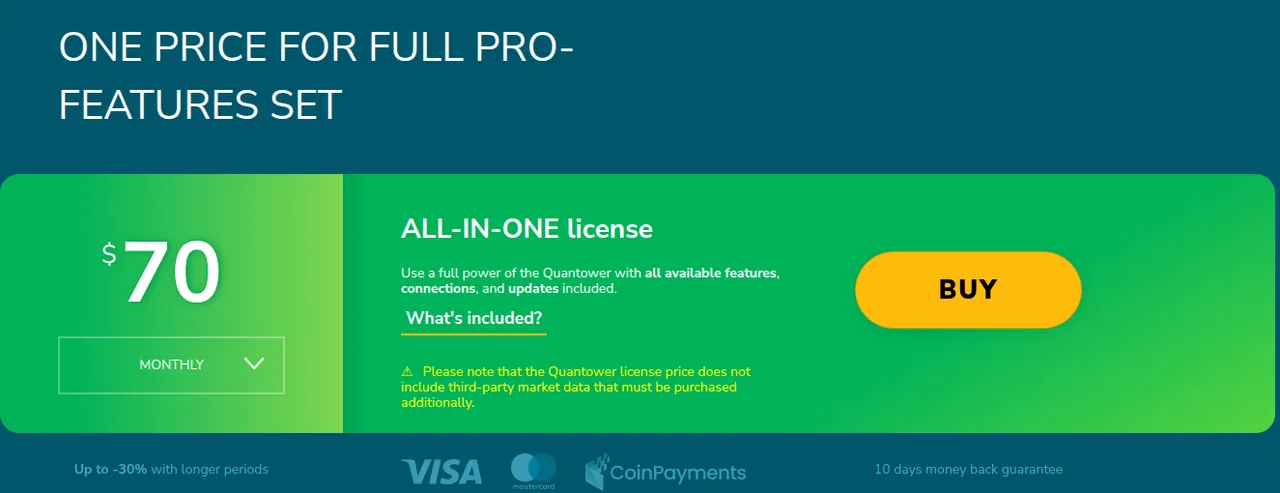
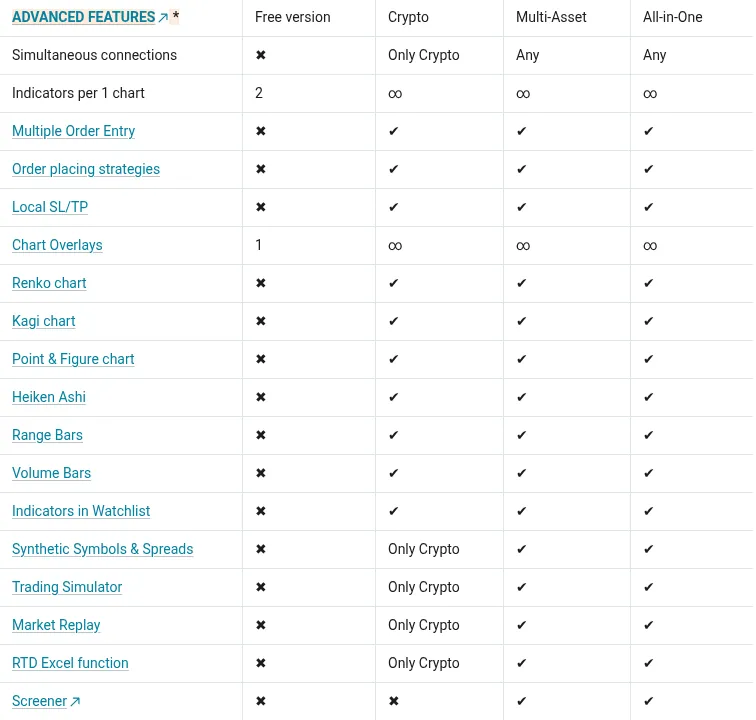
Longer periods cost less: 10% off for 3 months, 20% for 6 months and 30% for a year. Licenses do not renew automatically. Exchange market data is not included and is paid separately to your data provider. With some connections listed on the site, such as AMP, Binance, Bybit, Topstep and Optimus Futures, the paid features come at no extra cost. Market Replay and the Trading Simulator are not in the free version: the Crypto license includes them for crypto connections only, and Multi-Asset and All-in-One for every connection.
Why choose Quantower
Most traders can start on the free version and only pay when they hit a limit, and even then you can buy just one extension instead of a full plan. Because the platform is broker-neutral, you keep the same charts and workspace when you change broker or move to a prop firm. Footprint, volume profile, TPO and DOM heatmap tools all live inside one app.
Good to know before you buy
- Windows only. There is no macOS version; the FAQ suggests Parallels, VirtualBox or VMware Fusion and does not guarantee stability there. The vendor recommends Windows 10 and .NET Framework 4.8; 16 GB RAM, a 4-core CPU and an SSD are recommended.
- One computer at a time. A paid license logs out on the other computer when you sign in elsewhere; the free version can be installed on several PCs.
- Refunds: within 10 calendar days, for first orders only. Lifetime licenses are not refundable.
- Payment: Visa or Mastercard (via the WayForPay processor, with 3D Secure) and crypto via CoinPayments. Some banks decline WayForPay payments until you approve them; PayPal is not available.
- Support: live chat Monday to Friday, 1:00 am to 3:00 pm CST.
- Quantower is software, not a broker: your funds stay with your broker or exchange. This is not investment advice; trading carries a risk of loss.
Pros and cons
Pros
- Free version with real trading, charts, DOM and a C# API
- 60+ brokers, crypto exchanges, data feeds and prop firms in one app
- Order-flow tools: footprint, volume profiles, TPO and DOM heatmap
- Pay per extension, or 10–30% less on longer licenses
- No auto-renewal and a 7-day full-featured trial
Cons
- Windows only; Mac users need a virtual machine
- Market data is paid separately
- Refunds only within 10 days on first orders, none for lifetime
- One paid license works on one computer at a time
Frequently asked questions
Is Quantower free?
Yes. The free version needs no registration and lets you trade through one connection with charts, DOM Trader, Time & Sales and two indicators per chart. Advanced features (including Market Replay) and volume analysis need a paid license.
How much does Quantower cost?
The All-in-One license costs $70 a month, $588 a year or $1,690 for lifetime access. Multi-Asset is $50 a month and Crypto $40 a month; single extensions start at $20 a month.
Is there a Quantower free trial or promo code?
There is a 7-day full-featured trial of the All-in-One license for registered users. No public promo code is listed; the main discount is up to 30% for longer license periods.
Is Quantower legit?
Quantower LLC, based in Dnipro, Ukraine, publishes its prices, a refund policy, documentation and live-chat support. It is trading software, not a broker, so your money stays with your broker or exchange.
Can I get a refund from Quantower?
You can ask support for a refund within 10 calendar days of payment on a first order. Lifetime licenses are not refunded.
Compare Quantower
- Best backtesting software for traders: Forex Tester, TrendSpider, Quantower and TraderSync
The short answer: Forex Tester if you backtest forex by hand and want tick data and a lifetime licence, TrendSpider if you want no-code automated backtests on stocks and ETFs,…
 Capitalist Exploits
 Elite Trader Funding
 Forex Tester
 Forex University