Forex Tester review: browser-based backtesting and trading simulator
Forex Tester Online lets you replay years of historical market data in your browser and trade it as if it were live, so you can test a strategy before risking money. It suits forex, futures and stock traders who backtest by hand or with robots, and traders preparing for prop firm challenges. There is a free demo, and paid plans come as annual, monthly or one-time lifetime licences.
Not investment advice. Trading carries a risk of losing money.
No extra sign-up bonus — the provider's standard offer applies.
Disclosure: this is an affiliate link. If you sign up through it, we may earn a commission at no extra cost to you. The bonus and terms are set by Forex Tester and can change — check them on the official site before you sign up.
How to get started
- Open Forex Tester through the link on this page; there is no promo code to type.
- Try the free demo first: enter your email or use Google or Microsoft sign-in, no card needed.
- Choose Starter or Pro and pay annually, monthly (Pro only) or once for lifetime access.
- Register your account and open Forex Tester Online in any browser; nothing to install.
- If it isn't for you, email support within 30 days of your first payment for a refund.
What you get with Forex Tester Online
Forex Tester Online is backtesting software from Forex Tester Software Inc. You pick a symbol and a date, then step through history candle by candle and place trades as if the market were live. Everything happens in a simulation: the software cannot place real trades.
- Historical data: up to 23 years of tick-by-tick data per symbol, updated daily, with a 1-minute minimum timeframe. CME futures data goes back to 2013, depending on the contract.
- Charts: up to 10 synchronized charts across symbols and timeframes, so a higher-timeframe bar never shows its future.
- Realistic conditions: spreads, swaps and commissions, plus a global economic calendar.
- Analysis: 95 built-in indicators, a trading journal with tags, checklists, confidence levels and up to 10 screenshots per trade and performance analytics.
- Pro tools: Exit Optimizer for stop loss, take profit and holding time, trading robots, custom indicators, blind testing that hides dates and prices, prop firm challenge mode, and analysis of imported MT4, MT5, TradingView or NinjaTrader history.
It runs in any browser on Windows, macOS, Linux, Android or iOS, though Forex Tester recommends a desktop or laptop.
Who Forex Tester is for
- Discretionary traders who want many practice trades on real history, fast.
- Prop firm candidates rehearsing a challenge under its rules, with alerts when a rule is broken (Pro).
- Algorithmic traders testing robots, or mixing manual and automated systems in one portfolio (Pro).
- Traders reviewing their live results, by importing their history and getting a list of costly habits.
Forex Tester covers practice and testing. To journal live trades, see the TraderSync review; for charting and scanning, the TrendSpider review; and if you are heading for a funded account, the Elite Trader Funding review. More tools are in best trading services.
Forex Tester pricing
There are two paid plans, Starter and Pro, and three ways to pay. Prices below are the regular ones, with the Halloween sale prices shown on 29 October 2026 in brackets.
| Plan | Monthly | Annual | Lifetime (one-time) |
|---|---|---|---|
| Starter | — | $199/yr ($159) | $299 ($239) |
| Pro | $39.99/mo ($31.99) | $299/yr ($239) | $499 ($399) |
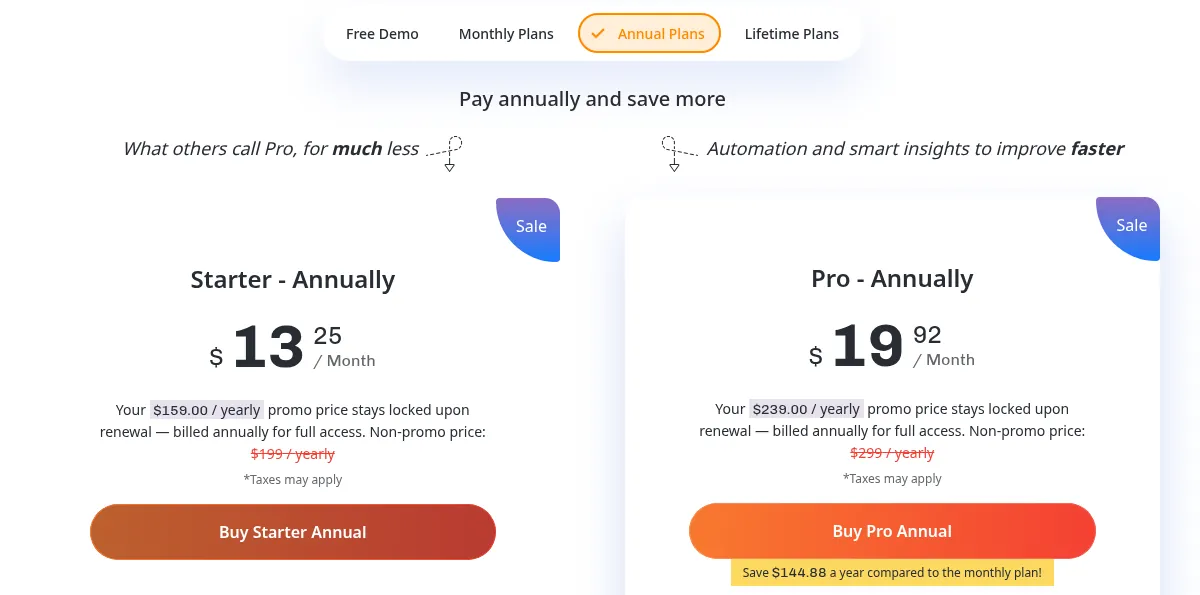
The site says a promo price stays locked when the plan renews, and taxes may apply. Lifetime plans include future updates with no further payment.
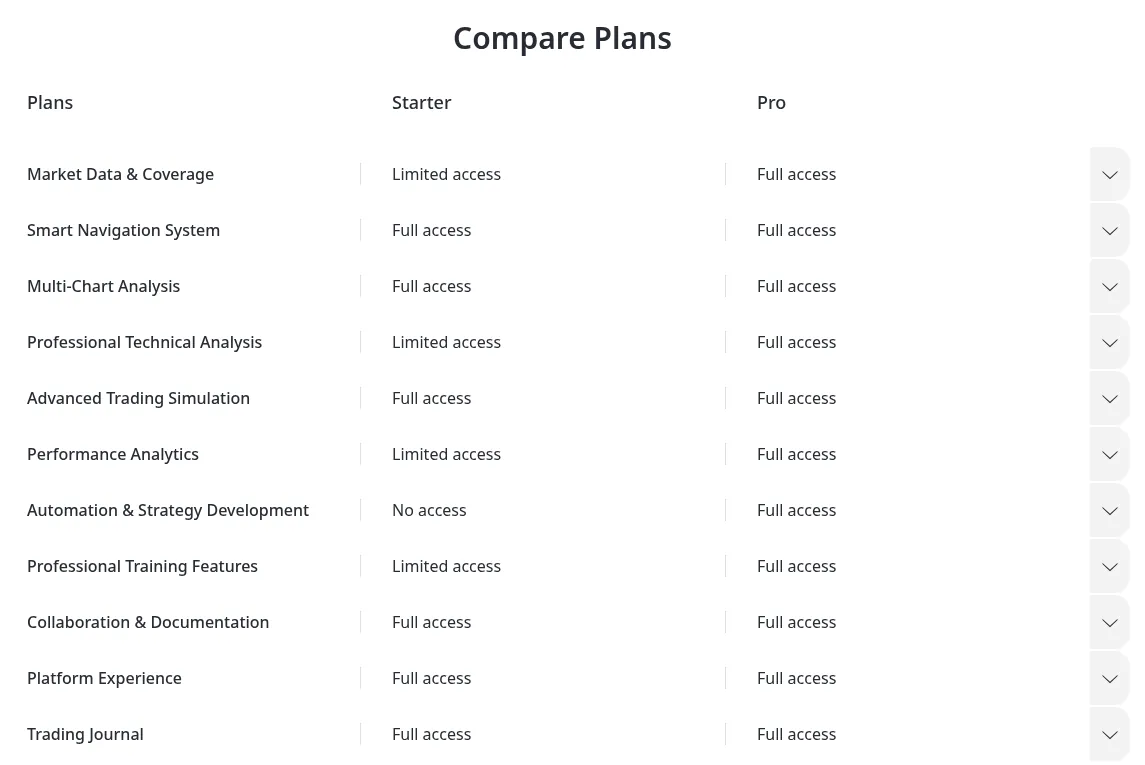
- Starter: 69 symbols (28 forex pairs, 16 stocks, 10 ETFs, 8 indices, 5 commodities and 2 crypto), up to 10 charts, unlimited projects and data retention.
- Pro: all 283 symbols plus every Pro tool listed above.
- Free demo: 1 month of historical data, manual backtesting and the core interface; projects can't be saved.
Why choose Forex Tester
Forex Tester is built for backtesting rather than simple bar replay: tick data, synchronized timeframes and broker-like costs bring results closer to live trading. You can buy it once instead of renting it, there is nothing to install, and Forex Tester says months of scenarios can be tested in hours.
Good to know before you buy
- Refunds: request one by email within 30 days of your first payment, or within 7 days of a renewal. Only the last payment is refunded.
- Cancellation: cancel any time by emailing support.
- Simulation only: it is not a broker and holds no money. A good backtest does not guarantee live profits, and trading forex and CFDs carries a high risk of loss.
- Sale prices change: the site said lifetime prices would rise on 2 November 2026, so check the current price before paying.
- No identity checks: it is a software subscription with no KYC, and we found no country restrictions.
Pros and cons
Pros
- Runs in any browser, nothing to install
- Up to 23 years of tick data and 10 synchronized charts
- Lifetime licence available instead of a subscription
- Prop firm mode, robots and blind testing on Pro
- 30-day refund window on the first payment
Cons
- No sign-up discount for users who come through a referral link
- Starter covers only 69 symbols and has no automation
- Monthly billing exists only for Pro
- The free demo has 1 month of data and can't save projects
Frequently asked questions
Is there a Forex Tester promo code?
Forex Tester does not publish a promo code for referral sign-ups, and our link needs no code. It runs seasonal sales instead: on 29 October 2026 a Halloween sale cut the annual and lifetime prices.
Is Forex Tester free?
There is a free demo that needs only an email and no card. It gives 1 month of historical data and manual backtesting, but projects can't be saved.
How much does Forex Tester cost?
Regular prices are $199 a year or $299 lifetime for Starter, and $39.99 a month, $299 a year or $499 lifetime for Pro. Sale prices are often lower.
Can I use Forex Tester on a Mac?
Yes. Forex Tester Online runs in the browser, so it works on macOS, Windows, Linux, Android and iOS. A desktop or laptop is recommended.
How do I get a refund from Forex Tester?
Email support@forextester.com within 30 days of your first payment, or within 7 days of a recurring charge. Only the last payment is refunded.
Is Forex Tester legit?
It is run by Forex Tester Software Inc., its terms are governed by Ontario, Canada law, support is by email, and refund rules are published. One caveat: it is a simulator, so good backtests are no promise of live profits.
Compare Forex Tester
- Best backtesting software for traders: Forex Tester, TrendSpider, Quantower and TraderSync
The short answer: Forex Tester if you backtest forex by hand and want tick data and a lifetime licence, TrendSpider if you want no-code automated backtests on stocks and ETFs,…
 ForexVPS