Best tools for day traders: trading journal, charting, VPS and education
Day traders usually need four kinds of tools: charting and backtesting, a trading journal, a server that keeps automated strategies running, and education. The short answer: TraderSync if you want to learn from your own trades, TrendSpider if you want automated charting, scans and backtests, ForexVPS if you run MetaTrader expert advisors 24/7, and HowToTrade if you are still learning forex and want free lessons first. This guide compares their prices, trials and limits so you know which one to pay for first.
Not investment advice. Trading carries a risk of losing money.
Comparison at a glance
| Service | Best for | Starting price | Free plan / trial | Key limit | Review & sign-up |
|---|---|---|---|---|---|
| TrendSpider | Automated charting, scanning, alerts and backtests | Standard $54–$89/mo (list, by billing term) | 14-day trial for $19, non-refundable | Standard: 10 alerts, 2-hour minimum scan and backtest timeframe | TrendSpider review →Get TrendSpider → |
| TraderSync | Trading journal with broker auto-import and reports | $29.95/mo | 7-day free trial | No permanent free plan; Pro has 5 AI messages a day | TraderSync review →Get TraderSync → |
| ForexVPS | Running MT4/MT5 expert advisors 24/7 | $40/mo ($28.80/mo billed yearly) | 14-day money-back on VPS plans | Core: 2 CPU, 4 GB RAM, 1–2 platforms | ForexVPS review →Get ForexVPS → |
| HowToTrade | Learning forex with free lessons and trade ideas | Free; Trading Room $29/mo | Free account; 7 days of Trading Room access | Forex/CFD focus; no published refund policy | HowToTrade review →Get HowToTrade → |
Disclosure: the sign-up buttons in this table are affiliate links. If you sign up through one, we may earn a commission at no extra cost to you. Commissions don't decide which services we include or what we say about them.
The short answer
Day trading tools fall into four jobs, and the four services here each do one of them. They are not rivals: the question is which gap in your routine costs you most.
- Pick TraderSync if you already trade often and want to know why you win or lose. It imports trades from your broker and breaks results down by time of day, setup and instrument, from $29.95 per month with a 7-day free trial.
- Pick TrendSpider if you spend hours drawing lines and flipping through charts. It automates trendlines and pattern detection and adds a scanner, alerts, bots and a strategy tester, with a 14-day trial that costs $19.
- Pick ForexVPS if you run expert advisors or several MetaTrader terminals that must stay online when your computer is off. Plans start at $40 per month, or $28.80 per month billed yearly, with a 14-day money-back guarantee on VPS plans.
- Pick HowToTrade if you are still learning forex and want free strategy videos, trade ideas and signals before you pay for anything. Its Trading Room costs $29 per month after 7 days of free access.
Starting from zero? Learn for free, journal every trade, then pay for automation.
What a day trader's toolkit actually covers
A working day-trading setup has four layers:
- Analysis: charts, scanners and backtests. Finding setups and testing a rule on historical data before you risk money on it. TrendSpider sits here.
- Review: a trading journal. Recording every trade and turning the history into answers: which hour, which setup, which ticker loses money. TraderSync sits here.
- Execution infrastructure: a trading VPS. A remote Windows server near your broker that keeps MetaTrader, cTrader or NinjaTrader and your expert advisors running 24/7. ForexVPS sits here.
- Education: lessons, trade ideas and live analysis. HowToTrade sits here, with a free academy and a paid live trading room.
You do not need all four on day one: a manual trader on one screen has little use for a VPS. The TraderSync review and the other reviews linked below go deeper on each tool.
How to choose: what we compared
We compared them on the points that decide whether a subscription pays for itself:
- The problem it solves. Finding setups, repeating the same mistakes, a strategy that stops when your laptop sleeps, or not knowing a strategy yet. Buy for that problem only.
- Starting price. USD per month unless stated; watch for promotional first-year prices.
- Free plan or trial. A free tier, a free trial and a paid trial are very different commitments.
- The limit you will hit first. Alerts, backtest depth and scan timeframe on charting plans; AI questions and replay resolution on journal plans; CPU, memory and the number of terminals on a VPS.
- Markets, platforms and refunds. A journal must import from your broker and a VPS must run your platform. Several of these services have strict or unpublished refund rules, so the trial is your real test period.
Prices and trials side by side
Entry prices as listed on each vendor's pricing page, October 2026:
| TrendSpider | TraderSync | ForexVPS | HowToTrade | |
|---|---|---|---|---|
| What it is | Charting, scanner, backtests, bots | Trading journal | Windows trading VPS | Forex education and trade ideas |
| Entry price | Standard $54–$89/mo (list, by billing term) | Pro $29.95/mo | Core $40/mo, or $28.80/mo billed yearly | Free account; Trading Room $29/mo |
| Trial | 14 days for $19, non-refundable | 7 days free | 14-day money-back on VPS plans | 7 days of Trading Room access for new users |
| Yearly billing | Promo prices for the first 12 months, higher renewal | Halloween promo (Oct 2026): 50–60% off annual | About 25% cheaper | Trading Room billed monthly |
TrendSpider's price depends on the billing term and on whether you start with the trial, and promotions can lower the first 12 months, so confirm the figure at checkout.
TrendSpider: best for automated charting, scanning and backtests
TrendSpider draws trendlines and flags chart patterns and Fibonacci levels across several timeframes, then adds a market scanner, alerts, trading bots, a Strategy Tester for backtesting and Sidekick, an AI assistant with 25 messages a month on every plan. Futures data (from $7.50 per month) and options data (from $9.50) cost extra.
Every plan has every feature; the tier decides how fast and deep you can scan and test. According to the TrendSpider pricing page, Standard allows 10 active alerts, 5 bots and backtests of 2,000 bars with a 2-hour minimum timeframe, and its minimum scanning timeframe is also 2 hours. For intraday work that matters: Premium drops the backtest and scan timeframe to 5 minutes (10,000 bars) with 50 alerts, and Enhanced and Advanced go down to 1 minute.
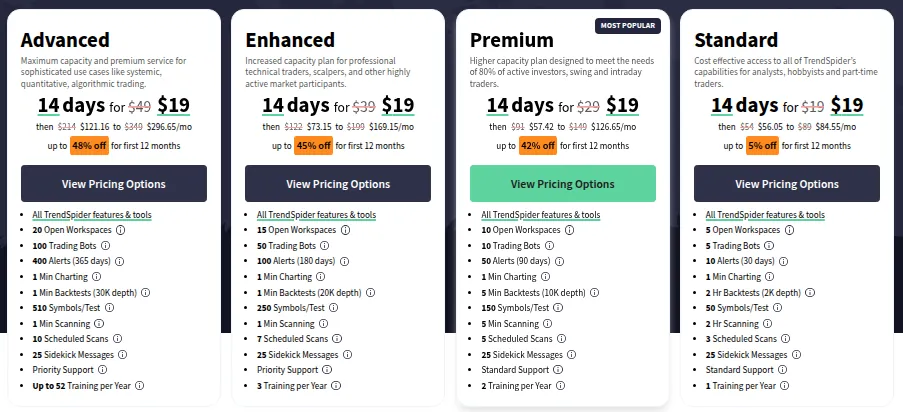
Pick TrendSpider if you scan many symbols, want alerts instead of watching charts all day, and want to backtest a rule before trading it. The downside: there is no free trial, only a $19 non-refundable one, and plan charges are refundable only within 72 hours and after cancelling (minus the trial fee on a first payment); plans bought at a promotional price are final sale. Day traders will usually need Premium or higher for intraday scans and backtests. Full details in the TrendSpider review.
TraderSync: best trading journal for active traders
TraderSync imports trades automatically from over 700 brokers and platforms (or from files and manual entry), covers stocks, options, futures, forex, crypto, CFDs and indices on every plan, and builds reports such as MFE/MAE stats, exit-efficiency analysis and running P&L charts. Trade replay re-plays price around your entries and exits, and the Cypher AI assistant answers questions about your trades.
There are three tiers: Pro at $29.95 per month, Premium at $49.95 and Elite at $79.95. Annual plans are sold too; in late October 2026 a Halloween promotion priced them at $179.64, $269.64 and $383.76 a year. Pro allows 5 broker accounts, 1-minute market replay and 5 Cypher messages a day. Premium adds unlimited accounts, strategies and trading plans, 1-second replay and 15 messages a day. Elite adds 250 ms replay with Level II and Time & Sales, automated backtesting and 60 messages a day.
Pick TraderSync if you place enough trades that reviewing them by hand is no longer realistic, and your broker is on its import list. The downside: there is no permanent free plan, its billing policy makes all payments non-refundable, it takes credit cards only, and Level II replay and automated backtesting are Elite-only. Use the 7-day free trial on your real trade history before paying.
ForexVPS: best for running expert advisors 24/7
An expert advisor stops the moment your computer sleeps or your home connection drops. ForexVPS rents Windows servers in financial data centers near broker servers that keep platforms running around the clock. MetaTrader 4 and 5 deploy in one click, and cTrader, NinjaTrader, thinkorswim, TradingView and Interactive Brokers are listed as compatible.
Plans are sized by how many platforms you run. As the ForexVPS pricing page lists them: Core (2 CPU, 4 GB RAM, 1–2 platforms) at $40 per month, Edge (4 CPU, 6 GB, 2–3 platforms) at $60 and Prime (6 CPU, 8 GB, 3–5+ platforms) at $80. Yearly billing brings these to $28.80, $43.20 and $57.60 per month. A Core-sized VPS can be free if you open an account with one of its partner brokers and trade the required monthly lot volume.
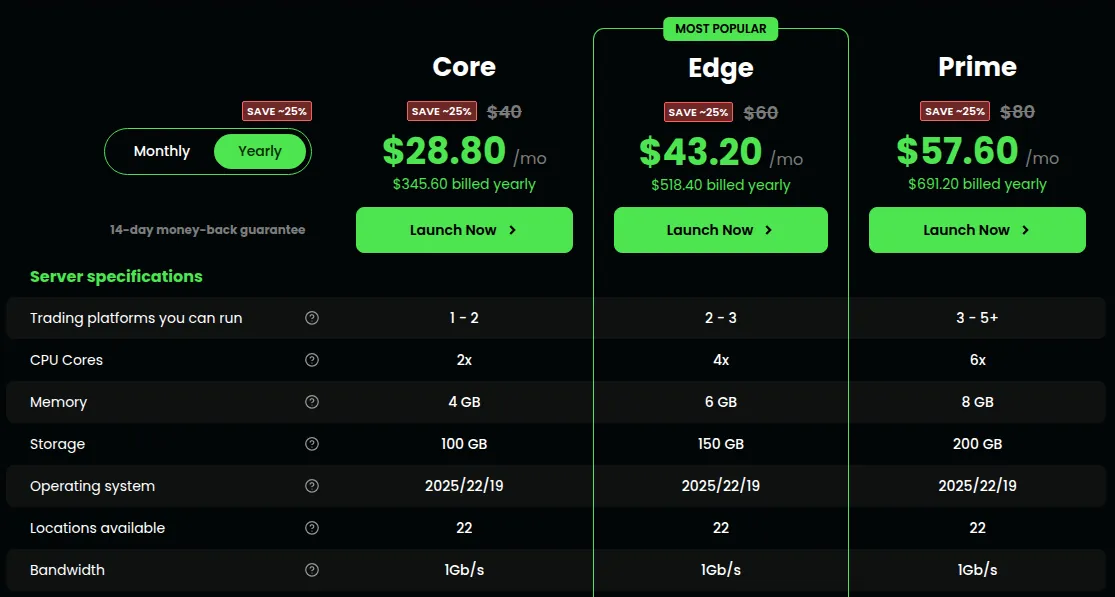
Pick ForexVPS if you trade automated strategies or need low latency to your broker. The downside: it costs more than a general-purpose VPS, the advertised latency "as low as 1ms" is the vendor's claim and depends on where your broker's server is, and dedicated servers and discounted products are non-refundable. More in the ForexVPS review.
HowToTrade: best for learning forex day trading for free
HowToTrade, which absorbed the former ForexSignals.com, is a forex and CFD education site. A free account gives you short strategy videos, daily trade ideas and free signals with key levels on pairs such as EURUSD and XAUUSD, risk calculators, an economic calendar and a free MetaTrader 4 simulator.
The paid Trading Room costs $29 per month, per the HowToTrade pricing page, and adds daily live trading streams, weekly forecast reports and real-time news. New users get 7 days of free access first; if you had a trial before with the same payment method, you are charged at once. A separate funded-trader program costs a one-time $549.
Pick HowToTrade if you are a beginner or intermediate forex trader who wants to learn and follow live analysis cheaply. The downside: no refund policy is published, the free signals page pushes a sponsor broker on its trade buttons, and the content is forex and CFD-focused, so stock day traders get less from it. See the HowToTrade review.
Which tool should you buy first?
- New to trading: HowToTrade's free academy and a demo account. Automating an untested strategy only automates guesses.
- Trading actively by hand: a journal such as TraderSync first; its reports show which setups to keep.
- Trading a rules-based strategy: add TrendSpider to scan, alert and backtest; budget for Premium for intraday timeframes.
- Running expert advisors: ForexVPS Core, moving up only if you add terminals.
Crypto traders who want bots on exchanges rather than MetaTrader should read our guide to the best crypto trading bots. More options are on the best trading services page.
Risks and things to check before you pay
- Tools do not create an edge. None of them guarantees profits, and backtests describe the past. Day trading carries a real risk of loss; nothing here is investment advice.
- Use the trial seriously. TrendSpider's trial fee and all TraderSync payments are non-refundable, and HowToTrade publishes no refund policy.
- Watch auto-renewal. TrendSpider, ForexVPS and HowToTrade renew automatically until you cancel.
Frequently asked questions
What tools do I need to start day trading?
A broker with a demo account, a charting tool and a way to record every trade. Add a scanner like TrendSpider once you trade a defined setup, and a VPS only for automated strategies.
What is the best trading journal for day traders?
TraderSync suits active day traders who want trades imported from their broker and broken down by time, setup and instrument. Pro costs $29.95 per month and every tier has a 7-day free trial. Check that your broker is on its import list first.
Is TrendSpider worth it for day trading?
It can be if you scan many symbols and backtest rules, but intraday traders usually need Premium or higher: Standard scans and backtests only down to a 2-hour timeframe. The 14-day trial costs $19 and is non-refundable.
TrendSpider vs TraderSync: which should I get?
They do different jobs. TrendSpider helps you find and test setups before a trade; TraderSync analyses the trades you have already made.
Do I need a VPS for day trading?
Only if you run expert advisors, copy trading or several terminals that must stay online, or want lower latency to your broker. Manual traders on one screen rarely need one. ForexVPS starts at $40 per month or $28.80 per month billed yearly.
- TrendSpider pricing
- TrendSpider homepage
- TrendSpider refund policy
- TraderSync pricing
- TraderSync billing and refund policy
- ForexVPS homepage (platforms and locations)
- ForexVPS pricing
- ForexVPS free Forex VPS
- ForexVPS terms of service
- HowToTrade pricing
- HowToTrade homepage
- HowToTrade terms and conditions
- HowToTrade free forex signals