Restream vs StreamYard: which multistreaming software should you use?
Restream and StreamYard both let you go live from a browser studio with guests on screen, but they are built around different jobs. Restream is a multistreaming service first: its free plan already sends one stream to two channels, and it relays feeds from OBS and other encoders. StreamYard is a browser studio first: multistreaming starts on its paid Essential plan, but you get Full HD in the studio from that first paid tier, a 7-day free trial and a 7-day money-back guarantee. This guide compares prices, limits and terms so you can pick the right one for your streams.
Comparison at a glance
| Service | Best for | Starting price | Free plan / trial | Key limit | Review & sign-up |
|---|---|---|---|---|---|
| Restream | Streaming to many platforms at once, with OBS or other encoders | $19/mo (Standard, monthly) | Free plan: 2 channels at once, 720p Studio, branding | Studio 720p below Professional; narrow refunds | Restream review →Get Restream → |
| StreamYard | Guest interviews, podcasts and shows from a browser studio | $14.99/mo billed yearly ($18.99 monthly) | Free plan (1 destination, logo) + 7-day trial of paid plans | Multistreaming from Essential; 2 destinations until Core | StreamYard review →Get StreamYard → |
Disclosure: the sign-up buttons in this table are affiliate links. If you sign up through one, we may earn a commission at no extra cost to you. Commissions don't decide which services we include or what we say about them.
The short answer
Pick Restream if reaching many platforms at once is the point. Its Free plan streams to 2 channels at the same time, Standard covers 3 channels for $19 a month, and it accepts a feed from OBS or another encoder, passing up to 4K through to destinations that support it. You also get chat from all connected channels in one window.
Pick StreamYard if you mostly run interviews, podcasts or shows with guests and want a polished browser studio at a lower price per month. Essential costs $14.99 a month billed yearly ($18.99 monthly) and adds Full HD and multistreaming to 2 destinations; paid plans start with a 7-day free trial, and the first charge is covered by a 7-day money-back guarantee.
If you only stream to one platform and never use an encoder, StreamYard's Free plan is the simpler place to start. If you plan to stream to five or more platforms, compare Restream Professional (5 channels, $49/mo) with StreamYard Advanced (8 destinations, $68.99/mo billed yearly) before deciding.
What we compared and why it matters
Multistream software looks similar on the surface, so the details decide which one fits:
- Price at your destination count. Both services price by how many platforms you can reach at once. Compare the plan you would actually need, not the cheapest tier.
- What the free plan really allows. Some free plans multistream, some don't; both add the service's branding.
- Studio quality. The resolution of the browser studio matters if you go live without an encoder.
- Encoder support. If you already use OBS, vMix or Streamlabs, you want a service that accepts your feed.
- Guests. How many people can appear on screen at once, and whether there is a backstage.
- Recording and extras. Recording limits, clips, webinars and pre-recorded streams.
- Trial and refunds. How much you can test before you pay, and what happens if it doesn't work out.
Prices below are in US dollars per month, as listed on each service's pricing page when we checked.
Pricing side by side
Monthly billing, per month:
| Destinations at once | Restream | StreamYard |
|---|---|---|
| 1 (no multistream) | — | Free ($0) |
| 2 | Free ($0) | Essential ($18.99) |
| 3 | Standard ($19) | Core ($44.99) |
| 5 | Professional ($49) | Advanced ($88.99, 8 destinations) |
| 8 | Business ($239) | Advanced ($88.99) |
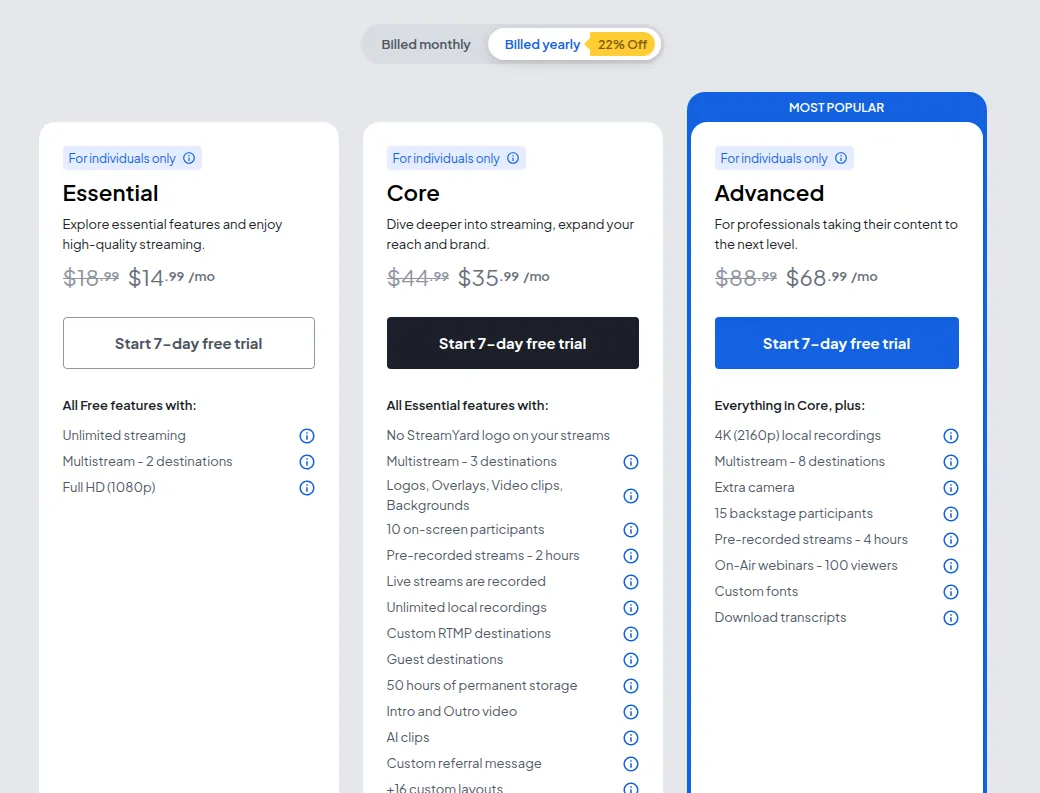
StreamYard's yearly billing lowers those prices to $14.99 (Essential), $35.99 (Core) and $68.99 (Advanced) per month, about 22% less. Restream advertises 20% off for annual billing but does not list the annual prices on its pricing page, so check them at checkout. Restream also has a custom-priced Enterprise plan, and StreamYard sells separate Business plans for companies and larger teams; its Essential, Core and Advanced plans are for individual use only.
The pattern is clear: Restream is cheaper for 2 to 5 destinations, while StreamYard Advanced is far cheaper if you need 8. StreamYard is the only one of the two with a free plan that doesn't multistream at all, and the only one that lets you pay in Indian Rupees (it accepts USD or INR only).
Free plans compared
Restream Free streams to 2 channels at once, includes the browser Studio at 720p with up to 6 people on screen and 1 seat, and shows Restream branding. It has no cloud recording. Facebook Pages and Groups and custom RTMP destinations need a paid plan.
StreamYard Free includes the StreamYard logo on your streams, unspecified streaming limits, 2 hours of local recordings per month, 6 on-screen participants and 1 seat. The pricing page lists multistreaming only from Essential up, so on Free you stream to one destination.
If you want to test multistreaming without paying, Restream Free is the one that does it. If you want to test the full paid studio, StreamYard's 7-day free trial on Essential, Core or Advanced is the better trial.
Studio quality, encoders and guests
Both services run their studio in the browser, so you and your guests don't install anything.
Resolution. Restream Studio streams at 720p on Free and Standard and at 1080p on Professional and higher. StreamYard lists Full HD (1080p) from Essential, its first paid tier, and Advanced adds 4K local recordings. So at the low end StreamYard gives you a sharper studio for the money.
Encoders. Restream is built to accept an encoder: you can connect OBS, Streamlabs, vMix, Ecamm Live or XSplit, and with an encoder it keeps your original resolution and frame rate, sending up to 4K to destinations that support it. Restream recommends at least 10 Mbps upload for Studio, or 25 Mbps+ for Full HD. StreamYard is centred on its own browser studio; Core and up add custom RTMP destinations for sending your stream to extra platforms.
Guests. Restream allows 6 on-screen participants on Free and 10 on paid plans, with custom limits on Enterprise. StreamYard allows 6 on Free and 10 on Core, and Advanced adds 15 backstage participants, useful for panels where speakers rotate on and off screen.
Recording, clips and webinars
Restream has no cloud recording on Free; paid plans remove branding and record streams to the cloud: up to 6 hours per stream kept for 15 days on Standard, 10 hours kept for 15 days on Professional, and 10 hours kept for 30 days on Business. Turning streams into short clips is a paid add-on starting at +$19 a month on Standard (50 clips), and Webinars start at +$99 a month for 100 attendees. Upload & Stream lets you schedule a recorded video and broadcast it as a live stream. Extra team seats cost $25 per seat per month.
StreamYard includes more in the plan price. Core gives unlimited local recordings, cloud recording with 50 hours of permanent storage, 2 hours of pre-recorded streams, and branding tools such as logos, overlays and custom layouts with no StreamYard logo. Advanced adds On-Air webinars for up to 100 viewers, 4 hours of pre-recorded streams and 4K local recordings.
If you want webinars without a separate add-on, StreamYard Advanced at $68.99 a month (yearly) includes them; on Restream the webinar add-on alone is $99 a month. If you plan to cut your streams into Shorts and Reels, a dedicated tool may also be worth a look; see our guide to AI video clipping tools.
Trials, refunds and other terms
This is where the two differ most.
StreamYard shows a 7-day free trial on Essential, Core and Advanced, and a 7-day money-back guarantee on your first charge. After 7 days a purchase cannot be refunded. You can cancel anytime and keep paid features until the end of the billing cycle, then the account returns to the free plan. You can also upgrade mid-cycle and pay only the difference.
Restream has no free trial of paid plans, but the Free plan has no time limit. Its Terms of Use say prepaid, unused fees are not refunded when you close your account, and downgrades bring no refund or credit; exceptions cover an outage of at least 72 consecutive hours or an access problem support can't fix within seven days. You must be at least 16 to use it, and access is barred from U.S.-embargoed countries. New users who sign up through the link on this page get $10 off their first paid plan, applied at checkout; it cannot be combined with another promo code.
If you are unsure, start with Restream Free or with monthly billing rather than a yearly prepay, since unused prepaid time is not refunded.
Restream: who it suits and the catch
Restream suits gamers and creators who stream to Twitch, YouTube, Kick and TikTok together, businesses that need to reach LinkedIn and Facebook Pages from one feed, and anyone already producing in OBS or vMix. Its strengths are 30+ destinations, multistreaming on the free plan, unified chat and encoder passthrough up to 4K.
The catch: the browser Studio is 720p until Professional ($49/mo), clips and webinars cost extra, and refunds are narrow. Read the full Restream review for plan details and the cancellation process.
StreamYard: who it suits and the catch
StreamYard suits podcasters, interviewers, educators and marketers who run shows with guests from the browser, want Full HD from the first paid plan and like branding tools included rather than sold as add-ons. Its trial and money-back guarantee make it low-risk to try.
The catch: no multistreaming on the free plan, the logo stays until Core, 3 destinations already cost $44.99 a month ($35.99 yearly), and you can pay only in USD or Indian Rupees. The StreamYard review covers each plan in detail, and more options are in design, video and audio tools.
Frequently asked questions
Is Restream or StreamYard better for multistreaming?
For 2 to 5 destinations Restream is cheaper: its Free plan covers 2 channels and Standard covers 3 for $19 a month. For 8 destinations StreamYard Advanced ($68.99 a month billed yearly) costs much less than Restream Business ($239 a month).
Can I multistream for free?
Yes, with Restream: its Free plan streams to 2 channels at once with Restream branding. StreamYard's pricing page lists multistreaming only from the paid Essential plan.
Which one has better video quality?
In the browser studio, StreamYard offers Full HD (1080p) from Essential, while Restream Studio is 720p on Free and Standard and 1080p from Professional. With an encoder such as OBS, Restream keeps your original resolution, up to 4K where the destination supports it.
Can I use OBS with Restream or StreamYard?
Restream is built for it: you can connect OBS, Streamlabs, vMix, Ecamm Live or XSplit and relay that feed to every channel. StreamYard is centred on its own browser studio.
Do Restream and StreamYard offer refunds?
StreamYard has a 7-day money-back guarantee on the first charge and a 7-day free trial of paid plans. Restream does not refund prepaid unused time, except in narrow cases such as a long outage, so start on its free plan or monthly billing if unsure.
How many guests can join a stream?
Both allow 6 people on screen on their free plans and 10 on paid plans (StreamYard from Core). StreamYard Advanced also adds 15 backstage participants.