AnyPay review: online payment aggregator for sites and bots
AnyPay is a payment aggregator, running since 2017, that lets a website, Telegram bot or online service take payments by bank card, SBP, e-wallets and cryptocurrency through one connection. Fees start at 2% depending on the payment type, and the service is aimed at Russian-speaking merchants in Russia and the CIS.
No extra sign-up bonus — the provider's standard offer applies.
Disclosure: this is an affiliate link. If you sign up through it, we may earn a commission at no extra cost to you. The bonus and terms are set by AnyPay and can change — check them on the official site before you sign up.
How to get started
- Open AnyPay through the link on this page and register an account.
- Add your project: the site must be finished, with contacts and a clear description of what you sell.
- Wait for moderation, which AnyPay says takes up to 24 hours.
- Connect payments with a CMS module, the payment form (SCI), the API or a payment link from the Widgets tab.
- Add your payout details and withdraw from your AnyPay balance to a card, SBP, YooMoney, USDT or another connected method.
What AnyPay does
AnyPay is an online payment aggregator: instead of contracting with each bank and payment system, a merchant connects once and the buyer picks a method on AnyPay's payment page. The service works as an agent under a public offer: it accepts payments from your customers, keeps its fee and credits the rest to your internal AnyPay balance.
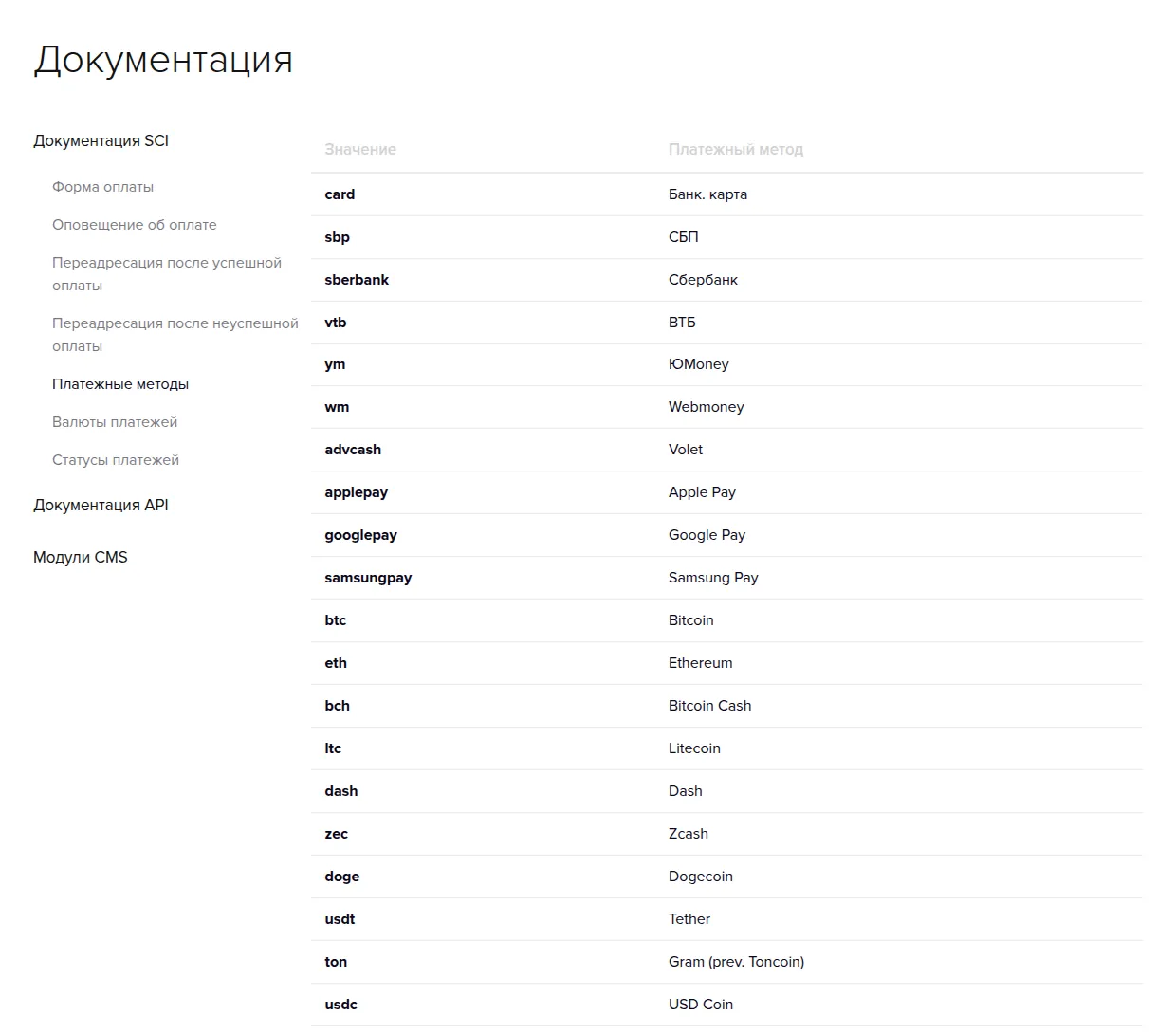
Payment methods listed in the developer documentation:
- Cards and banks: bank cards, SBP (Faster Payments System), Sberbank, VTB.
- Mobile wallets: Apple Pay, Google Pay, Samsung Pay.
- E-money: YooMoney, WebMoney, Volet.
- Crypto: Bitcoin, Ethereum, Bitcoin Cash, Litecoin, Dash, Zcash, Dogecoin, Tether (USDT), Toncoin and USD Coin.
Payments can be priced in RUB, USD, EUR, UAH, BYN, KZT, UZS, AZN, AMD, KGS and TJS, and the payment page is shown in Russian or English. AnyPay states that it meets the ISO 27001 and PCI DSS 3.1 security standards.
Who AnyPay is for
- Online stores and digital services with Russian-speaking customers who pay by card, SBP or YooMoney.
- Telegram bots and messenger projects that sell subscriptions or digital goods; a payment link or form works without a full checkout.
- Projects that want crypto and fiat in one place, from USDT to bank cards.
- Merchants who pay others: mass payouts send money to many recipients at once from the dashboard or the API.
AnyPay's site is in Russian only, and its payment methods are mostly Russian. If you need a Russian aggregator with fiscal receipts, read the Unitpay review. For a crypto-only gateway, see the NOWPayments review, or browse all banking and payment services.
AnyPay fees
AnyPay publishes starting rates only:
| Payment type | Fee |
|---|---|
| E-money | from 2% |
| Non-cash (bank) payments | from 3% |
| Mobile payments | from 3.5% |
| Cash payments | from 5% |
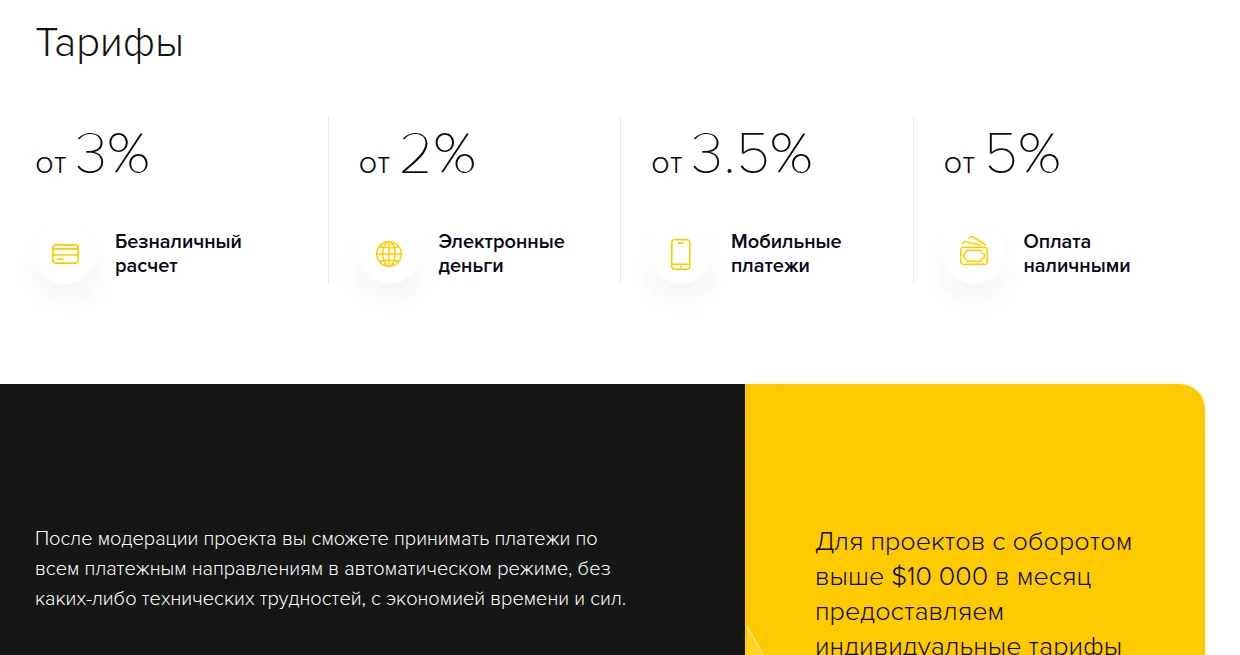
Projects with turnover above $10,000 a month can ask for individual rates. The fee is withheld from each incoming payment before the money reaches your balance. Exact rates per method are shown in your project, and the API can return them; there is no public per-method price list. There is no stated sign-up or monthly fee.
Payouts, moderation and rules
Payouts. Money from buyers lands on your internal AnyPay balance. There is no limit on the number of withdrawal requests; requests are processed within 24 hours and, per AnyPay, mostly within 15 minutes. Through the API you can pay out to a bank card, SBP, YooMoney, USDT (TRC20), WebMoney WMZ or a mobile phone, with the payout amount set in rubles.
Moderation. Every project is reviewed, which AnyPay says takes up to 24 hours. The site must work fully, have no empty or placeholder pages, show working contacts and describe the product or service in detail. A rejected project can be re-submitted through support after fixes.
Terms to know. Under the public offer AnyPay can ask for information about your business and suspend access if you refuse, or while a complaint from a buyer or third party is open. It can change the offer without notice by publishing a new version. The offer does not name the company behind the service.
Support: support@anypay.io and Telegram (t.me/anypay).
Pros and cons
Pros
- Cards, SBP, e-wallets and ten cryptocurrencies through one connection
- Fees from 2%, with individual rates above $10,000 a month
- Withdrawals processed within 24 hours, often in about 15 minutes
- Mass payouts and a full API for payments and payouts
- Works for websites, Telegram bots and payment links
Cons
- Only starting rates are published, not exact fees per method
- Site and documentation are in Russian only
- Payment methods are mostly Russian, so it fits CIS audiences best
- The public offer does not name the operating company
Frequently asked questions
How much does AnyPay charge?
From 2% for e-money, from 3% for bank payments, from 3.5% for mobile payments and from 5% for cash. Projects with over $10,000 a month in turnover can request individual rates.
Is there an AnyPay promo code or sign-up bonus?
No. There is no sign-up bonus or discount via our link, and AnyPay does not advertise one.
How fast are AnyPay payouts?
Withdrawal requests are processed within 24 hours, and AnyPay says most are done within 15 minutes. There is no limit on how many requests you make.
Does AnyPay accept crypto payments?
Yes. The documentation lists Bitcoin, Ethereum, Bitcoin Cash, Litecoin, Dash, Zcash, Dogecoin, USDT, Toncoin and USD Coin alongside cards and e-wallets.
How long does AnyPay moderation take?
AnyPay says projects are moderated within 24 hours. The site must be complete, show contacts and describe what you sell.
Can I use AnyPay without a website?
AnyPay targets websites, bots and messengers, and you can generate a payment link or form in the dashboard. A project still goes through moderation.
 Unitpay