Proton Mail vs Tuta: which secure email provider should you choose?
Short answer: pick Proton Mail if you want to keep using a desktop email client, exchange PGP mail or bundle a VPN and password manager with your inbox. Pick Tuta if you want subject lines, contacts and calendar encrypted too and the most storage and custom domains for the money, and you're fine using only Tuta's apps. This guide is for anyone leaving Gmail or Outlook for a private, encrypted mailbox and comparing the two best-known options on encryption, apps, free plans and price.
Comparison at a glance
| Service | Best for | Starting price | Free plan / trial | Key limit | Review & sign-up |
|---|---|---|---|---|---|
| Proton Mail | Desktop email clients, PGP users and an all-in-one privacy bundle | $3.99/mo billed yearly ($4.99 monthly), Mail Plus | Free plan: 1 GB, 150 messages/day; 2-week paid trial for new users | Subject lines not end-to-end encrypted; 1 custom domain on Mail Plus | Proton Mail review →Get Proton Mail → |
| Tuta (Tutanota) | Maximum encryption and cheap custom domains | €3/mo billed yearly (€3.60 monthly), Revolutionary | Free plan: 1 GB, 1 calendar, 3 labels; 13 months for 12 on yearly plans | No IMAP or PGP; free account closed after 6 months unused | Tuta (Tutanota) review →Get Tuta (Tutanota) → |
Disclosure: the sign-up buttons in this table are affiliate links. If you sign up through one, we may earn a commission at no extra cost to you. Commissions don't decide which services we include or what we say about them.
The short answer: who should pick which
Both services encrypt your mailbox so the provider can't read it, both have a free plan with 1 GB, and both cost a few euros or dollars a month on a yearly plan. The choice comes down to how you use email:
- Pick Proton Mail if you want to keep using Outlook, Thunderbird or Apple Mail, need to exchange PGP-encrypted mail with people outside Proton, want a simple import from Gmail, or would also use a VPN, password manager and cloud storage under one bill.
- Pick Tuta if you want subject lines encrypted as well as the message body, the lowest price for a custom domain (3 domains on the €3/month yearly plan), more storage per euro, and you're happy to read mail only in Tuta's own apps.
How to choose a secure email provider
"Most secure email" means different things depending on what you're protecting against. These are the points that actually differ between Proton Mail and Tuta:
- What gets encrypted. Both encrypt message bodies and attachments end to end. The difference is in the details: subject lines, contacts, calendar entries and the search index.
- Mail to people outside the service. Most of your contacts use Gmail or Outlook. Check how you send them an encrypted message: a password-protected email, or PGP if they use it.
- Apps and email clients. If you rely on a desktop client, you need IMAP support. Without it, you're limited to the provider's own web and mobile apps.
- Free plan rules. Storage, daily sending caps, folders and labels, and how long an unused free account survives.
- Price for what you need. Custom domain, extra addresses and storage, compared on the same billing period.
- Jurisdiction and refunds. Which country's law applies to your data and how long you have to change your mind.
We compare published plans, terms and security documentation only. We didn't run our own tests, and nothing here is a score. For VPNs and other privacy tools, see the best VPN and privacy services.
Encryption: what each service protects
Proton Mail stores message bodies and attachments with end-to-end and zero-access encryption, which Proton describes as "nobody else can access your emails, not even Proton". That includes mail that arrives from Gmail or other providers once it lands in your inbox. Proton states plainly that subject lines are not end-to-end encrypted, for compatibility with email standards. Proton is built on OpenPGP, so you can exchange encrypted mail with anyone who uses PGP, on any provider.
Tuta encrypts more of each message: the subject line, body, attachments and the sender and recipient names. It also encrypts your entire address book, every calendar field (title, location, times, reminders), your inbox rules and your search index. According to Tuta, the only unencrypted parts of an email are the email addresses and the date. Its protocol, TutaCrypt, combines classic algorithms (x25519 or RSA) with Kyber-1024, which Tuta describes as quantum-safe. Tuta does not support PGP, so you can't exchange PGP mail with outside contacts.
For people outside either service, both offer password-protected emails: the recipient opens the message with a password you share with them separately. Ordinary mail sent to a Gmail address is protected by TLS in transit but isn't end-to-end encrypted on either service.
Prices and plans side by side
Proton prices are in US dollars and Tuta prices in euros (Tuta's personal prices include taxes). Both sell monthly and yearly billing; yearly is cheaper on both.
| Proton Mail | Tuta | |
|---|---|---|
| Free plan | 1 GB, 1 address, 150 messages/day | 1 GB, 1 address, 1 calendar, 3 labels |
| Entry paid plan | Mail Plus: $4.99/month, or $3.99/month billed $47.88 yearly | Revolutionary: €3.60/month, or €3/month billed €36 yearly |
| Entry plan storage | 15 GB | 20 GB |
| Entry plan addresses and domains | 10 addresses, 1 custom domain | 15 extra addresses, 3 custom domains |
| Top personal plan | Proton Unlimited: $12.99/month, or $9.99/month billed $119.88 yearly | Legend: €9.60/month, or €8/month billed €96 yearly |
| Top plan storage | 500 GB, 15 addresses, 3 domains | 500 GB, 30 extra addresses, 10 domains |
| Extras in the top plan | Paid Proton VPN, Pass and Drive | Mail, calendar and contacts only |
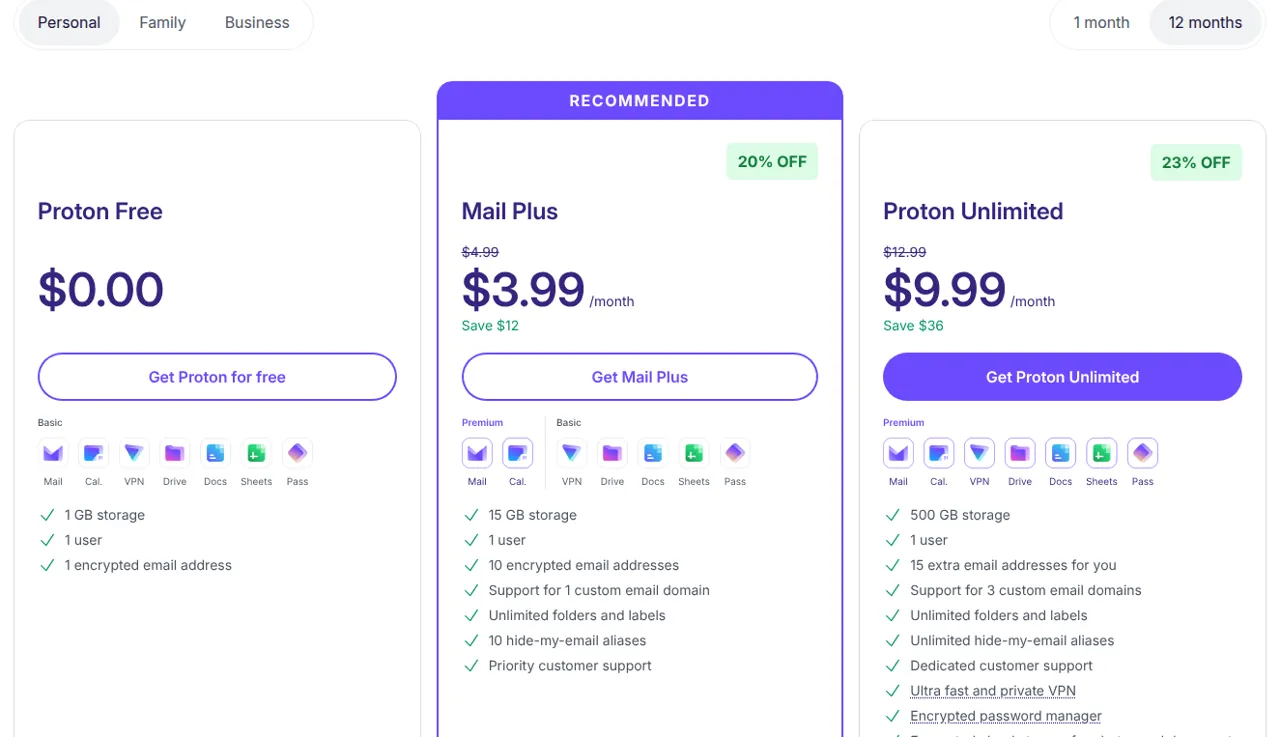
On paper, Tuta gives you more storage, addresses and custom domains for less. Proton Unlimited costs a little more than Legend but bundles a VPN, a password manager and 500 GB of cloud storage, which matters if you'd otherwise pay for those separately. Tuta also sells business plans per user (excluding taxes): Essential €6, Advanced €8 and Unlimited €12 per user per month on yearly billing. Check the current numbers on Proton's pricing page and Tuta's pricing page before you pay.
Free plans compared
Both free plans encrypt your mail the same way the paid plans do, so you can test the privacy side without paying. Neither includes a custom domain.
Proton Free starts at 500 MB and goes up to 1 GB once you complete Proton's "Get started" checklist. It allows 150 messages per day, 3 folders, 3 labels, 1 filter and 25 MB attachments. Free accounts can be deleted after 12 months without activity.
Tuta Free gives you 1 GB, one calendar and three labels, with no catch-all address or autoresponder. Tuta's terms limit free accounts to private use and to one per person; a second account or business use needs a paid plan. A free account can be closed if it isn't used for six months, which is half Proton's window, so log in regularly if you keep one as a backup address.
Apps, email clients and switching
Proton Mail has apps for the web, Windows, macOS, Linux, Android and iPhone. On a paid plan you also get Proton Mail Bridge, which lets you use Outlook, Thunderbird or Apple Mail with your Proton account. The Bridge isn't available on the free plan. Proton's Easy Switch imports messages, contacts and calendars from Gmail, Outlook, Yahoo and Apple, and with Gmail it keeps forwarding new mail to Proton.
Tuta doesn't support IMAP at all. The company explains that IMAP would require storing mail unencrypted on your device, so you read mail only in Tuta's own apps, available for the web, Android (including F-Droid), iOS, Windows, macOS and Linux. The desktop apps can work offline with an encrypted local cache. Importing old mail from another provider is done in the desktop app and, according to Tuta, is available only on the Legend and business Unlimited plans.
Proton Mail: best for switching from Gmail and for an all-in-one privacy bundle
Proton Mail is run by Proton AG in Geneva, Switzerland, and Swiss law governs the terms for users outside the US. Its strengths are compatibility and the wider Proton ecosystem: PGP support, Bridge for desktop clients, an import tool, hide-my-email aliases (10 on Mail Plus, unlimited on Proton Unlimited), and one account that also opens Proton VPN, Pass and Drive.
New Proton users who sign up through the button in the table above get a two-week free trial of an eligible paid plan such as Mail Plus, with no payment details until the trial ends. Paid plans come with a 30-day refund window, once per user, for purchases made on Proton's website or apps.
The downsides: subject lines aren't end-to-end encrypted, the free plan caps you at 150 messages a day and three folders, and Mail Plus includes only one custom domain. Full plan details are in our Proton Mail review.
Tuta: best for maximum encryption and low-cost custom domains
Tuta (formerly Tutanota) is operated by Tutao GmbH in Hanover, Germany, with servers in Germany. All of its clients are open source. Its strengths are how much it encrypts (subjects, contacts, calendar, search index) and value: Revolutionary includes 20 GB, 15 extra addresses and 3 custom domains for €3 a month on yearly billing, and families can add members at €3 per user per month.
If you subscribe to a yearly plan through the button in the table above, you get 13 months for the price of 12. Private customers who sign up online have a 14-day right of withdrawal under Tuta's terms. Payment is by card or PayPal, and Tuta gift cards can be bought with cash or cryptocurrency through a third-party store.
The downsides: no IMAP, so no Outlook or Thunderbird; no PGP; importing old mail requires a top plan; and free accounts are closed after six months without use. Plans, payment options and limits are covered in our Tuta review.
Which one should you pick?
- You want the strongest encryption for the price: Tuta. Subject lines, contacts and calendar entries are encrypted, and Revolutionary costs €3/month yearly with 20 GB.
- You use Outlook, Thunderbird or Apple Mail: Proton Mail on a paid plan, through Bridge.
- You're moving away from Gmail with years of mail: Proton Mail, thanks to its Easy Switch import tool.
- You want your own domain cheaply: Tuta Revolutionary (3 domains) beats Proton Mail Plus (1 domain).
- You'd also pay for a VPN and password manager: Proton Unlimited bundles them for $9.99/month yearly.
- You exchange encrypted mail with PGP users: Proton Mail; Tuta doesn't support PGP.
Both have free plans, so you can open one of each, try the apps you'll use every day, and only then pay for a year.
Frequently asked questions
Is Proton Mail or Tuta more secure?
Both encrypt message bodies and attachments end to end and can't read your stored mail. Tuta encrypts more metadata: subject lines, sender and recipient names, contacts and calendar entries, while Proton does not end-to-end encrypt subject lines. Proton supports PGP for encrypted mail with other providers; Tuta does not.
Which is cheaper, Proton Mail or Tuta?
Tuta Revolutionary costs €3 per month on yearly billing with 20 GB and 3 custom domains. Proton Mail Plus costs $3.99 per month yearly with 15 GB and 1 custom domain. At the top end, Tuta Legend is €8 per month yearly and Proton Unlimited $9.99, but Proton's plan also includes a VPN, password manager and cloud storage.
Can I use Outlook or Thunderbird with Proton Mail or Tuta?
With Proton Mail, yes, on a paid plan through Proton Mail Bridge, which supports Outlook, Thunderbird and Apple Mail. Tuta doesn't support IMAP, so you use its own web, mobile and desktop apps instead.
Which encrypted email has the best free plan?
Both give you 1 GB. Proton Free limits you to 150 messages a day, 3 folders and 3 labels, and deletes accounts after 12 months of inactivity. Tuta Free has one calendar and three labels, is for private use only, one account per person, and closes accounts unused for six months.
Can I import my Gmail into Proton Mail or Tuta?
Proton's Easy Switch imports messages, contacts and calendars from Gmail, Outlook, Yahoo and Apple, and keeps forwarding new Gmail messages. Tuta imports mail in its desktop app, and according to Tuta only on the Legend and business Unlimited plans.